ESP32 C3 Super Mini - ILI9341 ILI9488 ST7789 TFT LCD Touch-Display mit SPI-Schnittstelle

Dieser Workshop zeigt Ihnen, wie Sie ein SPI TFT LCD Display an einen ESP32 C3 Super Mini anschließen. Das Board arbeitet mit 3,3V, derselben Spannung, die die meisten SPI TFT Module verwenden, sodass die Verdrahtung einfach und sicher bleibt.

In diesem Tutorial lernen Sie:

Dieser Workshop behandelt sowohl SPI TFT LCD Displays mit und ohne Touch. Er funktioniert mit Panels in 1,3, 1,54, 2,2, 2,4, 2,8, 3,2 und 3,5 Zoll, die von den Controller-Chips ILI9341, ILI9488 oder ST7789 angesteuert werden.
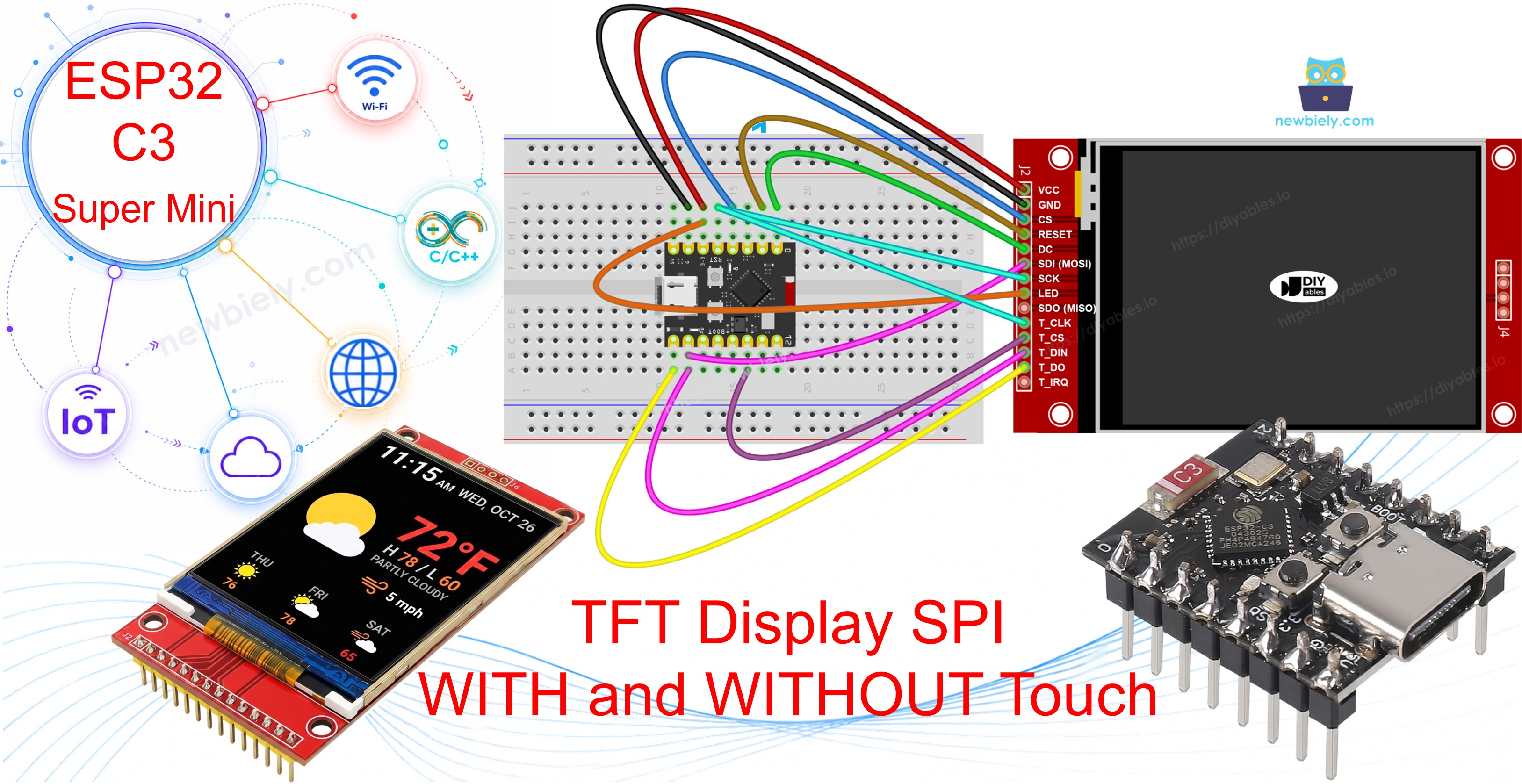
ESP32 C3 Super Mini TFT LCD Touch-Display SPI

Workshop-Stationen in diesem Tutorial:

Erforderliche Hardware

1×ESP32 C3 Super Mini
1×USB-Kabel Typ-A zu Typ-C (für USB-A PC)
1×USB-Kabel Typ-C zu Typ-C (für USB-C PC)
1×SPI TFT display module
1×Verbindungskabel

Oder Sie können die folgenden Kits kaufen:

1×DIYables Sensor-Kit (18 Sensoren/Displays)
Offenlegung: Einige der in diesem Abschnitt bereitgestellten Links sind Amazon-Affiliate-Links. Wir können eine Provision für Käufe erhalten, die über diese Links getätigt werden, ohne zusätzliche Kosten für Sie. Wir schätzen Ihre Unterstützung.

Überblick über the SPI TFT Display

Ein SPI TFT Display ist ein farbiger LCD-Bildschirm, der über eine schnelle SPI-Verbindung mit dem ESP32 C3 Super Mini kommuniziert.

Hauptmerkmale:

  • Ein Treiber-IC im Modul speichert die Pixel und führt die Zeichenbefehle aus.
  • Es werden nur wenige Leitungen benötigt - SPI ist ein 3-Draht-Bus plus ein Chip-Select pro Gerät.
  • Funktioniert mit den Adafruit GFX Zeichenfunktionen, sodass Formen, Text, Schriftarten und Bitmaps sofort nutzbar sind.
  • Touch-Versionen haben zusätzlich einen XPT2046 Controller am selben SPI-Bus.
  • Die DIYables_TFT_SPI-Bibliothek steuert sowohl den Bildschirm als auch das Touch-Panel mit einer einzigen API.

Technische Daten:

  • ILI9341: 16-Bit RGB565 Farbe, bis zu 40 MHz SPI.
  • ILI9488: 18-Bit RGB666 Farbe über SPI, bis zu 24 MHz.
  • ST7789: 16-Bit RGB565 Farbe, bis zu 40 MHz SPI.
  • Logikpegel: 3,3V - perfekt passend zum ESP32 C3 Super Mini.
  • Panelgrößen: 1,3, 1,54, 2,2, 2,4, 2,8, 3,2 und 3,5 Zoll.

Empfehlung: Wenn Sie noch kein Display gekauft haben, wählen Sie den ST7789 Treiber. Er ist leicht erhältlich, läuft mit der vollen SPI-Geschwindigkeit von 40 MHz und ist die einfachste Wahl für ein neues ESP32 C3 Super Mini Projekt.

WARNING

Der ESP32 C3 Super Mini verwendet 3,3V-Logik. Verbinden Sie TFT VCC nur mit dem 3,3V-Pin. Verwenden Sie niemals 5V.

Pinbelegung

Die meisten SPI TFT LCD Displays haben die folgenden Pins.

Display-Pins:

Pin Funktion
VCC Stromversorgung
GND Masse
CS Chip Select — wird auf LOW gezogen, um das Display am SPI-Bus auszuwählen
DC / RS Daten-/Befehlsauswahl — HIGH für Pixeldaten, LOW für Befehle
RST Hardware-Reset — optional; bei Nichtverwendung mit 3.3V verbinden
MOSI / SDI / SDA SPI-Dateneingang (MCU → Display)
SCK / CLK SPI-Takt
MISO / SDO SPI-Datenausgang (Display → MCU) — optional bei reiner Anzeigenutzung
LED / BL / BLK Hintergrundbeleuchtung — mit 3.3V oder einem PWM-Pin zum Dimmen verbinden

SD-Karten-Pins (falls Ihre Anwendung auf die SD-Karte zugreifen muss):

Pin Funktion
SD_CS / TF_CS Chip Select der SD-Karte
MOSI / SDI MOSI — Daten von der MCU zur SD-Karte
SCK / CLK SCK — SPI-Takt
MISO / SDO MISO — Daten von der SD-Karte zur MCU

Bei TFT Displays mit Touch-Unterstützung gibt es zusätzliche Touch-Pins (falls Ihre Anwendung die Touch-Funktion nutzt und das Display sie unterstützt):

Pin Funktion
T_CS Chip Select des Touch-Controllers
T_CLK SCK — SPI-Takt
T_DIN MOSI — Daten von der MCU zum Touch-Controller
T_DO MISO — Daten vom Touch-Controller zur MCU
T_IRQ Touch-Interrupt — optional; signalisiert, wenn der Bildschirm berührt wird

※ Notiz:

Einige Display-Module ohne Touch haben ebenfalls die Pins T_CS, T_CLK, T_DIN, T_DO und T_IRQ. Diese sind auf solchen Boards funktionslos — der Touch-Controller-IC ist nicht bestückt. Sie sind vorhanden, weil die Platine dasselbe Layout wie die Touch-Version verwendet, um Fertigungsvarianten zu reduzieren.
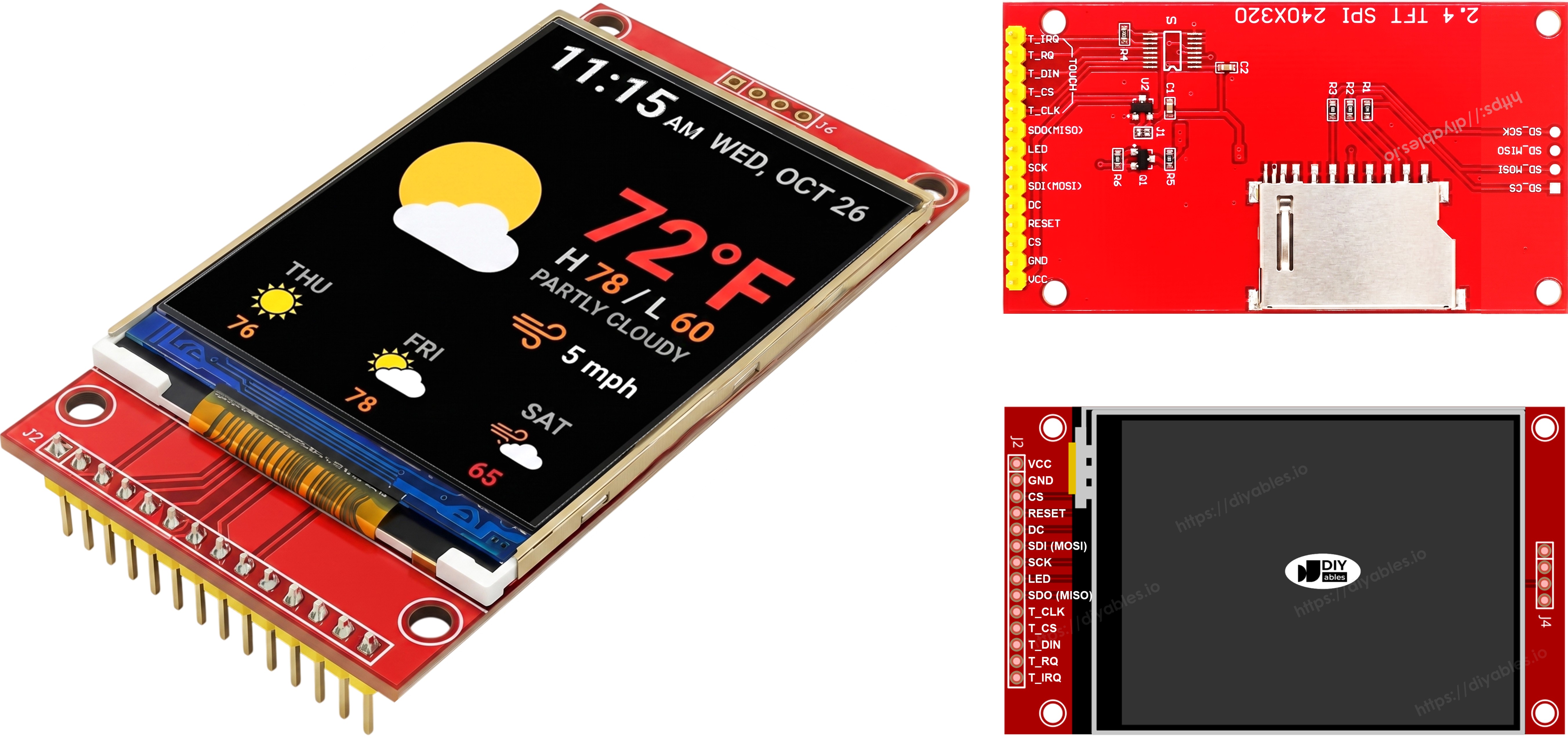
Pinbelegung des TFT SPI Displays

Verdrahtungsdiagramm

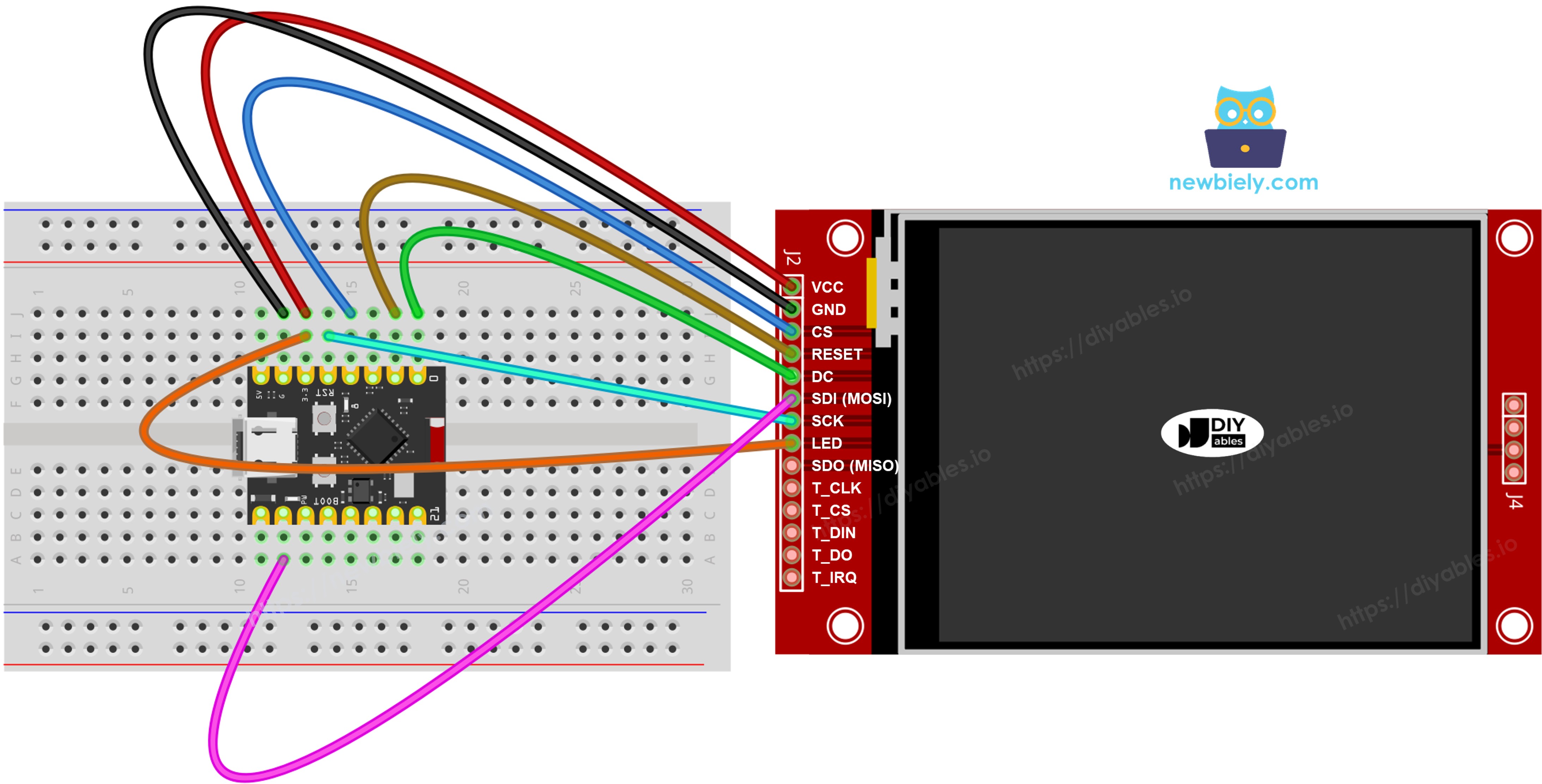
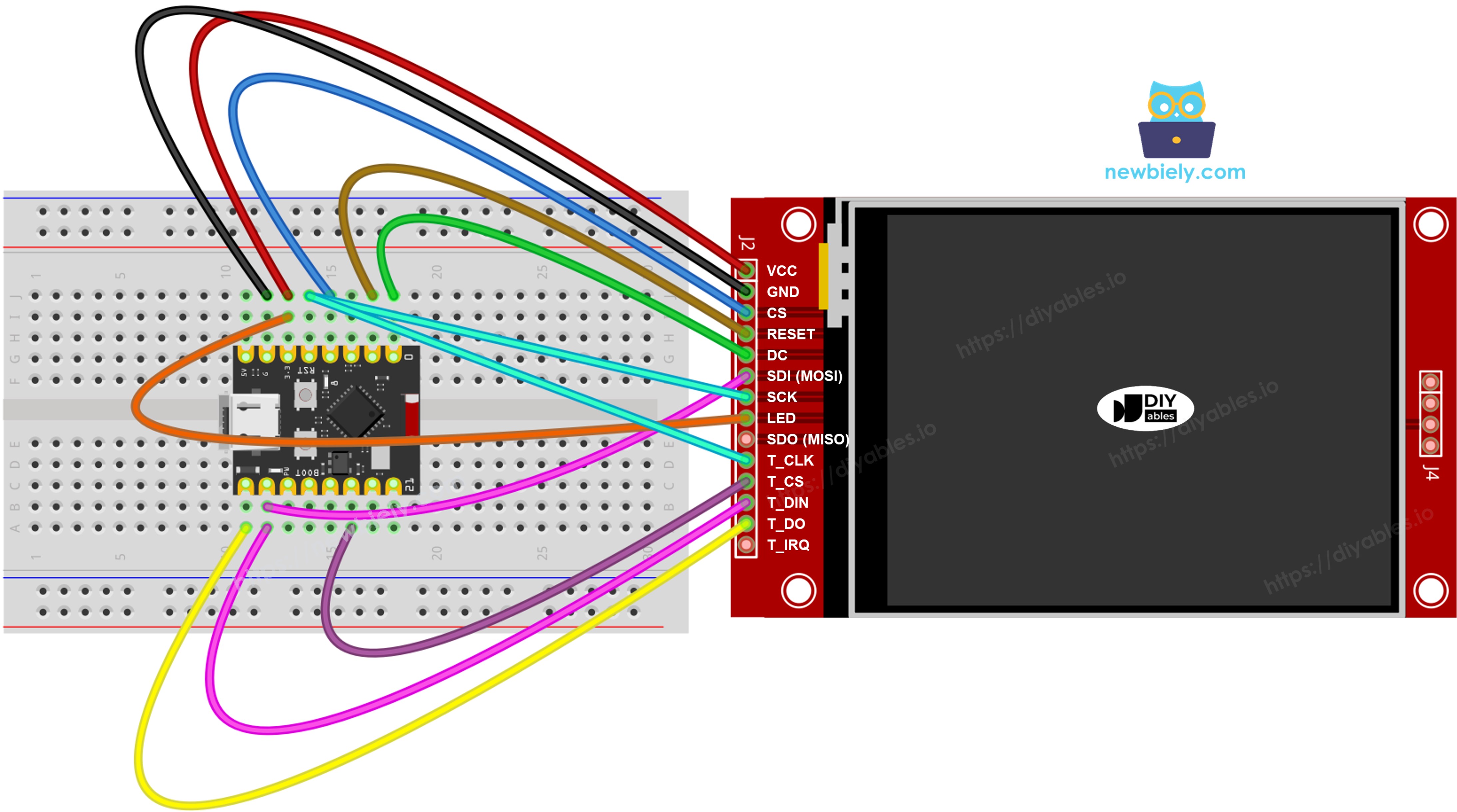
Verdrahten Sie das TFT LCD Display mit den Hardware-SPI-Pins des ESP32 C3 Super Mini.

  • Hinweis: VCC nur an 3,3V anschließen. 5V können den ESP32 C3 Super Mini und das Panel beschädigen.
  • Hinweis: Die Hardware-SPI-Pins des ESP32 C3 Super Mini sind SCK = GPIO4, MISO = GPIO5, MOSI = GPIO6.
  • Hinweis: Jedes Gerät am Bus benötigt einen eigenen CS-Pin. Das Display verwendet GPIO3, der Touch-Controller GPIO10 und die SD-Karte GPIO7.
  • Hinweis — SDO (MISO) ist optional: Die SDO (MISO) Leitung überträgt nur Daten vom Display zurück zum Board. Keiner der Beispielcodes in diesem Tutorial liest vom Display, daher kann dieser Pin unverbunden bleiben. Bei Modulen, bei denen der Touch-Controller denselben SPI-Bus nutzt, kann eine angeschlossene SDO-Leitung die Kommunikation stören, daher wird empfohlen, sie unverbunden zu lassen.

Ohne Touch

Verbinden Sie MOSI mit GPIO6, SCK mit GPIO4 und MISO mit GPIO5. CS, DC und RST können beliebige freie GPIOs sein — in den Beispielen werden GPIO3, GPIO0 und GPIO1 verwendet.

Display:

TFT Pin ESP32 C3 Super Mini Pin Beschreibung
VCC 3.3V Stromversorgung (nur 3.3V)
GND GND Masse
CS GPIO3 Chip Select
DC / RS GPIO0 Daten-/Befehlsauswahl
RST GPIO1 Reset (optional)
MOSI / SDI GPIO6 Hardware-SPI MOSI
SCK GPIO4 Hardware-SPI-Takt
MISO / SDO GPIO5 Hardware-SPI MISO (optional)
LED / BL 3.3V Hintergrundbeleuchtung

SD-Karte (falls Ihre Anwendung auf die SD-Karte zugreifen muss):

SD Pin ESP32 C3 Super Mini Pin Beschreibung
SD_CS / TF_CS GPIO7 Chip Select der SD-Karte
MOSI / SDI GPIO6 Gemeinsam mit Display-MOSI (GPIO6)
SCK / CLK GPIO4 Gemeinsam mit Display-SCK (GPIO4)
MISO / SDO GPIO5 Gemeinsam mit Display-MISO (GPIO5)
Schaltplan ESP32 C3 Super Mini TFT SPI Display ohne Touch

Dieses Bild wurde mit Fritzing erstellt. Klicken Sie, um das Bild zu vergrößern.

Mit Touch

Verbinden Sie den XPT2046 Touch-Controller mit demselben SPI-Bus des ESP32 C3 Super Mini, wobei GPIO6, GPIO4 und GPIO5 mit dem Display gemeinsam genutzt werden.

Display:

TFT Pin ESP32 C3 Super Mini Pin Beschreibung
VCC 3.3V Stromversorgung (nur 3.3V)
GND GND Masse
CS GPIO3 Chip Select
DC / RS GPIO0 Daten-/Befehlsauswahl
RST GPIO1 Reset (optional)
MOSI / SDI GPIO6 Hardware-SPI MOSI
SCK GPIO4 Hardware-SPI-Takt
MISO / SDO GPIO5 Hardware-SPI MISO (optional)
LED / BL 3.3V Hintergrundbeleuchtung

Touch-Controller (falls Ihre Anwendung die Touch-Funktion nutzt und das Display sie unterstützt):

Touch Pin ESP32 C3 Super Mini Pin Beschreibung
T_CS GPIO10 Touch Chip Select
T_IRQ nicht verbunden Touch-Interrupt (optional, im Code auf -1 setzen)
T_DIN GPIO6 Gemeinsam mit Display-MOSI (GPIO6)
T_CLK GPIO4 Gemeinsam mit Display-SCK (GPIO4)
T_DO GPIO5 Gemeinsam mit Display-MISO (GPIO5)
Schaltplan ESP32 C3 Super Mini TFT SPI Display mit Touch

Dieses Bild wurde mit Fritzing erstellt. Klicken Sie, um das Bild zu vergrößern.

Der ESP32 C3 Super Mini hat einen Hardware-SPI-Bus an den Stiftleisten, daher teilen sich Display, SD-Karte und Touch-Controller dieselben drei Datenleitungen (MOSI GPIO6, SCK GPIO4, MISO GPIO5). Jedes Gerät hat seinen eigenen CS-Pin, sodass immer nur eines aktiv ist. Die DIYables_TFT_SPI-Bibliothek verwaltet sowohl das Display als auch den XPT2046 Touch-Controller über eine einzige API — für die Touch-Seite ist keine separate SPI-Bibliothek erforderlich.

Bibliothek einrichten

Installieren Sie die Bibliothek einmal, dann lassen sich alle folgenden Beispiele kompilieren.

  • Board anschließen: Verbinden Sie den ESP32 C3 Super Mini über ein USB-Typ-C-Kabel mit Ihrem Computer.
  • Arduino IDE öffnen: Stellen Sie sicher, dass ESP32 C3 Super Mini unter Werkzeuge > Board ausgewählt ist, und wählen Sie den richtigen Port.
  • Bibliotheksverwalter öffnen: Klicken Sie auf das Symbol Libraries in der linken Seitenleiste.
  • Bibliothek suchen: Geben Sie "DIYables_TFT_SPI" in das Suchfeld ein und suchen Sie den Eintrag von DIYables.
  • Installieren: Klicken Sie auf Install und dann auf Install All, wenn Abhängigkeiten angeboten werden.
  • Search for DIYables TFT SPI created by DIYables.io and click the Install button.
∞
Newbiely | Arduino IDE 2.3.8
──
☐
✕
File
Edit
Sketch
Tools
Help
ESP32C3 Dev Module
Library Manager
Type:
All
Topic:
All
DIYables TFT SPI by DIYables.io
Works with both touch and non-touch versions of the same SPI TFT modules. Supports ILI9341 (240x320, 16-bit RGB565), ILI9488 (320x480, 18-bit RGB666), and ST7789 (240x320, 16-bit RGB565) displays over SPI. Includes built-in driver for XPT2046 / HR2046 / ADS7843 SPI touch controllers and 4-wire resistive touch panels - no separate touch library required. Use the display-only API for non-touch panels, or add initTouchSPI() to enable touch on modules that include a touch controller. Extends Adafruit GFX for full graphics support. Works with any Arduino-compatible board that has SPI. More info
1.0.3
INSTALL
Newbiely.ino
···
1 void setup() {
Output
Serial Monitor
Ln 1, Col 1
ESP32C3 Dev Module on COM15
1

Einstiegs-Sketch

Dies ist der kleinste Sketch, mit dem das TFT LCD Display am ESP32 C3 Super Mini läuft.

Was dieser Code macht:

  • Bindet die DIYables_TFT_SPI-Bibliothek ein.
  • Legt die Pins CS, DC und RST auf GPIO3, GPIO0 und GPIO1 fest.
  • Erstellt das Display-Objekt für Ihren Treiberchip.
  • Startet das Display und schaltet es ins Querformat.
#include <DIYables_TFT_SPI.h> #define TFT_CS_PIN 7 #define TFT_DC_PIN 3 #define TFT_RST_PIN 2 // Uncomment the line that matches your driver chip: // DIYables_ILI9341_SPI TFT_display(240, 320, TFT_CS_PIN, TFT_DC_PIN, TFT_RST_PIN); // DIYables_ILI9488_SPI TFT_display(320, 480, TFT_CS_PIN, TFT_DC_PIN, TFT_RST_PIN); DIYables_ST7789_SPI TFT_display(240, 320, TFT_CS_PIN, TFT_DC_PIN, TFT_RST_PIN); void setup() { TFT_display.begin(); TFT_display.setRotation(1); } void loop() { // drawing code here }

※ Notiz:

Es darf nur EINE Display-Objekt-Zeile aktiv sein. Lassen Sie die anderen beiden auskommentiert, sonst lässt sich der Sketch nicht kompilieren.

Workshop - Formen zeichnen

Das Beispiel DrawShapes verwendet alle Adafruit GFX Zeichenprimitive auf dem ESP32 C3 Super Mini.

Was dieser Code macht:

  • Zeichnet umrandete und gefüllte Kreise.
  • Zeichnet umrandete und gefüllte Dreiecke.
  • Zeichnet Rechtecke und abgerundete Rechtecke.
  • Zeichnet Rauten aus einzelnen Linien.
  • Zeichnet das gesamte Muster alle 10 Sekunden neu.
/* * Dieser ESP32 C3 Super Mini Code wurde von newbiely.de entwickelt * Dieser ESP32 C3 Super Mini Code wird der Öffentlichkeit ohne jegliche Einschränkung zur Verfügung gestellt. * Für vollständige Anleitungen und Schaltpläne besuchen Sie bitte: * https://newbiely.de/tutorials/esp32-c3/esp32-c3-super-mini-tft-lcd-touch-display-spi */ /* Created by DIYables This example code is in the public domain Product page: https://diyables.io */ // ============================================= // Single include brings in the base class plus all driver classes. // ============================================= #include <DIYables_TFT_SPI.h> // ============================================= // Wiring (ESP32 C3 SuperMini) // --------------------------------------------- // TFT module ESP32 C3 SuperMini // ------------ --------------------------------- // VCC -> 3.3V (NOT 5V!) // GND -> GND // CS -> GPIO3 (TFT_CS_PIN) // RESET -> GPIO1 (TFT_RST_PIN) // DC / RS -> GPIO0 (TFT_DC_PIN) // SDI / MOSI -> GPIO6 (hardware SPI MOSI) // SCK -> GPIO4 (hardware SPI SCK) // LED -> 3.3V (or any GPIO via initBacklight) // SDO / MISO -> GPIO5 (only needed when reading from display) // ============================================= // ============================================= // SPI pin definitions (adjust for your board) // ============================================= #define TFT_CS_PIN 3 #define TFT_DC_PIN 0 #define TFT_RST_PIN 1 // Panel resolution in native (portrait) orientation - change to match your module #define TFT_WIDTH 240 #define TFT_HEIGHT 320 // MOSI and SCK use default hardware SPI pins // ============================================= // Create display object (uncomment matching driver) // ============================================= // DIYables_ILI9341_SPI TFT_display(TFT_WIDTH, TFT_HEIGHT, TFT_CS_PIN, TFT_DC_PIN, TFT_RST_PIN); // DIYables_ILI9488_SPI TFT_display(TFT_WIDTH, TFT_HEIGHT, TFT_CS_PIN, TFT_DC_PIN, TFT_RST_PIN); DIYables_ST7789_SPI TFT_display(TFT_WIDTH, TFT_HEIGHT, TFT_CS_PIN, TFT_DC_PIN, TFT_RST_PIN); #define BLACK DIYables_TFT_SPI::colorRGB(0, 0, 0) #define BLUE DIYables_TFT_SPI::colorRGB(0, 0, 255) #define RED DIYables_TFT_SPI::colorRGB(255, 0, 0) #define GREEN DIYables_TFT_SPI::colorRGB(0, 255, 0) #define ORANGE DIYables_TFT_SPI::colorRGB(255, 165, 0) #define PINK DIYables_TFT_SPI::colorRGB(255, 192, 203) #define VIOLET DIYables_TFT_SPI::colorRGB(148, 0, 211) #define TURQUOISE DIYables_TFT_SPI::colorRGB(64, 224, 208) #define WHITE DIYables_TFT_SPI::colorRGB(255, 255, 255) // Helper to draw a filled diamond void fillDiamond(int cx, int cy, int h, int v, uint16_t color) { int x0 = cx, y0 = cy - v; int x1 = cx + h, y1 = cy; int x2 = cx, y2 = cy + v; int x3 = cx - h, y3 = cy; TFT_display.fillTriangle(x0, y0, x1, y1, x2, y2, color); TFT_display.fillTriangle(x0, y0, x2, y2, x3, y3, color); } void setup() { TFT_display.begin(); TFT_display.setRotation(1); // Landscape } void loop() { TFT_display.fillScreen(WHITE); uint16_t w = TFT_display.width(); uint16_t h = TFT_display.height(); // Scale positions relative to screen size with better spacing int col1 = w / 8; int col2 = w * 3 / 8; int col3 = w * 5 / 8; int col4 = w * 7 / 8; int row1 = h / 4; int row2 = h / 2; int row3 = h * 3 / 4; // Outlined circle TFT_display.drawCircle(col1, row1, 30, RED); // Filled circle TFT_display.fillCircle(col2, row1, 30, RED); // Outlined triangle TFT_display.drawTriangle(col3 - 30, row1 + 25, col3 + 30, row1 + 25, col3, row1 - 25, BLUE); // Filled triangle TFT_display.fillTriangle(col4 - 30, row1 + 25, col4 + 30, row1 + 25, col4, row1 - 25, GREEN); // Outlined rectangle TFT_display.drawRect(col1 - 35, row2 - 20, 70, 40, ORANGE); // Filled rectangle TFT_display.fillRect(col2 - 35, row2 - 20, 70, 40, TURQUOISE); // Outlined round rectangle TFT_display.drawRoundRect(col3 - 35, row2 - 20, 70, 40, 10, VIOLET); // Filled round rectangle TFT_display.fillRoundRect(col4 - 35, row2 - 20, 70, 40, 10, PINK); // Outlined diamond (centered between col1 and col2) int diamond1_x = (col1 + col2) / 2; TFT_display.drawLine(diamond1_x, row3 - 30, diamond1_x + 25, row3, GREEN); TFT_display.drawLine(diamond1_x + 25, row3, diamond1_x, row3 + 30, GREEN); TFT_display.drawLine(diamond1_x, row3 + 30, diamond1_x - 25, row3, GREEN); TFT_display.drawLine(diamond1_x - 25, row3, diamond1_x, row3 - 30, GREEN); // Filled diamond (centered between col3 and col4) int diamond2_x = (col3 + col4) / 2; fillDiamond(diamond2_x, row3, 25, 30, BLUE); delay(10000); }

Schnelle Schritte

  • Neu beim ESP32 C3 Super Mini? Absolvieren Sie zuerst unser Tutorial Erste Schritte mit dem ESP32 C3 Super Mini, um Ihre Entwicklungsumgebung einzurichten.
  • Bauteile verdrahten: Schließen Sie das TFT LCD Modul gemäß der obigen Tabelle an. Verwenden Sie 3,3V für VCC.
  • Board anschließen: Verbinden Sie den ESP32 C3 Super Mini über ein USB-Typ-C-Kabel mit Ihrem Computer.
  • Board auswählen: Stellen Sie sicher, dass ESP32 C3 Super Mini unter Werkzeuge > Board ausgewählt ist, und wählen Sie den COM-Port.
  • Code kopieren: Fügen Sie den obigen Code in die Arduino IDE ein.
  • Code hochladen: Klicken Sie auf Upload und warten Sie auf die Fertig-Meldung.
  • Ergebnis ansehen: Der Bildschirm zeigt ein Muster aus farbigen Formen.
  • Profi-Tipp: Kommentieren Sie nur die Treiberzeile ein, die zu Ihrem Panel passt. Ein falscher Treiber führt zu einem leeren oder verrauschten Bildschirm.

Methodenreferenz

Methode Aktion Syntax
begin() Initialisiert das Display und setzt es zurück. TFT_display.begin();
setRotation(r) Legt die Ausrichtung fest (0=Hochformat, 1=Querformat). TFT_display.setRotation(1);
fillScreen(color) Füllt den Bildschirm mit einer Farbe. TFT_display.fillScreen(BLACK);
colorRGB(r,g,b) Erzeugt eine 16-Bit-Farbe aus R, G, B. colorRGB(255,128,0)
fillCircle(x,y,r,color) Gefüllter Kreis. TFT_display.fillCircle(100,100,50,RED);
fillRoundRect(x,y,w,h,r,color) Gefülltes abgerundetes Rechteck. TFT_display.fillRoundRect(10,10,100,50,10,BLUE);
drawTriangle(x0,y0,x1,y1,x2,y2,color) Dreiecksumriss. TFT_display.drawTriangle(60,10,10,110,110,110,GREEN);

Workshop - Text und Zahlen anzeigen

Das Beispiel ShowTextAndNumber gibt Zeichenketten und Zahlen mit der eingebauten GFX-Text-Engine aus.

Was dieser Code macht:

  • Legt die Textfarbe und die Textgröße fest.
  • Gibt einen Temperaturwert mit einer Nachkommastelle aus.
  • Gibt einen Feuchtigkeitswert mit Prozentzeichen aus.
  • Platziert jede Zeile an ihrer eigenen Pixelposition.
/* * Dieser ESP32 C3 Super Mini Code wurde von newbiely.de entwickelt * Dieser ESP32 C3 Super Mini Code wird der Öffentlichkeit ohne jegliche Einschränkung zur Verfügung gestellt. * Für vollständige Anleitungen und Schaltpläne besuchen Sie bitte: * https://newbiely.de/tutorials/esp32-c3/esp32-c3-super-mini-tft-lcd-touch-display-spi */ /* Created by DIYables This example code is in the public domain Product page: https://diyables.io */ // ============================================= // Single include brings in the base class plus all driver classes. // ============================================= #include <DIYables_TFT_SPI.h> // ============================================= // Wiring (ESP32 C3 SuperMini) // --------------------------------------------- // TFT module ESP32 C3 SuperMini // ------------ --------------------------------- // VCC -> 3.3V (NOT 5V!) // GND -> GND // CS -> GPIO3 (TFT_CS_PIN) // RESET -> GPIO1 (TFT_RST_PIN) // DC / RS -> GPIO0 (TFT_DC_PIN) // SDI / MOSI -> GPIO6 (hardware SPI MOSI) // SCK -> GPIO4 (hardware SPI SCK) // LED -> 3.3V (or any GPIO via initBacklight) // SDO / MISO -> GPIO5 (only needed when reading from display) // ============================================= // ============================================= // SPI pin definitions (adjust for your board) // ============================================= #define TFT_CS_PIN 3 #define TFT_DC_PIN 0 #define TFT_RST_PIN 1 // Panel resolution in native (portrait) orientation - change to match your module #define TFT_WIDTH 240 #define TFT_HEIGHT 320 // ============================================= // Create display object (uncomment matching driver) // ============================================= // DIYables_ILI9341_SPI TFT_display(TFT_WIDTH, TFT_HEIGHT, TFT_CS_PIN, TFT_DC_PIN, TFT_RST_PIN); // DIYables_ILI9488_SPI TFT_display(TFT_WIDTH, TFT_HEIGHT, TFT_CS_PIN, TFT_DC_PIN, TFT_RST_PIN); DIYables_ST7789_SPI TFT_display(TFT_WIDTH, TFT_HEIGHT, TFT_CS_PIN, TFT_DC_PIN, TFT_RST_PIN); #define MAGENTA DIYables_TFT_SPI::colorRGB(255, 0, 255) #define WHITE DIYables_TFT_SPI::colorRGB(255, 255, 255) void setup() { Serial.begin(115200); Serial.println(F("TFT SPI Display - Show text and numbers")); TFT_display.begin(); TFT_display.setRotation(1); // Landscape TFT_display.fillScreen(WHITE); // Set text color and size TFT_display.setTextColor(MAGENTA); TFT_display.setTextSize(3); // Sample values float temperature = 23.5; float humidity = 78.6; // Display temperature TFT_display.setCursor(20, 20); TFT_display.print("Temperature: "); TFT_display.print(temperature, 1); TFT_display.print(char(247)); TFT_display.println("C"); // Display humidity TFT_display.setCursor(20, 60); TFT_display.print("Humidity: "); TFT_display.print(humidity, 1); TFT_display.print("%"); } void loop() { }

Schnelle Schritte

  • Verdrahten und hochladen: Verwenden Sie dieselbe Verdrahtung wie bei der Formen-Station und klicken Sie dann auf Upload.
  • Ergebnis ansehen: Das Display gibt Textzeilen in verschiedenen Farben und Größen aus.
  • Profi-Tipp: Textgröße 1 entspricht 6x8 Pixeln. Größe 3 ist auch quer durch den Raum gut lesbar.

Methodenreferenz

Methode Aktion Syntax
setTextColor(color) Legt die Vordergrundfarbe für die Textausgabe fest. TFT_display.setTextColor(WHITE);
setTextSize(size) Skaliert den Text um einen ganzzahligen Faktor. Größe 1 = 6×8 px. TFT_display.setTextSize(2);
setCursor(x, y) Bewegt den Textcursor an die Pixelposition (x, y). TFT_display.setCursor(10, 20);
print(value) Gibt eine Zeichenkette oder Zahl an der Cursorposition aus. TFT_display.print("ESP32 C3!");
println(value) Gibt aus und bewegt den Cursor in die nächste Zeile. TFT_display.println(42);

Workshop - Bild zeichnen

In dieser Station laden Sie ein vollfarbiges RGB565-Bitmap auf das TFT LCD Display. Die Pixeldaten werden als PROGMEM-Array in bitmap.h in die Firmware kompiliert. Auf dem ESP32 C3 Super Mini liegen PROGMEM-Daten im Flash und werden in den Adressraum eingeblendet, sodass die Bilddaten keinen SRAM belegen.

Was dieser Code macht:

  • Bindet das Bild-Array aus bitmap.h ein.
  • Liest die tatsächliche Bildschirmbreite und -höhe vom Treiber.
  • Zentriert das Bild auf dem Bildschirm.
  • Invertiert die Farben alle 2 Sekunden, damit Sie die Aktualisierung sehen.
/* * Dieser ESP32 C3 Super Mini Code wurde von newbiely.de entwickelt * Dieser ESP32 C3 Super Mini Code wird der Öffentlichkeit ohne jegliche Einschränkung zur Verfügung gestellt. * Für vollständige Anleitungen und Schaltpläne besuchen Sie bitte: * https://newbiely.de/tutorials/esp32-c3/esp32-c3-super-mini-tft-lcd-touch-display-spi */ /* Created by DIYables This example code is in the public domain Product page: https://diyables.io */ // ============================================= // Single include brings in the base class plus all driver classes. // ============================================= #include <DIYables_TFT_SPI.h> #include "bitmap.h" // ============================================= // Wiring (ESP32 C3 SuperMini) // --------------------------------------------- // TFT module ESP32 C3 SuperMini // ------------ --------------------------------- // VCC -> 3.3V (NOT 5V!) // GND -> GND // CS -> GPIO3 (TFT_CS_PIN) // RESET -> GPIO1 (TFT_RST_PIN) // DC / RS -> GPIO0 (TFT_DC_PIN) // SDI / MOSI -> GPIO6 (hardware SPI MOSI) // SCK -> GPIO4 (hardware SPI SCK) // LED -> 3.3V (or any GPIO via initBacklight) // SDO / MISO -> GPIO5 (only needed when reading from display) // ============================================= // ============================================= // SPI pin definitions (adjust for your board) // ============================================= #define TFT_CS_PIN 3 #define TFT_DC_PIN 0 #define TFT_RST_PIN 1 // Panel resolution in native (portrait) orientation - change to match your module #define TFT_WIDTH 240 #define TFT_HEIGHT 320 // ============================================= // Create display object (uncomment matching driver) // ============================================= // DIYables_ILI9341_SPI TFT_display(TFT_WIDTH, TFT_HEIGHT, TFT_CS_PIN, TFT_DC_PIN, TFT_RST_PIN); // DIYables_ILI9488_SPI TFT_display(TFT_WIDTH, TFT_HEIGHT, TFT_CS_PIN, TFT_DC_PIN, TFT_RST_PIN); DIYables_ST7789_SPI TFT_display(TFT_WIDTH, TFT_HEIGHT, TFT_CS_PIN, TFT_DC_PIN, TFT_RST_PIN); #define WHITE DIYables_TFT_SPI::colorRGB(255, 255, 255) int img_width = 120; int img_height = 53; void setup() { Serial.begin(115200); Serial.println(F("TFT SPI Display - Draw Image")); TFT_display.begin(); uint16_t SCREEN_WIDTH = TFT_display.width(); uint16_t SCREEN_HEIGHT = TFT_display.height(); int x = (SCREEN_WIDTH - img_width) / 2; int y = (SCREEN_HEIGHT - img_height) / 2; TFT_display.fillScreen(WHITE); TFT_display.drawRGBBitmap(x, y, myBitmap, img_width, img_height); } void loop() { delay(2000); TFT_display.invertDisplay(true); delay(2000); TFT_display.invertDisplay(false); }

Fügen Sie dem Sketch einen zweiten Tab namens bitmap.h hinzu und fügen Sie diese Bilddaten dort ein.

/* * Dieser ESP32 C3 Super Mini Code wurde von newbiely.de entwickelt * Dieser ESP32 C3 Super Mini Code wird der Öffentlichkeit ohne jegliche Einschränkung zur Verfügung gestellt. * Für vollständige Anleitungen und Schaltpläne besuchen Sie bitte: * https://newbiely.de/tutorials/esp32-c3/esp32-c3-super-mini-tft-lcd-touch-display-spi */ const uint16_t myBitmap[] PROGMEM = {0xffff, 0xffff, 0xffff, 0xffff, 0xffff, 0xffff, 0xffff, 0xffff, 0xffff, 0xffff, 0xffff, 0xffff, 0xffff, 0xffff, 0xffff, 0xffff, 0xffff, 0xffff, 0xffff, 0xffff, 0xef5d, 0x0000, 0x0000, 0x0000, 0x0000, 0x0000, 0x0000, 0x0000, 0x0000, 0x0000, 0x0000, 0x0000, 0x0000, 0x0000, 0x0000, 0x0000, 0x0000, 0x0000, 0x0000, 0x0000, 0x0000, 0x0000, 0x0000, 0x0000, 0x0000, 0x0000, 0x0000, 0x0000, 0x0000, 0x0000, 0x0000, 0x0000, 0x0000, 0x0000, 0x0000, 0xffff, 0xffff, 0xffff, 0xffff, 0xbdf7, 0x0000, 0x0000, 0x0000, 0x0000, 0x0000, 0x0000, 0x0000, 0x0000, 0x0000, 0x0000, 0x0000, 0x0000, 0x0000, 0x18c3, 0xbdf7, 0xbdf7, 0xe73c, 0xffff, 0xffff, 0xffff, 0xffff, 0xffff, 0xffff, 0xffff, 0xffff, 0xffff, 0xffff, 0xffdf, 0x0000, 0x0000, 0x0000, 0x0000, 0x0000, 0xffdf, 0xffff, 0xffff, 0x2124, 0x0000, 0x0000, 0x0000, 0x0000, 0x0000, 0xdedb, 0xffff, 0xffff, 0xffff, 0xffff, 0xffff, 0xffff, 0xffff, 0xffff, 0xffff, 0xffff, 0xffff, 0x0841, 0x0000, 0x0000, 0x0000, 0x0000, 0x3186, 0xffff, 0xffff, 0xffff, 0xffff, 0xffff, 0xffff, 0xffff, 0xffff, 0xffff, 0xffff, 0xffff, 0xffff, 0xffff, 0xffff, 0xffff, 0xffff, 0xffff, 0xffff, 0xffff, 0xffff, 0xef5d, 0x0000, 0x0000, 0x0000, 0x0000, 0x0000, 0x0000, 0x0000, 0x0000, 0x0000, 0x0000, 0x0000, 0x0000, 0x0000, 0x0000, 0x0000, 0x0000, 0x0000, 0x0000, 0x0000, 0x0000, 0x0000, 0x0000, 0x0000, 0x0000, 0x0000, 0x0000, 0x0000, 0x0000, 0x0000, 0x0000, 0x0000, 0x0000, 0x0000, 0x0000, 0xffff, 0xffff, 0xffff, 0xffff, 0xbdf7, 0x0000, 0x0000, 0x0000, 0x0000, 0x0000, 0x0000, 0x0000, 0x0000, 0x0000, 0x0000, 0x0000, 0x0000, 0x0000, 0x0000, 0x0000, 0x0000, 0x2124, 0x528a, 0xffff, 0xffff, 0xffff, 0xffff, 0xffff, 0xffff, 0xffff, 0xffff, 0xffff, 0xffdf, 0x0000, 0x0000, 0x0000, 0x0000, 0x0000, 0xffdf, 0xffff, 0xffff, 0x8c71, 0x0000, 0x0000, 0x0000, 0x0000, 0x0000, 0x632c, 0xffff, 0xffff, 0xffff, 0xffff, 0xffff, 0xffff, 0xffff, 0xffff, 0xffff, 0xffff, 0x630c, 0x0000, 0x0000, 0x0000, 0x0000, 0x3186, 0xf79e, 0xffff, 0xffff, 0xffff, 0xffff, 0xffff, 0xffff, 0xffff, 0xffff, 0xffff, 0xffff, 0xffff, 0xffff, 0xffff, 0xffff, 0xffff, 0xffff, 0xffff, 0xffff, 0xffff, 0xffff, 0xef5d, 0x0000, 0x0000, 0x0000, 0x0000, 0x0000, 0x0000, 0x0000, 0x0000, 0x0000, 0x0000, 0x0000, 0x0000, 0x0000, 0x0000, 0x0000, 0x0000, 0x0000, 0x0000, 0x0000, 0x0000, 0x0000, 0x0000, 0x0000, 0x0000, 0x0000, 0x0000, 0x0000, 0x0000, 0x0000, 0x0000, 0x0000, 0x0000, 0x0000, 0x0000, 0xffff, 0xffff, 0xffff, 0xffff, 0xbdf7, 0x0000, 0x0000, 0x0000, 0x0000, 0x0000, 0x0000, 0x0000, 0x0000, 0x0000, 0x0000, 0x0000, 0x0000, 0x0000, 0x0000, 0x0000, 0x0000, 0x0000, 0x0000, 0x0000, 0xbdf7, 0xffff, 0xffff, 0xffff, 0xffff, 0xffff, 0xffff, 0xffff, 0xffdf, 0x0000, 0x0000, 0x0000, 0x0000, 0x0000, 0xffdf, 0xffff, 0xffff, 0xffff, 0x528a, 0x0000, 0x0000, 0x0000, 0x0000, 0x0000, 0xe71c, 0xffff, 0xffff, 0xffff, 0xffff, 0xffff, 0xffff, 0xffff, 0xffff, 0xef5d, 0x2124, 0x0000, 0x0000, 0x0000, 0x0000, 0x73ae, 0xffff, 0xffff, 0xffff, 0xffff, 0xffff, 0xffff, 0xffff, 0xffff, 0xffff, 0xffff, 0xffff, 0xffff, 0xffff, 0xffff, 0xffff, 0xffff, 0xffff, 0xffff, 0xffff, 0xffff, 0xffff, 0xef5d, 0x0000, 0x0000, 0x0000, 0x0000, 0x0000, 0x0000, 0x0000, 0x0000, 0x0000, 0x0000, 0x0000, 0x0000, 0x0000, 0x0000, 0x0000, 0x0000, 0x0000, 0x0000, 0x0000, 0x0000, 0x0000, 0x0000, 0x0000, 0x0000, 0x0000, 0x0000, 0x0000, 0x0000, 0x0000, 0x0000, 0x0000, 0x0000, 0x0000, 0x0000, 0xffff, 0xffff, 0xffff, 0xffff, 0xbdf7, 0x0000, 0x0000, 0x0000, 0x0000, 0x0000, 0x0000, 0x0000, 0x0000, 0x0000, 0x0000, 0x0000, 0x0000, 0x0000, 0x0000, 0x0000, 0x0000, 0x0000, 0x0000, 0x0000, 0x0020, 0xad55, 0xffff, 0xffff, 0xffff, 0xffff, 0xffff, 0xffff, 0xffdf, 0x0000, 0x0000, 0x0000, 0x0000, 0x0000, 0xffdf, 0xffff, 0xffff, 0xffff, 0xffff, 0x0000, 0x0000, 0x0000, 0x0000, 0x0000, 0x3186, 0xffff, 0xffff, 0xffff, 0xffff, 0xffff, 0xffff, 0xffff, 0xffff, 0x4a69, 0x0000, 0x0000, 0x0000, 0x0000, 0x0000, 0xffff, 0xffff, 0xffff, 0xffff, 0xffff, 0xffff, 0xffff, 0xffff, 0xffff, 0xffff, 0xffff, 0xffff, 0xffff, 0xffff, 0xffff, 0xffff, 0xffff, 0xffff, 0xffff, 0xffff, 0xffff, 0xffff, 0xef5d, 0x0000, 0x0000, 0x0000, 0x0000, 0x0000, 0x0000, 0x0000, 0x0000, 0x0000, 0x0000, 0x0000, 0x0000, 0x0000, 0x0000, 0x0000, 0x0000, 0x0000, 0x0000, 0x0000, 0x0000, 0x0000, 0x0000, 0x0000, 0x0000, 0x0000, 0x0000, 0x0000, 0x0000, 0x0000, 0x0000, 0x0000, 0x0000, 0x0000, 0x0000, 0xffff, 0xffff, 0xffff, 0xffff, 0xbdf7, 0x0000, 0x0000, 0x0000, 0x0000, 0x0000, 0x4a49, 0x4a49, 0x4a49, 0x4a49, 0x4a49, 0x4a49, 0x4a49, 0x4a49, 0x0000, 0x0000, 0x0000, 0x0000, 0x0000, 0x0000, 0x0000, 0x0000, 0xbdd7, 0xffff, 0xffff, 0xffff, 0xffff, 0xffff, 0xffdf, 0x0000, 0x0000, 0x0000, 0x0000, 0x0000, 0xffdf, 0xffff, 0xffff, 0xffff, 0xffff, 0x9492, 0x0000, 0x0000, 0x0000, 0x0000, 0x0000, 0x630c, 0xffff, 0xffff, 0xffff, 0xffff, 0xffff, 0xffff, 0xc618, 0x0000, 0x0000, 0x0000, 0x0000, 0x10a2, 0xd6ba, 0xffff, 0xffff, 0xffff, 0xffff, 0xffff, 0xffff, 0xffff, 0xffff, 0xffff, 0xffff, 0xffff, 0xffff, 0xffff, 0xffff, 0xffff, 0xffff, 0xffff, 0xffff, 0xffff, 0xffff, 0xffff, 0xffff, 0xef5d, 0x0000, 0x0000, 0x0000, 0x0000, 0x0000, 0x0000, 0x0000, 0x0000, 0x0000, 0x0000, 0x0000, 0x0000, 0x0000, 0x0000, 0x0000, 0x0000, 0x0000, 0x0000, 0x0000, 0x0000, 0x0000, 0x0000, 0x0000, 0x0000, 0x0000, 0x0000, 0x0000, 0x0000, 0x0000, 0x0000, 0x0000, 0x0000, 0x0000, 0x0000, 0xffff, 0xffff, 0xffff, 0xffff, 0xbdf7, 0x0000, 0x0000, 0x0000, 0x0000, 0x0000, 0xffff, 0xffff, 0xffff, 0xffff, 0xffff, 0xffff, 0xffff, 0xffff, 0xce79, 0xb596, 0x0000, 0x0000, 0x0000, 0x0000, 0x0000, 0x0000, 0x1082, 0xffff, 0xffff, 0xffff, 0xffff, 0xffff, 0xffdf, 0x0000, 0x0000, 0x0000, 0x0000, 0x0000, 0xffdf, 0xffff, 0xffff, 0xffff, 0xffff, 0xef5d, 0x1082, 0x0000, 0x0000, 0x0000, 0x0000, 0x1082, 0xe73c, 0xffff, 0xffff, 0xffff, 0xffff, 0xffff, 0x2965, 0x0000, 0x0000, 0x0000, 0x0000, 0x4228, 0xffff, 0xffff, 0xffff, 0xffff, 0xffff, 0xffff, 0xffff, 0xffff, 0xffff, 0xffff, 0xffff, 0xffff, 0xffff, 0xffff, 0xffff, 0xffff, 0xffff, 0xffff, 0xffff, 0xffff, 0xffff, 0xffff, 0xffff, 0xef5d, 0x0000, 0x0000, 0x0000, 0x0000, 0x0000, 0x0000, 0x0000, 0x0000, 0x0000, 0x0000, 0x0000, 0x0000, 0x0000, 0x0000, 0x0000, 0x0000, 0x0000, 0x0000, 0x0000, 0x0000, 0x0000, 0x0000, 0x0000, 0x0000, 0x0000, 0x0000, 0x0000, 0x0000, 0x0000, 0x0000, 0x0000, 0x0000, 0x0000, 0x0000, 0xffff, 0xffff, 0xffff, 0xffff, 0xbdf7, 0x0000, 0x0000, 0x0000, 0x0000, 0x0000, 0xffff, 0xffff, 0xffff, 0xffff, 0xffff, 0xffff, 0xffff, 0xffff, 0xffff, 0xffff, 0xef5d, 0x18e3, 0x0000, 0x0000, 0x0000, 0x0000, 0x0000, 0x8c71, 0xffff, 0xffff, 0xffff, 0xffff, 0xffdf, 0x0000, 0x0000, 0x0000, 0x0000, 0x0000, 0xffdf, 0xffff, 0xffff, 0xffff, 0xffff, 0xffff, 0xffff, 0x0000, 0x0000, 0x0000, 0x0000, 0x0000, 0x9cd3, 0xffff, 0xffff, 0xffff, 0xffff, 0x9cf3, 0x0000, 0x0000, 0x0000, 0x0000, 0x0000, 0xffff, 0xffff, 0xffff, 0xffff, 0xffff, 0xffff, 0xffff, 0xffff, 0xffff, 0xffff, 0xffff, 0xffff, 0xffff, 0xffff, 0xffff, 0xffff, 0xffff, 0xffff, 0xffff, 0xffff, 0xffff, 0xffff, 0xffff, 0xffff, 0xef5d, 0x0000, 0x0000, 0x0000, 0x0000, 0x0000, 0x0000, 0x0000, 0x0000, 0x0000, 0x0000, 0x0000, 0x0000, 0x0000, 0x0000, 0x0000, 0x0000, 0x0000, 0x0000, 0x0000, 0x0000, 0x0000, 0x0000, 0x0000, 0x0000, 0x0000, 0x0000, 0x0000, 0x0000, 0x0000, 0x0000, 0x0000, 0x0000, 0x0000, 0x0000, 0xffff, 0xffff, 0xffff, 0xffff, 0xbdf7, 0x0000, 0x0000, 0x0000, 0x0000, 0x0000, 0xffff, 0xffff, 0xffff, 0xffff, 0xffff, 0xffff, 0xffff, 0xffff, 0xffff, 0xffff, 0xffff, 0xe71c, 0x0000, 0x0000, 0x0000, 0x0000, 0x0000, 0x18c3, 0xffff, 0xffff, 0xffff, 0xffff, 0xffdf, 0x0000, 0x0000, 0x0000, 0x0000, 0x0000, 0xffdf, 0xffff, 0xffff, 0xffff, 0xffff, 0xffff, 0xffff, 0x7bcf, 0x0000, 0x0000, 0x0000, 0x0000, 0x0000, 0x7bef, 0xffff, 0xffff, 0xffff, 0x10a2, 0x0000, 0x0000, 0x0000, 0x0000, 0xa534, 0xffff, 0xffff, 0xffff, 0xffff, 0xffff, 0xffff, 0xffff, 0xffff, 0xffff, 0xffff, 0xffff, 0xffff, 0xffff, 0xffff, 0xffff, 0xffff, 0xffff, 0xffff, 0xffff, 0xffff, 0xffff, 0xffff, 0xffff, 0xffff, 0xef5d, 0x0000, 0x0000, 0x0000, 0x0000, 0x0000, 0x0000, 0x0000, 0x0000, 0x0000, 0x0000, 0x0000, 0x0000, 0x0000, 0x0000, 0x0000, 0x0000, 0x0000, 0x0000, 0x0000, 0x0000, 0x0000, 0x0000, 0x0000, 0x0000, 0x0000, 0x0000, 0x0000, 0x0000, 0x0000, 0x0000, 0x0000, 0x0000, 0x0000, 0x0000, 0xffff, 0xffff, 0xffff, 0xffff, 0xbdf7, 0x0000, 0x0000, 0x0000, 0x0000, 0x0000, 0xffff, 0xffff, 0xffff, 0xffff, 0xffff, 0xffff, 0xffff, 0xffff, 0xffff, 0xffff, 0xffff, 0xffff, 0x4a69, 0x0000, 0x0000, 0x0000, 0x0000, 0x0000, 0xffff, 0xffff, 0xffff, 0xffff, 0xffdf, 0x0000, 0x0000, 0x0000, 0x0000, 0x0000, 0xffdf, 0xffff, 0xffff, 0xffff, 0xffff, 0xffff, 0xffff, 0xbdd7, 0x0841, 0x0000, 0x0000, 0x0000, 0x0000, 0x39e7, 0xf79e, 0xffff, 0x2945, 0x0000, 0x0000, 0x0000, 0x0000, 0x4a69, 0xffff, 0xffff, 0xffff, 0xffff, 0xffff, 0xffff, 0xffff, 0xffff, 0xffff, 0xffff, 0xffff, 0xffff, 0xffff, 0xffff, 0xffff, 0xffff, 0xffff, 0xffff, 0xffff, 0xffff, 0xffff, 0xffff, 0xffff, 0xffff, 0xffff, 0xef5d, 0x0000, 0x0000, 0x0000, 0x0000, 0x0000, 0x0000, 0x0000, 0x0000, 0x0000, 0x0000, 0x0000, 0x0000, 0x0000, 0x0000, 0x0000, 0x0000, 0x0000, 0x0000, 0x0000, 0x0000, 0x0000, 0x0000, 0x0000, 0x0000, 0x0000, 0x0000, 0x0000, 0x0000, 0x0000, 0x0000, 0x0000, 0x0000, 0x0000, 0x0000, 0xffff, 0xffff, 0xffff, 0xffff, 0xbdf7, 0x0000, 0x0000, 0x0000, 0x0000, 0x0000, 0xffff, 0xffff, 0xffff, 0xffff, 0xffff, 0xffff, 0xffff, 0xffff, 0xffff, 0xffff, 0xffff, 0xffff, 0xe73c, 0x0000, 0x0000, 0x0000, 0x0000, 0x0000, 0x31a6, 0xffff, 0xffff, 0xffff, 0xffdf, 0x0000, 0x0000, 0x0000, 0x0000, 0x0000, 0xffdf, 0xffff, 0xffff, 0xffff, 0xffff, 0xffff, 0xffff, 0xffff, 0xdedb, 0x0000, 0x0000, 0x0000, 0x0000, 0x0000, 0xdedb, 0xb5b6, 0x0020, 0x0000, 0x0000, 0x0000, 0x0000, 0xe71c, 0xffff, 0xffff, 0xffff, 0xffff, 0xffff, 0xffff, 0xffff, 0xffff, 0xffff, 0xffff, 0xffff, 0xffff, 0xffff, 0xffff, 0xffff, 0xffff, 0xffff, 0xffff, 0xffff, 0xffff, 0xffff, 0xffff, 0xffff, 0xffff, 0xffff, 0xef5d, 0x0000, 0x0000, 0x0000, 0x0000, 0x0000, 0x0000, 0x0000, 0x0000, 0x0000, 0x0000, 0x0000, 0x0000, 0x0000, 0x0000, 0x0000, 0x0000, 0x0000, 0x0000, 0x0000, 0x0000, 0x0000, 0x0000, 0x0000, 0x0000, 0x0000, 0x0000, 0x0000, 0x0000, 0x0000, 0x0000, 0x0000, 0x0000, 0x0000, 0x0000, 0xffff, 0xffff, 0xffff, 0xffff, 0xbdf7, 0x0000, 0x0000, 0x0000, 0x0000, 0x0000, 0xffff, 0xffff, 0xffff, 0xffff, 0xffff, 0xffff, 0xffff, 0xffff, 0xffff, 0xffff, 0xffff, 0xffff, 0xe73c, 0x0841, 0x0000, 0x0000, 0x0000, 0x0000, 0x0861, 0xffff, 0xffff, 0xffff, 0xffdf, 0x0000, 0x0000, 0x0000, 0x0000, 0x0000, 0xffdf, 0xffff, 0xffff, 0xffff, 0xffff, 0xffff, 0xffff, 0xffff, 0xffff, 0x31a6, 0x0000, 0x0000, 0x0000, 0x0000, 0x0000, 0x6b6d, 0x0000, 0x0000, 0x0000, 0x0000, 0x4a49, 0xffff, 0xffff, 0xffff, 0xffff, 0xffff, 0xffff, 0x2124, 0x2124, 0x2124, 0x2124, 0xffff, 0xffff, 0xffff, 0xffff, 0xffff, 0xffff, 0xffff, 0xffff, 0xffff, 0xffff, 0xffff, 0xffff, 0xffff, 0xffff, 0xffff, 0xffff, 0xef5d, 0x0000, 0x0000, 0x0000, 0x0000, 0x0000, 0x0000, 0x0000, 0x0000, 0x0000, 0x0000, 0x0000, 0x0000, 0x0000, 0x0000, 0x0000, 0x0000, 0x0000, 0x0000, 0x0000, 0x0000, 0x0000, 0x0000, 0x0000, 0x0000, 0x0000, 0x0000, 0x0000, 0x0000, 0x0000, 0x0000, 0x0000, 0x0000, 0x0000, 0x0000, 0xffff, 0xffff, 0xffff, 0xffff, 0xbdf7, 0x0000, 0x0000, 0x0000, 0x0000, 0x0000, 0xffff, 0xffff, 0xffff, 0xffff, 0xffff, 0xffff, 0xffff, 0xffff, 0xffff, 0xffff, 0xffff, 0xffff, 0xffff, 0x5aeb, 0x0000, 0x0000, 0x0000, 0x0000, 0x0861, 0xffff, 0xffff, 0xffff, 0xffdf, 0x0000, 0x0000, 0x0000, 0x0000, 0x0000, 0xffdf, 0xffff, 0xffff, 0xffff, 0xffff, 0xffff, 0xffff, 0xffff, 0xffff, 0x9cd3, 0x0000, 0x0000, 0x0000, 0x0000, 0x0000, 0x0000, 0x0000, 0x0000, 0x0000, 0x4228, 0xffdf, 0xffff, 0xffff, 0xffff, 0xffff, 0xffff, 0xffff, 0x0000, 0x0000, 0x0000, 0x0000, 0x0000, 0x0000, 0x2104, 0xa514, 0xffff, 0xffff, 0xffff, 0xffff, 0xffff, 0xffff, 0xffff, 0xffff, 0xffff, 0xffff, 0xffff, 0xffff, 0xef5d, 0x0000, 0x0000, 0x0000, 0x0000, 0x0000, 0x0000, 0x0000, 0x0000, 0x0000, 0x0000, 0x0000, 0x0000, 0x0000, 0x0000, 0x0000, 0x0000, 0x0000, 0x0000, 0x0000, 0x0000, 0x0000, 0x0000, 0x0000, 0x0000, 0x0000, 0x0000, 0x0000, 0x0000, 0x0000, 0x0000, 0x0000, 0x0000, 0x0000, 0x0000, 0xffff, 0xffff, 0xffff, 0xffff, 0xbdf7, 0x0000, 0x0000, 0x0000, 0x0000, 0x0000, 0xffff, 0xffff, 0xffff, 0xffff, 0xffff, 0xffff, 0xffff, 0xffff, 0xffff, 0xffff, 0xffff, 0xffff, 0xffdf, 0x528a, 0x0000, 0x0000, 0x0000, 0x0000, 0x0861, 0xffff, 0xffff, 0xffff, 0xffdf, 0x0000, 0x0000, 0x0000, 0x0000, 0x0000, 0xffdf, 0xffff, 0xffff, 0xffff, 0xffff, 0xffff, 0xffff, 0xffff, 0xffff, 0xffff, 0x6b6d, 0x0000, 0x0000, 0x0000, 0x0000, 0x0000, 0x0000, 0x0000, 0x0000, 0x9492, 0xffff, 0xffff, 0xffff, 0xffff, 0xffff, 0xffff, 0xffff, 0x0000, 0x0000, 0x0000, 0x0000, 0x0000, 0x0000, 0x0000, 0x0000, 0x18e3, 0xb5b6, 0xffff, 0xffff, 0xffff, 0xffff, 0xffff, 0xffff, 0xffff, 0xffff, 0xffff, 0xffff, 0xef5d, 0x0000, 0x0000, 0x0000, 0x0000, 0x0000, 0x0000, 0x0000, 0x0000, 0x0000, 0x0000, 0x0000, 0x0000, 0x0000, 0x0000, 0x0000, 0x0000, 0x0000, 0x0000, 0x0000, 0x0000, 0x0000, 0x0000, 0x0000, 0x0000, 0x0000, 0x0000, 0x0000, 0x0000, 0x0000, 0x0000, 0x0000, 0x0000, 0x0000, 0x0000, 0xffff, 0xffff, 0xffff, 0xffff, 0xbdf7, 0x0000, 0x0000, 0x0000, 0x0000, 0x0000, 0xffff, 0xffff, 0xffff, 0xffff, 0xffff, 0xffff, 0xffff, 0xffff, 0xffff, 0xffff, 0xffff, 0xffff, 0xe73c, 0x0020, 0x0000, 0x0000, 0x0000, 0x0000, 0x0861, 0xffff, 0xffff, 0xffff, 0xffdf, 0x0000, 0x0000, 0x0000, 0x0000, 0x0000, 0xffdf, 0xffff, 0xffff, 0xffff, 0xffff, 0xffff, 0xffff, 0xffff, 0xffff, 0xffff, 0xffff, 0x0000, 0x0000, 0x0000, 0x0000, 0x0000, 0x0000, 0x0000, 0x0000, 0xffff, 0xffff, 0xffff, 0xffff, 0xffff, 0xffff, 0xffff, 0xffff, 0x0000, 0x0000, 0x0000, 0x0000, 0x0000, 0x0000, 0x0000, 0x0000, 0x0000, 0x0000, 0x18c3, 0xdefb, 0xffff, 0xffff, 0xffff, 0xffff, 0xffff, 0xffff, 0xffff, 0xffff, 0xef5d, 0x0000, 0x0000, 0x0000, 0x0000, 0x0000, 0x0000, 0x0000, 0x0000, 0x0000, 0x0000, 0x0000, 0x0000, 0x0000, 0x0000, 0x0000, 0x0000, 0x0000, 0x0000, 0x0000, 0x0000, 0x0000, 0x0000, 0x0000, 0x0000, 0x0000, 0x0000, 0x0000, 0x0000, 0x0000, 0x0000, 0x0000, 0x0000, 0x0000, 0x0000, 0xffff, 0xffff, 0xffff, 0xffff, 0xbdf7, 0x0000, 0x0000, 0x0000, 0x0000, 0x0000, 0xffff, 0xffff, 0xffff, 0xffff, 0xffff, 0xffff, 0xffff, 0xffff, 0xffff, 0xffff, 0xffff, 0xffff, 0xe73c, 0x0000, 0x0000, 0x0000, 0x0000, 0x0000, 0x6b6d, 0xffff, 0xffff, 0xffff, 0xffdf, 0x0000, 0x0000, 0x0000, 0x0000, 0x0000, 0xffdf, 0xffff, 0xffff, 0xffff, 0xffff, 0xffff, 0xffff, 0xffff, 0xffff, 0xffff, 0xffff, 0x9cf3, 0x0000, 0x0000, 0x0000, 0x0000, 0x0000, 0x18e3, 0xe71c, 0xffff, 0xffff, 0xffff, 0xffff, 0xffff, 0xffff, 0xffff, 0xffff, 0x0000, 0x0000, 0x0000, 0x0000, 0x0000, 0x0000, 0x0000, 0x0000, 0x0000, 0x0000, 0x0000, 0x1082, 0x39e7, 0xffff, 0xffff, 0xffff, 0xffff, 0xffff, 0xffff, 0xffff, 0xef5d, 0x0000, 0x0000, 0x0000, 0x0000, 0x0000, 0x0000, 0x0000, 0x0000, 0x0000, 0x0000, 0x0000, 0x0000, 0x0000, 0x0000, 0x0000, 0x0000, 0x0000, 0x0000, 0x0000, 0x0000, 0x0000, 0x0000, 0x0000, 0x0000, 0x0000, 0x0000, 0x0000, 0x0000, 0x0000, 0x0000, 0x0000, 0x0000, 0x0000, 0x0000, 0xffff, 0xffff, 0xffff, 0xffff, 0xbdf7, 0x0000, 0x0000, 0x0000, 0x0000, 0x0000, 0xffff, 0xffff, 0xffff, 0xffff, 0xffff, 0xffff, 0xffff, 0xffff, 0xffff, 0xffff, 0xffff, 0xffff, 0x18c3, 0x0000, 0x0000, 0x0000, 0x0000, 0x0000, 0xffff, 0xffff, 0xffff, 0xffff, 0xffdf, 0x0000, 0x0000, 0x0000, 0x0000, 0x0000, 0xffdf, 0xffff, 0xffff, 0xffff, 0xffff, 0xffff, 0xffff, 0xffff, 0xffff, 0xffff, 0xffff, 0xf7be, 0x18e3, 0x0000, 0x0000, 0x0000, 0x0000, 0x528a, 0xffff, 0xffff, 0xffff, 0xffff, 0xffff, 0xffff, 0xffff, 0xffff, 0xffff, 0x0000, 0x0000, 0x0000, 0x0000, 0x0000, 0x0000, 0x0000, 0x0000, 0x0000, 0x0000, 0x0000, 0x0000, 0x0000, 0x630c, 0xffff, 0xffff, 0xffff, 0xffff, 0xffff, 0xffff, 0xef5d, 0x0000, 0x0000, 0x0000, 0x0000, 0x0000, 0x0000, 0x0000, 0x0000, 0x0000, 0x0000, 0x0000, 0x0000, 0x0000, 0x0000, 0x0000, 0x0000, 0x0000, 0x0000, 0x0000, 0x0000, 0x0000, 0x0000, 0x0000, 0x0000, 0x0000, 0x0000, 0x0000, 0x0000, 0x0000, 0x0000, 0x0000, 0x0000, 0x0000, 0x0000, 0xffff, 0xffff, 0xffff, 0xffff, 0xbdf7, 0x0000, 0x0000, 0x0000, 0x0000, 0x0000, 0xffff, 0xffff, 0xffff, 0xffff, 0xffff, 0xffff, 0xffff, 0xffff, 0xffff, 0xffff, 0xffff, 0xbdf7, 0x0000, 0x0000, 0x0000, 0x0000, 0x0000, 0x18e3, 0xffff, 0xffff, 0xffff, 0xffff, 0xffdf, 0x0000, 0x0000, 0x0000, 0x0000, 0x0000, 0xffdf, 0xffff, 0xffff, 0xffff, 0xffff, 0xffff, 0xffff, 0xffff, 0xffff, 0xffff, 0xffff, 0xffff, 0x2104, 0x0000, 0x0000, 0x0000, 0x0000, 0x52aa, 0xffff, 0xffff, 0xffff, 0xffff, 0xffff, 0xffff, 0xffff, 0xffff, 0xffff, 0x0000, 0x0000, 0x0000, 0x0000, 0x0000, 0x0000, 0x0000, 0x0000, 0x0000, 0x0000, 0x0000, 0x0000, 0x0000, 0x0000, 0x31a6, 0xffff, 0xffff, 0xffff, 0xffff, 0xffff, 0xef5d, 0x0000, 0x0000, 0x0000, 0x0000, 0x0000, 0x0000, 0x0000, 0x0000, 0x0000, 0x0000, 0x0000, 0x0000, 0x0000, 0x0000, 0x0000, 0x0000, 0x0000, 0x0000, 0x0000, 0x0000, 0x0000, 0x0000, 0x0000, 0x0000, 0x0000, 0x0000, 0x0000, 0x0000, 0x0000, 0x0000, 0x0000, 0x0000, 0x0000, 0x0000, 0xffff, 0xffff, 0xffff, 0xffff, 0xbdf7, 0x0000, 0x0000, 0x0000, 0x0000, 0x0000, 0xffff, 0xffff, 0xffff, 0xffff, 0xffff, 0xffff, 0xffff, 0xffff, 0xffff, 0xffff, 0xe71c, 0x0841, 0x0000, 0x0000, 0x0000, 0x0000, 0x0000, 0x8c51, 0xffff, 0xffff, 0xffff, 0xffff, 0xffdf, 0x0000, 0x0000, 0x0000, 0x0000, 0x0000, 0xffdf, 0xffff, 0xffff, 0xffff, 0xffff, 0xffff, 0xffff, 0xffff, 0xffff, 0xffff, 0xffff, 0xffff, 0x2104, 0x0000, 0x0000, 0x0000, 0x0000, 0x52aa, 0xffff, 0xffff, 0xffff, 0xffff, 0xffff, 0xffff, 0xffff, 0xffff, 0xffff, 0x0000, 0x0000, 0x0000, 0x0000, 0x0000, 0x0000, 0x0000, 0x0000, 0x0000, 0x0000, 0x0000, 0x0000, 0x0000, 0x0000, 0x0000, 0x5acb, 0xffff, 0xffff, 0xffff, 0xffff, 0xef5d, 0x0000, 0x0000, 0x0000, 0x0000, 0x0000, 0x0000, 0x0000, 0x0000, 0x0000, 0x0000, 0x0000, 0x0000, 0x0000, 0x0000, 0x0000, 0x0000, 0x0000, 0x0000, 0x0000, 0x0000, 0x0000, 0x0000, 0x0000, 0x0000, 0x0000, 0x0000, 0x0000, 0x0000, 0x0000, 0x0000, 0x0000, 0x0000, 0x0000, 0x0000, 0xffff, 0xffff, 0xffff, 0xffff, 0xbdf7, 0x0000, 0x0000, 0x0000, 0x0000, 0x0000, 0xffff, 0xffff, 0xffff, 0xffff, 0xffff, 0xffff, 0xffff, 0xffff, 0xc618, 0x9492, 0x0000, 0x0000, 0x0000, 0x0000, 0x0000, 0x0000, 0x1082, 0xffff, 0xffff, 0xffff, 0xffff, 0xffff, 0xffdf, 0x0000, 0x0000, 0x0000, 0x0000, 0x0000, 0xffdf, 0xffff, 0xffff, 0xffff, 0xffff, 0xffff, 0xffff, 0xffff, 0xffff, 0xffff, 0xffff, 0xffff, 0x2104, 0x0000, 0x0000, 0x0000, 0x0000, 0x52aa, 0xffff, 0xffff, 0xffff, 0xffff, 0xffff, 0xffff, 0xffff, 0xffff, 0xffff, 0x0000, 0x0000, 0x0000, 0x0000, 0x0000, 0x0000, 0x0000, 0x0000, 0x0000, 0x0000, 0x0000, 0x0000, 0x0000, 0x0000, 0x0000, 0x0000, 0xffff, 0xffff, 0xffff, 0xffff, 0xef5d, 0x0000, 0x0000, 0x0000, 0x0000, 0x0000, 0x0000, 0x0000, 0x0000, 0x0000, 0x0000, 0x0000, 0x0000, 0x0000, 0x0000, 0x0000, 0x0000, 0x0000, 0x0000, 0x0000, 0x0000, 0x0000, 0x0000, 0x0000, 0x0000, 0x0000, 0x0000, 0x0000, 0x0000, 0x0000, 0x0000, 0x0000, 0x0000, 0x0000, 0x0000, 0xffff, 0xffff, 0xffff, 0xffff, 0xbdf7, 0x0000, 0x0000, 0x0000, 0x0000, 0x0000, 0x1082, 0x1082, 0x1082, 0x1082, 0x1082, 0x1082, 0x1082, 0x1082, 0x0020, 0x0000, 0x0000, 0x0000, 0x0000, 0x0000, 0x0000, 0x0000, 0xef7d, 0xffff, 0xffff, 0xffff, 0xffff, 0xffff, 0xffdf, 0x0000, 0x0000, 0x0000, 0x0000, 0x0000, 0xffdf, 0xffff, 0xffff, 0xffff, 0xffff, 0xffff, 0xffff, 0xffff, 0xffff, 0xffff, 0xffff, 0xffff, 0x2104, 0x0000, 0x0000, 0x0000, 0x0000, 0x52aa, 0xffff, 0xffff, 0xffff, 0xffff, 0xffff, 0xffff, 0xffff, 0xffff, 0xffff, 0x0000, 0x0000, 0x0000, 0x0000, 0x0000, 0x0000, 0x0000, 0x0000, 0x0000, 0x0000, 0x0000, 0x0000, 0x0000, 0x0000, 0x0000, 0x0000, 0x1082, 0xd69a, 0xffff, 0xffff, 0xef5d, 0x0000, 0x0000, 0x0000, 0x0000, 0x0000, 0x0000, 0x0000, 0x0000, 0x0000, 0x0000, 0x0000, 0x0000, 0x0000, 0x0000, 0x0000, 0x0000, 0x0000, 0x0000, 0x0000, 0x0000, 0x0000, 0x0000, 0x0000, 0x0000, 0x0000, 0x0000, 0x0000, 0x0000, 0x0000, 0x0000, 0x0000, 0x0000, 0x0000, 0x0000, 0xffff, 0xffff, 0xffff, 0xffff, 0xbdf7, 0x0000, 0x0000, 0x0000, 0x0000, 0x0000, 0x0000, 0x0000, 0x0000, 0x0000, 0x0000, 0x0000, 0x0000, 0x0000, 0x0000, 0x0000, 0x0000, 0x0000, 0x0000, 0x0000, 0x0841, 0xc618, 0xffff, 0xffff, 0xffff, 0xffff, 0xffff, 0xffff, 0xffdf, 0x0000, 0x0000, 0x0000, 0x0000, 0x0000, 0xffdf, 0xffff, 0xffff, 0xffff, 0xffff, 0xffff, 0xffff, 0xffff, 0xffff, 0xffff, 0xffff, 0xffff, 0x2104, 0x0000, 0x0000, 0x0000, 0x0000, 0x52aa, 0xffff, 0xffff, 0xffff, 0xffff, 0xffff, 0xffff, 0xffff, 0xffff, 0xffff, 0x0000, 0x0000, 0x0000, 0x0000, 0x0000, 0x0000, 0x0000, 0x0000, 0x0000, 0x0000, 0x0000, 0x0000, 0x0000, 0x0000, 0x0000, 0x0000, 0x0000, 0x9cd3, 0xffff, 0xffff, 0xef5d, 0x0000, 0x0000, 0x0000, 0x0000, 0x0000, 0x0000, 0x0000, 0x0000, 0x0000, 0x0000, 0x0000, 0x0000, 0x0000, 0x0000, 0x0000, 0x0000, 0x0000, 0x0000, 0x0000, 0x0000, 0x0000, 0x0000, 0x0000, 0x0000, 0x0000, 0x0000, 0x0000, 0x0000, 0x0000, 0x0000, 0x0000, 0x0000, 0x0000, 0x0000, 0xffff, 0xffff, 0xffff, 0xffff, 0xbdf7, 0x0000, 0x0000, 0x0000, 0x0000, 0x0000, 0x0000, 0x0000, 0x0000, 0x0000, 0x0000, 0x0000, 0x0000, 0x0000, 0x0000, 0x0000, 0x0000, 0x0000, 0x0000, 0x0000, 0xf7be, 0xffff, 0xffff, 0xffff, 0xffff, 0xffff, 0xffff, 0xffff, 0xffdf, 0x0000, 0x0000, 0x0000, 0x0000, 0x0000, 0xffdf, 0xffff, 0xffff, 0xffff, 0xffff, 0xffff, 0xffff, 0xffff, 0xffff, 0xffff, 0xffff, 0xffff, 0x2104, 0x0000, 0x0000, 0x0000, 0x0000, 0x52aa, 0xffff, 0xffff, 0xffff, 0xffff, 0xffff, 0xffff, 0xffff, 0xffff, 0xffff, 0x0000, 0x0000, 0x0000, 0x0000, 0x0000, 0x0000, 0x0000, 0x0000, 0x0000, 0x0000, 0x0000, 0x0000, 0x0000, 0x0000, 0x0000, 0x0000, 0x0000, 0x0000, 0xffff, 0xffff, 0xef5d, 0x0000, 0x0000, 0x0000, 0x0000, 0x0000, 0x0000, 0x0000, 0x0000, 0x0000, 0x0000, 0x0000, 0x0000, 0x0000, 0x0000, 0x0000, 0x0000, 0x0000, 0x0000, 0x0000, 0x0000, 0x0000, 0x0000, 0x0000, 0x0000, 0x0000, 0x0000, 0x0000, 0x0000, 0x0000, 0x0000, 0x0000, 0x0000, 0x0000, 0x0000, 0xffff, 0xffff, 0xffff, 0xffff, 0xbdf7, 0x0000, 0x0000, 0x0000, 0x0000, 0x0000, 0x0000, 0x0000, 0x0000, 0x0000, 0x0000, 0x0000, 0x0000, 0x0000, 0x0000, 0x0000, 0x0000, 0x4a49, 0x8430, 0xffff, 0xffff, 0xffff, 0xffff, 0xffff, 0xffff, 0xffff, 0xffff, 0xffff, 0xffdf, 0x0000, 0x0000, 0x0000, 0x0000, 0x0000, 0xffdf, 0xffff, 0xffff, 0xffff, 0xffff, 0xffff, 0xffff, 0xffff, 0xffff, 0xffff, 0xffff, 0xffff, 0x2104, 0x0000, 0x0000, 0x0000, 0x0000, 0x52aa, 0xffff, 0xffff, 0xffff, 0xffff, 0xffff, 0xffff, 0xffff, 0xffff, 0xffff, 0x0000, 0x0000, 0x0000, 0x0000, 0x0000, 0x0000, 0x0000, 0x0000, 0x0000, 0x0000, 0x0000, 0x0000, 0x0000, 0x0000, 0x0000, 0x0000, 0x0000, 0x0000, 0x18e3, 0xffff, 0xef5d, 0x0000, 0x0000, 0x0000, 0x0000, 0x0000, 0x0000, 0x0000, 0x0000, 0x0000, 0x0000, 0x0000, 0x0000, 0x0000, 0x0000, 0x0000, 0x0000, 0x0000, 0x0000, 0x0000, 0x0000, 0x0000, 0x0000, 0x0000, 0x0000, 0x0000, 0x0000, 0x0000, 0x0000, 0x0000, 0x0000, 0x0000, 0x0000, 0x0000, 0x0000, 0xffff, 0xffff, 0xffff, 0xffff, 0xbdf7, 0x0000, 0x0000, 0x0000, 0x0000, 0x0000, 0x0000, 0x0000, 0x0000, 0x0000, 0x0000, 0x0000, 0x0000, 0x0000, 0x0000, 0x9cf3, 0xffdf, 0xffff, 0xffff, 0xffff, 0xffff, 0xffff, 0xffff, 0xffff, 0xffff, 0xffff, 0xffff, 0xffff, 0xffdf, 0x0000, 0x0000, 0x0000, 0x0000, 0x0000, 0xffdf, 0xffff, 0xffff, 0xffff, 0xffff, 0xffff, 0xffff, 0xffff, 0xffff, 0xffff, 0xffff, 0xffff, 0x2104, 0x0000, 0x0000, 0x0000, 0x0000, 0x52aa, 0xffff, 0xffff, 0xffff, 0xffff, 0xffff, 0xffff, 0xffff, 0xffff, 0xffff, 0x0000, 0x0000, 0x0000, 0x0000, 0x0000, 0x0000, 0x0000, 0x0000, 0x0000, 0x0000, 0x0000, 0x0000, 0x0000, 0x0000, 0x0000, 0x0000, 0x0000, 0x0000, 0x0861, 0xce79, 0xef5d, 0x0000, 0x0000, 0x0000, 0x0000, 0x0000, 0x0000, 0x0000, 0x0000, 0x0000, 0x0000, 0x0000, 0x0000, 0x0000, 0x0000, 0x0000, 0x0000, 0x0000, 0x0000, 0x0000, 0x0000, 0x0000, 0x0000, 0x0000, 0x0000, 0x0000, 0x0000, 0x0000, 0x0000, 0x0000, 0x0000, 0x0000, 0x0000, 0x0000, 0x0000, 0xffff, 0xffff, 0xffff, 0xffff, 0xffff, 0xffff, 0xffff, 0xffff, 0xffff, 0xffff, 0xffff, 0xffff, 0xffff, 0xffff, 0xffff, 0xffff, 0xffff, 0xffff, 0xffff, 0xffff, 0xffff, 0xffff, 0xffff, 0xffff, 0xffff, 0xffff, 0xffff, 0xffff, 0xffff, 0xffff, 0xffff, 0xffff, 0xffff, 0xffff, 0xffff, 0xffff, 0xffff, 0xffff, 0xffff, 0xffff, 0xffff, 0xffff, 0xffff, 0xffff, 0xffff, 0xffff, 0xffff, 0xffff, 0xffff, 0xffff, 0xffff, 0xffff, 0xffff, 0xffff, 0xffff, 0xffff, 0xffff, 0xffff, 0xffff, 0xffff, 0xffff, 0xffff, 0xffff, 0xffff, 0xffff, 0x0000, 0x0000, 0x0000, 0x0000, 0x0000, 0x0000, 0x0000, 0x0000, 0x0000, 0x0000, 0x0000, 0x0000, 0x0000, 0x0000, 0x0000, 0x0000, 0x0000, 0x0000, 0x0000, 0x94b2, 0xef5d, 0x0000, 0x0000, 0x0000, 0x0000, 0x0000, 0x0000, 0x0000, 0x0000, 0x0000, 0x0000, 0x0000, 0x0000, 0x0000, 0x0000, 0x0000, 0x0000, 0x0000, 0x0000, 0x0000, 0x0000, 0x0000, 0x0000, 0x0000, 0x0000, 0x0000, 0x0000, 0x0000, 0x0000, 0x0000, 0x0000, 0x0000, 0x0000, 0x0000, 0x0000, 0xffff, 0xffff, 0xffff, 0xffff, 0xffff, 0xffff, 0xffff, 0xffff, 0xffff, 0xffff, 0xffff, 0xffff, 0xffff, 0xffff, 0xffff, 0xffff, 0xffff, 0xffff, 0xffff, 0xffff, 0xffff, 0xffff, 0xffff, 0xffff, 0xffff, 0xffff, 0xffff, 0xffff, 0xffff, 0xffff, 0xffff, 0xffff, 0xffff, 0xffff, 0xffff, 0xffff, 0xffff, 0xffff, 0xffff, 0xffff, 0xffff, 0xffff, 0xffff, 0xffff, 0xffff, 0xffff, 0xffff, 0xffff, 0xffff, 0xffff, 0xffff, 0xffff, 0xffff, 0xffff, 0xffff, 0xffff, 0xffff, 0xffff, 0xffff, 0xffff, 0xffff, 0xffff, 0xffff, 0xffff, 0xffff, 0x0000, 0x0000, 0x0000, 0x0000, 0x0000, 0x0000, 0x0000, 0x0000, 0x0000, 0x0000, 0x0000, 0x0000, 0x0000, 0x0000, 0x0000, 0x0000, 0x0000, 0x0000, 0x0000, 0x4a49, 0xef5d, 0x0000, 0x0000, 0x0000, 0x0000, 0x0000, 0x0000, 0x0000, 0x0000, 0x0000, 0x0000, 0x0000, 0x0000, 0x0000, 0x0000, 0x0000, 0x0000, 0x0000, 0x0000, 0x0000, 0x0000, 0x0000, 0x0000, 0x0000, 0x0000, 0x0000, 0x0000, 0x0000, 0x0000, 0x0000, 0x0000, 0x0000, 0x0000, 0x0000, 0x0000, 0xffff, 0xffff, 0xffff, 0xffff, 0xffff, 0xffff, 0xffff, 0xffff, 0xffff, 0xffff, 0xffff, 0xffff, 0xffff, 0xffff, 0xffff, 0xffff, 0xffff, 0xffff, 0xffff, 0xffff, 0xffff, 0xffff, 0xffff, 0xffff, 0xffff, 0xffff, 0xffff, 0xffff, 0xffff, 0xffff, 0xffff, 0xffff, 0xffff, 0xffff, 0xffff, 0xffff, 0xffff, 0xffff, 0xffff, 0xffff, 0xffff, 0xffff, 0xffff, 0xffff, 0xffff, 0xffff, 0xffff, 0xffff, 0xffff, 0xffff, 0xffff, 0xffff, 0xffff, 0xffff, 0xffff, 0xffff, 0xffff, 0xffff, 0xffff, 0xffff, 0xffff, 0xffff, 0xffff, 0xffff, 0xffff, 0x0000, 0x0000, 0x0000, 0x0000, 0x0000, 0x0000, 0x0000, 0x0000, 0x0000, 0x0000, 0x0000, 0x0000, 0x0000, 0x0000, 0x0000, 0x0000, 0x0000, 0x0000, 0x0000, 0x0000, 0xef5d, 0x0000, 0x0000, 0x0000, 0x0000, 0x0000, 0x0000, 0x0000, 0x0000, 0x0000, 0x0000, 0x0000, 0x0000, 0x0000, 0x0000, 0x0000, 0x0000, 0x0000, 0x0000, 0x0000, 0x0000, 0x0000, 0x0000, 0x0000, 0x0000, 0x0000, 0x0000, 0x0000, 0x0000, 0x0000, 0x0000, 0x0000, 0x0000, 0x0000, 0x0000, 0xffff, 0xffff, 0xffff, 0xffff, 0xffff, 0xffff, 0xffff, 0xffff, 0xffff, 0xffff, 0xffff, 0xffff, 0xffff, 0xffff, 0xffff, 0xffff, 0xffff, 0xffff, 0xffff, 0xffff, 0xffff, 0xffff, 0xffff, 0xffff, 0xffff, 0xffff, 0xffff, 0xffff, 0xffff, 0xffff, 0xffff, 0xffff, 0xffff, 0xffff, 0xffff, 0xffff, 0xffff, 0xffff, 0xffff, 0xffff, 0xffff, 0xffff, 0xffff, 0xffff, 0xffff, 0xffff, 0xffff, 0xffff, 0xffff, 0xffff, 0xffff, 0xffff, 0xffff, 0xffff, 0xffff, 0xffff, 0xffff, 0xffff, 0xffff, 0xffff, 0xffff, 0xffff, 0xffff, 0xffff, 0xffff, 0x0000, 0x0000, 0x0000, 0x0000, 0x0000, 0x0000, 0x0000, 0x0000, 0x0000, 0x0000, 0x0000, 0x0000, 0x0000, 0x0000, 0x0000, 0x0000, 0x0000, 0x0000, 0x0000, 0x0000, 0xef5d, 0x0000, 0x0000, 0x0000, 0x0000, 0x0000, 0x0000, 0x0000, 0x0000, 0x0000, 0x0000, 0x0000, 0x0000, 0x0000, 0x0000, 0x0000, 0x0000, 0x0000, 0x0000, 0x0000, 0x0000, 0x0000, 0x0000, 0x0000, 0x0000, 0x0000, 0x0000, 0x0000, 0x0000, 0x0000, 0x0000, 0x0000, 0x0000, 0x0000, 0x0000, 0xffff, 0xffff, 0xffff, 0xffff, 0xffff, 0xffff, 0xffff, 0xffff, 0xffff, 0xffff, 0xffff, 0xffff, 0xffff, 0xffff, 0xffff, 0xffff, 0xffff, 0xffff, 0xffff, 0xffff, 0xffff, 0xffff, 0xffff, 0xffff, 0xffff, 0xffff, 0xffff, 0xffff, 0xffff, 0xffff, 0xffff, 0xffff, 0xffff, 0xffff, 0xffff, 0xffff, 0xffff, 0xffff, 0xffff, 0xffff, 0xffff, 0xffff, 0xffff, 0xffff, 0xffff, 0xffff, 0xffff, 0xffff, 0xffff, 0xffff, 0xffff, 0xffff, 0xffff, 0xffff, 0xffff, 0xffff, 0xffff, 0xffff, 0xffff, 0xffff, 0xffff, 0xffff, 0xffff, 0xffff, 0xffff, 0x0000, 0x0000, 0x0000, 0x0000, 0x0000, 0x0000, 0x0000, 0x0000, 0x0000, 0x0000, 0x0000, 0x0000, 0x0000, 0x0000, 0x0000, 0x0000, 0x0000, 0x0000, 0x0000, 0x0000, 0xef5d, 0x0000, 0x0000, 0x0000, 0x0000, 0x0000, 0x0000, 0x0000, 0x0000, 0x0000, 0x0000, 0x0000, 0x0000, 0x0000, 0x0000, 0x0000, 0x0000, 0x0000, 0x0000, 0x0000, 0x0000, 0x0000, 0x0000, 0x0000, 0x0000, 0x0000, 0x0000, 0x0000, 0x0000, 0x0000, 0x0000, 0x0000, 0x0000, 0x0000, 0x0000, 0xffff, 0xffff, 0xffff, 0xffff, 0xbdf7, 0x0000, 0x0000, 0x0000, 0x0000, 0x0000, 0x0000, 0x0000, 0x0000, 0x0000, 0x0000, 0x0000, 0x0000, 0x0000, 0x0000, 0x0000, 0x0000, 0x0000, 0x0000, 0x0000, 0x0000, 0x0000, 0x0000, 0x0000, 0x0000, 0x0000, 0x0000, 0x0000, 0x0000, 0x0000, 0x0000, 0x0000, 0x0000, 0x0000, 0x0000, 0x0000, 0x0000, 0x0000, 0x0000, 0x0000, 0x0000, 0x0000, 0x0000, 0x0000, 0x0000, 0x0000, 0x0000, 0x0000, 0x0000, 0x0000, 0x0000, 0x0000, 0x0000, 0x0000, 0x0000, 0x0000, 0x0000, 0x0000, 0x0000, 0x0000, 0x0000, 0x0000, 0x0000, 0x0000, 0x0000, 0x0000, 0x0000, 0x0000, 0x0000, 0x0000, 0x0000, 0x0000, 0x0000, 0x0000, 0x0000, 0x0000, 0x0000, 0x0000, 0x0000, 0x0000, 0x0000, 0xef5d, 0x0000, 0x0000, 0x0000, 0x0000, 0x0000, 0x0000, 0x0000, 0x0000, 0x0000, 0x0000, 0x0000, 0x0000, 0x0000, 0x0000, 0x0000, 0x0000, 0x0000, 0x0000, 0x0000, 0x0000, 0x0000, 0x0000, 0x0000, 0x0000, 0x0000, 0x0000, 0x0000, 0x0000, 0x0000, 0x0000, 0x0000, 0x0000, 0x0000, 0x0000, 0xffff, 0xffff, 0xffff, 0xffff, 0xbdf7, 0x0000, 0x0000, 0x0000, 0x0000, 0x0000, 0x0000, 0x0000, 0x0000, 0x0000, 0x0000, 0x0000, 0x0000, 0x0000, 0x0000, 0x0000, 0x0000, 0x0000, 0x0000, 0x0000, 0x0000, 0x0000, 0x0000, 0x0000, 0x0000, 0x0000, 0x0000, 0x0000, 0x0000, 0x0000, 0x0000, 0x0000, 0x0000, 0x0000, 0x0000, 0x0000, 0x0000, 0x0000, 0x0000, 0x0000, 0x0000, 0x0000, 0x0000, 0x0000, 0x0000, 0x0000, 0x0000, 0x0000, 0x0000, 0x0000, 0x0000, 0x0000, 0x0000, 0x0000, 0x0000, 0x0000, 0x0000, 0x0000, 0x0000, 0x0000, 0x0000, 0x0000, 0x0000, 0x0000, 0x0000, 0x0000, 0x0000, 0x0000, 0x0000, 0x0000, 0x0000, 0x0000, 0x0000, 0x0000, 0x0000, 0x0000, 0x0000, 0x0000, 0x0000, 0x0000, 0x0000, 0x0000, 0x0000, 0x0000, 0x0000, 0x0000, 0x0000, 0x0000, 0x0000, 0x0000, 0x0000, 0x0000, 0x0000, 0x0000, 0x0000, 0x0000, 0x0000, 0x0000, 0x0000, 0x0000, 0x0000, 0x0000, 0x0000, 0x0000, 0x0000, 0x0000, 0x0000, 0x0000, 0x0000, 0x0000, 0x0000, 0x0000, 0x0000, 0x0000, 0x0000, 0x18e3, 0xffff, 0xffff, 0xffff, 0xffff, 0xbdf7, 0x0000, 0x0000, 0x0000, 0x0000, 0x0000, 0x0000, 0x0000, 0x0000, 0x0000, 0x0000, 0x0000, 0x0000, 0x0000, 0x0000, 0x0000, 0x0000, 0x0000, 0x0000, 0x0000, 0x0000, 0x0000, 0x0000, 0x0000, 0x0000, 0x0000, 0x0000, 0x0000, 0x0000, 0x0000, 0x0000, 0x0000, 0x0000, 0x0000, 0x0000, 0x0000, 0x0000, 0x0000, 0x0000, 0x0000, 0x0000, 0x0000, 0x0000, 0x0000, 0x0000, 0x0000, 0x0000, 0x0000, 0x0000, 0x0000, 0x0000, 0x0000, 0x0000, 0x0000, 0x0000, 0x0000, 0x0000, 0x0000, 0x0000, 0x0000, 0x0000, 0x0000, 0x0000, 0x0000, 0x0000, 0x0000, 0x0000, 0x0000, 0x0000, 0x0000, 0x0000, 0x0000, 0x0000, 0x0000, 0x0000, 0x0000, 0x0000, 0x0000, 0x0000, 0x0000, 0x0000, 0x0000, 0x0000, 0x0000, 0x0000, 0x0000, 0x0000, 0x0000, 0x0000, 0x0000, 0x0000, 0x0000, 0x0000, 0x0000, 0x0000, 0x0000, 0x0000, 0x0000, 0x0000, 0x0000, 0x0000, 0x0000, 0x0000, 0x0000, 0x0000, 0x0000, 0x0000, 0x0000, 0x0000, 0x0000, 0x0000, 0x0000, 0x0000, 0x0000, 0x0000, 0xce59, 0xffff, 0xffff, 0xffff, 0xffff, 0xbdf7, 0x0000, 0x0000, 0x0000, 0x0000, 0x0000, 0x0000, 0x0000, 0x0000, 0x0000, 0x0000, 0x0000, 0x0000, 0x0000, 0x0000, 0x0000, 0x0000, 0x0000, 0x0000, 0x0000, 0x0000, 0x0000, 0x0000, 0x0000, 0x0000, 0x0000, 0x0000, 0x0000, 0x0000, 0x0000, 0x0000, 0x0000, 0x0000, 0x0000, 0x0000, 0x0000, 0x0000, 0x0000, 0x0000, 0x0000, 0x0000, 0x0000, 0x0000, 0x0000, 0x0000, 0x0000, 0x0000, 0x0000, 0x0000, 0x0000, 0x0000, 0x0000, 0x0000, 0x0000, 0x0000, 0x0000, 0x0000, 0x0000, 0x0000, 0x0000, 0x0000, 0x0000, 0x0000, 0x0000, 0x0000, 0x0000, 0x0000, 0x0000, 0x0000, 0x0000, 0x0000, 0x0000, 0x0000, 0x0000, 0x0000, 0x0000, 0x0000, 0x0000, 0x0000, 0x0000, 0x0000, 0xef5d, 0x0000, 0x0000, 0x0000, 0x0000, 0x0000, 0x0000, 0x0000, 0x0000, 0x0000, 0x0000, 0x0000, 0x0000, 0x0000, 0x0000, 0x0000, 0x0000, 0x0000, 0x0000, 0x0000, 0x0000, 0x0000, 0x0000, 0x0000, 0x0000, 0x0000, 0x0000, 0x0000, 0x0000, 0x0000, 0x0000, 0x0000, 0x0000, 0x0000, 0xce59, 0xffff, 0xffff, 0xffff, 0xffff, 0xbdf7, 0x0000, 0x0000, 0x0000, 0x0000, 0x0000, 0x0000, 0x0000, 0x0000, 0x0000, 0x0000, 0x0000, 0x0000, 0x0000, 0x0000, 0x0000, 0x0000, 0x0000, 0x1082, 0x1082, 0x0000, 0x0000, 0x0000, 0x0000, 0x0000, 0x0000, 0x0000, 0x0000, 0x0000, 0x0000, 0x0000, 0x1082, 0x1082, 0x0841, 0x0000, 0x0000, 0x0000, 0x0000, 0x0000, 0x0000, 0x0000, 0x0000, 0x0000, 0x0000, 0x0000, 0x0000, 0x0000, 0x0000, 0x0000, 0x0000, 0x0000, 0x0000, 0x0000, 0x0000, 0x0000, 0x0000, 0x0000, 0x0000, 0x0000, 0x0000, 0x0000, 0x0000, 0x0000, 0x0000, 0x0000, 0x0000, 0x0000, 0x0000, 0x0000, 0x0000, 0x0000, 0x0000, 0x0000, 0x0000, 0x0000, 0x0000, 0x0000, 0x0000, 0x0000, 0x0000, 0x0000, 0xef5d, 0x0000, 0x0000, 0x0000, 0x0000, 0x0000, 0x0000, 0x0000, 0x0000, 0x0000, 0x0000, 0x0000, 0x0000, 0x0000, 0x0000, 0x0000, 0x0000, 0x0000, 0x0000, 0x0000, 0x0000, 0x0000, 0x0000, 0x0000, 0x0000, 0x0000, 0x0000, 0x0000, 0x0000, 0x0000, 0x0000, 0x0000, 0x0000, 0x0000, 0xce59, 0xffff, 0xffff, 0xffff, 0xffff, 0xbdf7, 0x0000, 0x0000, 0x0000, 0x0000, 0x0000, 0x0000, 0x0000, 0x0000, 0x0000, 0x0000, 0x0000, 0x0000, 0x0000, 0x0000, 0x0000, 0x0000, 0x0000, 0xffff, 0xffff, 0x0000, 0x0000, 0x0000, 0x0000, 0x0000, 0x0000, 0x0000, 0x0000, 0x0000, 0x0000, 0x0000, 0xffff, 0xffff, 0x8430, 0x0000, 0x0000, 0x0000, 0x0000, 0x0000, 0x0000, 0x0000, 0x0000, 0x0000, 0x0000, 0x0000, 0x0000, 0x0000, 0x0000, 0x0000, 0x0000, 0x0000, 0x0000, 0x0000, 0x0000, 0x0000, 0x0000, 0x0000, 0x0000, 0x0000, 0x0000, 0x0000, 0x0000, 0x0000, 0x0000, 0x0000, 0x0000, 0x0000, 0x0000, 0x0000, 0x0000, 0x0000, 0x0000, 0x0000, 0x0000, 0x0000, 0x0000, 0x0000, 0x0000, 0x0000, 0x0000, 0x0000, 0xef5d, 0x0000, 0x0000, 0x0000, 0x0000, 0x0000, 0x0000, 0x0000, 0x0000, 0x0000, 0x0000, 0x0000, 0x0000, 0x0000, 0x0000, 0x0000, 0x0000, 0x0000, 0x0000, 0x0000, 0x0000, 0x0000, 0x0000, 0x0000, 0x0000, 0x0000, 0x0000, 0x0000, 0x0000, 0x0000, 0x0000, 0x0000, 0x0000, 0x0020, 0xce79, 0xffff, 0xffff, 0xffff, 0xffff, 0xbdf7, 0x0000, 0x0000, 0x0000, 0x0000, 0x0000, 0x0000, 0x0000, 0x0000, 0x0000, 0x0000, 0x0000, 0x0000, 0x0000, 0x0000, 0x0000, 0x0000, 0x0000, 0xffff, 0xffff, 0x0000, 0x0000, 0x0000, 0x0000, 0x0000, 0x0000, 0x0000, 0x0000, 0x0000, 0x0000, 0x0000, 0xffff, 0xffff, 0x8430, 0x0000, 0x0000, 0x0000, 0x0000, 0x0000, 0x0000, 0x0000, 0x0000, 0x0000, 0x0000, 0x0000, 0x0000, 0x0000, 0x0000, 0x0000, 0x0000, 0x0000, 0x0000, 0x0000, 0x0000, 0x0000, 0x0000, 0x0000, 0x0000, 0x0000, 0x0000, 0x0000, 0x0000, 0x0000, 0x0000, 0x0000, 0x0000, 0x0000, 0x0000, 0x0000, 0x0000, 0x0000, 0x0000, 0x0000, 0x0000, 0x0000, 0x0000, 0x0000, 0x0000, 0x0000, 0x0000, 0x0000, 0xef5d, 0x0000, 0x0000, 0x0000, 0x0000, 0x0000, 0x0000, 0x0000, 0x0000, 0x0000, 0x0000, 0x0000, 0x0000, 0x0000, 0x0000, 0x0000, 0x0000, 0x0000, 0x0000, 0x0000, 0x0000, 0x0000, 0x0000, 0x0000, 0x0000, 0x0000, 0x0000, 0x0000, 0x0000, 0x0000, 0x0000, 0x0000, 0x0000, 0x4a69, 0xffff, 0xffff, 0xffff, 0xffff, 0xffff, 0xbdf7, 0x0000, 0x0000, 0x0000, 0x0000, 0x0000, 0x0000, 0x0000, 0x0000, 0x0000, 0x0000, 0x0000, 0x0000, 0x0000, 0x0000, 0x0000, 0x0000, 0x0000, 0xffff, 0xffff, 0x0000, 0x0000, 0x0000, 0x0000, 0x0000, 0x0000, 0x0000, 0x0000, 0x0000, 0x0000, 0x0000, 0xffff, 0xffff, 0x8430, 0x0000, 0x0000, 0x0000, 0x0000, 0x0000, 0x0000, 0x0000, 0x0000, 0x0000, 0x0000, 0x0000, 0x0000, 0x0000, 0x0000, 0x0000, 0x0000, 0x0000, 0x0000, 0x0000, 0x0000, 0x0000, 0x0000, 0x0000, 0x0000, 0x0000, 0x0000, 0x0000, 0x0000, 0x0000, 0x0000, 0x0000, 0x0000, 0x0000, 0x0000, 0x0000, 0x0000, 0x0000, 0x0000, 0x0000, 0x0000, 0x0000, 0x0000, 0x0000, 0x0000, 0x0000, 0x0000, 0x1082, 0xef5d, 0x0000, 0x0000, 0x0000, 0x0000, 0x0000, 0x0000, 0x0000, 0x0000, 0x0000, 0x0000, 0x0000, 0x0000, 0x0000, 0x0000, 0x0000, 0x0000, 0x0000, 0x0000, 0x0000, 0x0000, 0x0000, 0x0000, 0x0000, 0x0000, 0x0000, 0x0000, 0x0000, 0x0000, 0x0000, 0x0000, 0x0000, 0x0000, 0x630c, 0xffff, 0xffff, 0xffff, 0xffff, 0xffff, 0xbdf7, 0x0000, 0x0000, 0x0000, 0x0000, 0x0000, 0x0000, 0x0000, 0x18c3, 0x18c3, 0x18c3, 0x18c3, 0x10a2, 0x0000, 0x0000, 0x0000, 0x0000, 0x0000, 0xffff, 0xffff, 0x0000, 0x0861, 0x18c3, 0x18c3, 0x18c3, 0x0861, 0x0000, 0x0000, 0x0000, 0x0000, 0x0000, 0xffff, 0xffff, 0x8430, 0x0000, 0x0000, 0x0000, 0x0000, 0x0000, 0x18c3, 0x18c3, 0x18c3, 0x18c3, 0x0000, 0x0000, 0x0000, 0x0000, 0x0000, 0x0000, 0x0841, 0x18c3, 0x18c3, 0x18c3, 0x18c3, 0x0020, 0x0000, 0x0000, 0x0000, 0x0000, 0x0000, 0x0000, 0x0000, 0x0000, 0x0000, 0x0000, 0x0000, 0x0000, 0x0000, 0x0000, 0x0000, 0x0000, 0x0000, 0x0000, 0x0000, 0x0000, 0x0000, 0x0000, 0x0000, 0x0000, 0x0000, 0x94b2, 0xef5d, 0x0000, 0x0000, 0x0000, 0x0000, 0x0000, 0x0000, 0x0000, 0x0000, 0x0000, 0x0000, 0x0000, 0x0000, 0x0000, 0x0000, 0x0000, 0x0000, 0x0000, 0x0000, 0x0000, 0x0000, 0x0000, 0x0000, 0x0000, 0x0000, 0x0000, 0x0000, 0x0000, 0x0000, 0x0000, 0x0000, 0x0000, 0x0000, 0xffff, 0xffff, 0xffff, 0xffff, 0xffff, 0xffff, 0xbdf7, 0x0000, 0x0000, 0x0000, 0x0000, 0x0000, 0x2104, 0x9cf3, 0xffff, 0xffff, 0xffff, 0xffff, 0xf79e, 0x9cf3, 0x0000, 0x0000, 0x0000, 0x0000, 0xffff, 0xffff, 0x0861, 0xce59, 0xffff, 0xffff, 0xffff, 0xce59, 0x94b2, 0x0000, 0x0000, 0x0000, 0x0000, 0xffff, 0xffff, 0x8430, 0x0000, 0x0000, 0x0000, 0x4228, 0x9cf3, 0xffff, 0xffff, 0xffff, 0xffff, 0x9cf3, 0x1082, 0x0000, 0x0000, 0x0000, 0x8430, 0xbdf7, 0xffff, 0xffff, 0xffff, 0xffff, 0xad75, 0x6b6d, 0x0000, 0x0000, 0x0000, 0x0000, 0x0000, 0x0000, 0x0000, 0x0000, 0x0000, 0x0000, 0x0000, 0x0000, 0x0000, 0x0000, 0x0000, 0x0000, 0x0000, 0x0000, 0x0000, 0x0000, 0x0000, 0x0000, 0x0000, 0x0000, 0xa514, 0xef5d, 0x0000, 0x0000, 0x0000, 0x0000, 0x0000, 0x0000, 0x0000, 0x0000, 0x0000, 0x0000, 0x0000, 0x0000, 0x0000, 0x0000, 0x0000, 0x0000, 0x0000, 0x0000, 0x0000, 0x0000, 0x0000, 0x0000, 0x0000, 0x0000, 0x0000, 0x0000, 0x0000, 0x0000, 0x0000, 0x0000, 0x0000, 0xce79, 0xffff, 0xffff, 0xffff, 0xffff, 0xffff, 0xffff, 0xbdf7, 0x0000, 0x0000, 0x0000, 0x0000, 0x0000, 0x8430, 0xffff, 0xe71c, 0xe71c, 0xe71c, 0xe71c, 0xffff, 0xffff, 0x18c3, 0x0000, 0x0000, 0x0000, 0xffff, 0xffff, 0xffff, 0xffff, 0xe71c, 0xe71c, 0xe71c, 0xffff, 0xffff, 0x8c51, 0x0000, 0x0000, 0x0000, 0xffff, 0xffff, 0x8430, 0x0000, 0x0000, 0x18e3, 0xffff, 0xffff, 0xe73c, 0xe71c, 0xe71c, 0xffdf, 0xffff, 0xffff, 0x1082, 0x0000, 0x5aeb, 0xffff, 0xffff, 0xe73c, 0xe71c, 0xe71c, 0xe71c, 0xffdf, 0x0000, 0x0000, 0x0000, 0x0000, 0x0000, 0x0000, 0x0000, 0x0000, 0x0000, 0x0000, 0x0000, 0x0000, 0x0000, 0x0000, 0x0000, 0x0000, 0x0000, 0x0000, 0x0000, 0x0000, 0x0000, 0x0000, 0x0000, 0x0000, 0x18c3, 0xffff, 0xef5d, 0x0000, 0x0000, 0x0000, 0x0000, 0x0000, 0x0000, 0x0000, 0x0000, 0x0000, 0x0000, 0x0000, 0x0000, 0x0000, 0x0000, 0x0000, 0x0000, 0x0000, 0x0000, 0x0000, 0x0000, 0x0000, 0x0000, 0x0000, 0x0000, 0x0000, 0x0000, 0x0000, 0x0000, 0x0000, 0x0000, 0x2965, 0xef5d, 0xffff, 0xffff, 0xffff, 0xffff, 0xffff, 0xffff, 0xbdf7, 0x0000, 0x0000, 0x0000, 0x0000, 0x0000, 0x1082, 0x5aeb, 0x0000, 0x0000, 0x0000, 0x0000, 0xe73c, 0xffff, 0xdefb, 0x0000, 0x0000, 0x0000, 0xffff, 0xffff, 0xf79e, 0x5aeb, 0x0000, 0x0000, 0x0020, 0xb5b6, 0xffff, 0xffff, 0x0000, 0x0000, 0x0000, 0xffff, 0xffff, 0x8430, 0x0000, 0x0000, 0xf79e, 0xffff, 0x6b4d, 0x10a2, 0x0000, 0x0000, 0x4a69, 0xef7d, 0xffff, 0x94b2, 0x0000, 0x5aeb, 0xffff, 0xc638, 0x0861, 0x0000, 0x0000, 0x0000, 0x4a69, 0x0000, 0x0000, 0x0000, 0x0000, 0x0000, 0x0000, 0x0000, 0x0000, 0x0000, 0x0000, 0x0000, 0x0000, 0x0000, 0x0000, 0x0000, 0x0000, 0x0000, 0x0000, 0x0000, 0x0000, 0x0000, 0x0000, 0x0000, 0x0000, 0xffff, 0xffff, 0xef5d, 0x0000, 0x0000, 0x0000, 0x0000, 0x0000, 0x0000, 0x0000, 0x0000, 0x0000, 0x0000, 0x0000, 0x0000, 0x0000, 0x0000, 0x0000, 0x0000, 0x0000, 0x0000, 0x0000, 0x0000, 0x0000, 0x0000, 0x0000, 0x0000, 0x0000, 0x0000, 0x0000, 0x0000, 0x0000, 0x0000, 0x6b4d, 0xffff, 0xffff, 0xffff, 0xffff, 0xffff, 0xffff, 0xffff, 0xbdf7, 0x0000, 0x0000, 0x0000, 0x0000, 0x0000, 0x0000, 0x0000, 0x0000, 0x18e3, 0x2124, 0x2124, 0x4228, 0xffff, 0xdefb, 0x0000, 0x0000, 0x0000, 0xffff, 0xffff, 0xd69a, 0x0000, 0x0000, 0x0000, 0x0000, 0x0000, 0xffff, 0xffff, 0xffdf, 0x0000, 0x0000, 0xffff, 0xffff, 0x8430, 0x0000, 0x73ae, 0xffff, 0xffff, 0x2124, 0x10a2, 0x10a2, 0x10a2, 0x10a2, 0x738e, 0xffff, 0xad55, 0x0020, 0x5aeb, 0xffff, 0xffff, 0x4a49, 0x2124, 0x0020, 0x0000, 0x0000, 0x0000, 0x0000, 0x0000, 0x0000, 0x0000, 0x0000, 0x0000, 0x0000, 0x0000, 0x0000, 0x0000, 0x0000, 0x0000, 0x0000, 0x0000, 0x0000, 0x0000, 0x0000, 0x0000, 0x0000, 0x0000, 0x0000, 0x0000, 0x632c, 0xffff, 0xffff, 0xef5d, 0x0000, 0x0000, 0x0000, 0x0000, 0x0000, 0x0000, 0x0000, 0x0000, 0x0000, 0x0000, 0x0000, 0x0000, 0x0000, 0x0000, 0x0000, 0x0000, 0x0000, 0x0000, 0x0000, 0x0000, 0x0000, 0x0000, 0x0000, 0x0000, 0x0000, 0x0000, 0x0000, 0x0000, 0x0000, 0x0000, 0xffff, 0xffff, 0xffff, 0xffff, 0xffff, 0xffff, 0xffff, 0xffff, 0xbdf7, 0x0000, 0x0000, 0x0000, 0x0000, 0x0000, 0x2104, 0xa534, 0xad75, 0xef5d, 0xffff, 0xffff, 0xffff, 0xffff, 0xdefb, 0x0000, 0x0000, 0x0000, 0xffff, 0xffff, 0x10a2, 0x0000, 0x0000, 0x0000, 0x0000, 0x0000, 0xffff, 0xffff, 0xffdf, 0x0000, 0x0000, 0xffff, 0xffff, 0x8430, 0x0000, 0x73ae, 0xffff, 0xffff, 0xe71c, 0xe71c, 0xe71c, 0xe71c, 0xe71c, 0xef7d, 0xffff, 0xffff, 0x2104, 0x2104, 0xe73c, 0xffff, 0xffff, 0xffff, 0xb5b6, 0xa534, 0xa534, 0x0000, 0x0000, 0x0000, 0x0000, 0x0000, 0x0000, 0x0000, 0x0000, 0x0000, 0x0000, 0x0000, 0x0000, 0x0000, 0x0000, 0x0000, 0x0000, 0x0000, 0x0000, 0x0000, 0x0000, 0x0000, 0x0000, 0x0020, 0xad55, 0xffff, 0xffff, 0xef5d, 0x0000, 0x0000, 0x0000, 0x0000, 0x0000, 0x0000, 0x0000, 0x0000, 0x0000, 0x0000, 0x0000, 0x0000, 0x0000, 0x0000, 0x0000, 0x0000, 0x0000, 0x0000, 0x0000, 0x0000, 0x0000, 0x0000, 0x0000, 0x0000, 0x0000, 0x0000, 0x0000, 0x0000, 0x0861, 0xdedb, 0xffff, 0xffff, 0xffff, 0xffff, 0xffff, 0xffff, 0xffff, 0xffff, 0xbdf7, 0x0000, 0x0000, 0x0000, 0x0000, 0x0000, 0xffff, 0xffff, 0xf7be, 0xd6ba, 0xd6ba, 0xd6ba, 0xdefb, 0xffff, 0xdefb, 0x0000, 0x0000, 0x0000, 0xffff, 0xffff, 0x2124, 0x0000, 0x0000, 0x0000, 0x0000, 0x0000, 0xffff, 0xffff, 0xffdf, 0x0000, 0x0000, 0xffff, 0xffff, 0x8430, 0x0000, 0x73ae, 0xffff, 0xffff, 0xdedb, 0xd6ba, 0xd6ba, 0xd6ba, 0xd6ba, 0xd6ba, 0xd6ba, 0xd6ba, 0x18e3, 0x0000, 0x0000, 0xd6ba, 0xd6ba, 0xd6ba, 0xffdf, 0xffff, 0xffff, 0xb596, 0x0000, 0x0000, 0x0000, 0x0000, 0x0000, 0x0000, 0x0000, 0x0000, 0x0000, 0x0000, 0x0000, 0x0000, 0x0000, 0x0000, 0x0000, 0x0000, 0x0000, 0x0000, 0x0000, 0x0000, 0x0000, 0xb5b6, 0xffff, 0xffff, 0xffff, 0xef5d, 0x0000, 0x0000, 0x0000, 0x0000, 0x0000, 0x0000, 0x0000, 0x0000, 0x0000, 0x0000, 0x0000, 0x0000, 0x0000, 0x0000, 0x0000, 0x0000, 0x0000, 0x0000, 0x0000, 0x0000, 0x0000, 0x0000, 0x0000, 0x0000, 0x0000, 0x0000, 0x0000, 0x0000, 0xc638, 0xffff, 0xffff, 0xffff, 0xffff, 0xffff, 0xffff, 0xffff, 0xffff, 0xffff, 0xbdf7, 0x0000, 0x0000, 0x0000, 0x0000, 0x0000, 0xffff, 0xffff, 0x4228, 0x0000, 0x0000, 0x0000, 0x2124, 0xffff, 0xdefb, 0x0000, 0x0000, 0x0000, 0xffff, 0xffff, 0xef5d, 0x0000, 0x0000, 0x0000, 0x0000, 0x0000, 0xffff, 0xffff, 0x6b6d, 0x0000, 0x0000, 0xffff, 0xffff, 0x8430, 0x0000, 0x2124, 0xf7be, 0xffff, 0x1082, 0x0000, 0x0000, 0x0000, 0x0000, 0x0000, 0x0000, 0x0000, 0x0000, 0x0000, 0x0000, 0x0000, 0x0000, 0x0000, 0x4228, 0x8c51, 0xffff, 0xbdd7, 0x0000, 0x0000, 0x0000, 0x0000, 0x0000, 0x0000, 0x0000, 0x0000, 0x0000, 0x0000, 0x0000, 0x0000, 0x0000, 0x0000, 0x0000, 0x0000, 0x0000, 0x0000, 0x0000, 0x0000, 0x18e3, 0xffff, 0xffff, 0xffff, 0xffff, 0xef5d, 0x0000, 0x0000, 0x0000, 0x0000, 0x0000, 0x0000, 0x0000, 0x0000, 0x0000, 0x0000, 0x0000, 0x0000, 0x0000, 0x0000, 0x0000, 0x0000, 0x0000, 0x0000, 0x0000, 0x0000, 0x0000, 0x0000, 0x0000, 0x0000, 0x0000, 0x0000, 0x0000, 0x2124, 0xffff, 0xffff, 0xffff, 0xffff, 0xffff, 0xffff, 0xffff, 0xffff, 0xffff, 0xffff, 0xbdf7, 0x0000, 0x0000, 0x0000, 0x0000, 0x0000, 0xffff, 0xffff, 0x2124, 0x0000, 0x0000, 0x18e3, 0xffff, 0xffff, 0xdefb, 0x0000, 0x0000, 0x0000, 0xffff, 0xffff, 0xffff, 0x8430, 0x2965, 0x2965, 0x2965, 0xa514, 0xffff, 0xef5d, 0x0000, 0x0000, 0x0000, 0xffff, 0xffff, 0x8430, 0x0000, 0x0000, 0xc638, 0xffff, 0xffff, 0x2965, 0x2965, 0x18c3, 0x2965, 0x8410, 0x4228, 0x0000, 0x0000, 0x5aeb, 0x4a69, 0x2965, 0x0841, 0x0000, 0x2104, 0x738e, 0xffff, 0xb596, 0x0000, 0x0000, 0x0000, 0x0000, 0x0000, 0x0000, 0x0000, 0x0000, 0x0000, 0x0000, 0x0000, 0x0000, 0x0000, 0x0000, 0x0000, 0x0000, 0x0000, 0x0000, 0x0000, 0x10a2, 0xe71c, 0xffff, 0xffff, 0xffff, 0xffff, 0xef5d, 0x0000, 0x0000, 0x0000, 0x0000, 0x0000, 0x0000, 0x0000, 0x0000, 0x0000, 0x0000, 0x0000, 0x0000, 0x0000, 0x0000, 0x0000, 0x0000, 0x0000, 0x0000, 0x0000, 0x0000, 0x0000, 0x0000, 0x0000, 0x0000, 0x0000, 0x0000, 0x39e7, 0xf79e, 0xffff, 0xffff, 0xffff, 0xffff, 0xffff, 0xffff, 0xffff, 0xffff, 0xffff, 0xffff, 0xbdf7, 0x0000, 0x0000, 0x0000, 0x0000, 0x0000, 0xa534, 0xffff, 0xf79e, 0xad75, 0xad75, 0xe73c, 0xffff, 0xffff, 0xdefb, 0x0000, 0x0000, 0x0000, 0xffff, 0xffff, 0xffff, 0xffff, 0xffff, 0xffff, 0xffff, 0xffff, 0xffff, 0x7bef, 0x0000, 0x0000, 0x0000, 0xffff, 0xffff, 0x8430, 0x0000, 0x0000, 0x0000, 0x9cf3, 0xffff, 0xffff, 0xffff, 0xdedb, 0xffff, 0xffff, 0xffff, 0x0000, 0x0000, 0xce79, 0xffff, 0xffff, 0xbdf7, 0xad75, 0xef5d, 0xffff, 0xffff, 0x632c, 0x0000, 0x0000, 0x0000, 0x0000, 0x0000, 0x0000, 0x0000, 0x0000, 0x0000, 0x0000, 0x0000, 0x0000, 0x0000, 0x0000, 0x0000, 0x0000, 0x0000, 0x0000, 0x2104, 0xffff, 0xffff, 0xffff, 0xffff, 0xffff, 0xffff, 0xef5d, 0x0000, 0x0000, 0x0000, 0x0000, 0x0000, 0x0000, 0x0000, 0x0000, 0x0000, 0x0000, 0x0000, 0x0000, 0x0000, 0x0000, 0x0000, 0x0000, 0x0000, 0x0000, 0x0000, 0x0000, 0x0000, 0x0000, 0x0000, 0x0000, 0x1082, 0x6b4d, 0xffff, 0xffff, 0xffff, 0xffff, 0xffff, 0xffff, 0xffff, 0xffff, 0xffff, 0xffff, 0xffff, 0xffff, 0xbdf7, 0x0000, 0x0000, 0x0000, 0x0000, 0x0000, 0x0000, 0x8c71, 0xce79, 0xf79e, 0xce79, 0xce79, 0x18e3, 0xce79, 0xb596, 0x0000, 0x0000, 0x0000, 0xce79, 0xce79, 0x0020, 0x94b2, 0xce79, 0xef7d, 0xce79, 0xce79, 0x0000, 0x0000, 0x0000, 0x0000, 0x0000, 0xce79, 0xce79, 0x6b4d, 0x0000, 0x0000, 0x0000, 0x0000, 0xbdf7, 0xce79, 0xd69a, 0xef7d, 0xce79, 0xce79, 0x10a2, 0x0000, 0x0000, 0x2104, 0xbdf7, 0xce79, 0xd69a, 0xf7be, 0xd69a, 0xce79, 0x2945, 0x0000, 0x0000, 0x0000, 0x0000, 0x0000, 0x0000, 0x0000, 0x0000, 0x0000, 0x0000, 0x0000, 0x0000, 0x0000, 0x0000, 0x0000, 0x0000, 0x0000, 0x0000, 0x2104, 0xe73c, 0xffff, 0xffff, 0xffff, 0xffff, 0xffff, 0xffff, 0xef5d, 0x0000, 0x0000, 0x0000, 0x0000, 0x0000, 0x0000, 0x0000, 0x0000, 0x0000, 0x0000, 0x0000, 0x0000, 0x0000, 0x0000, 0x0000, 0x0000, 0x0000, 0x0000, 0x0000, 0x0000, 0x0000, 0x0000, 0x0000, 0x0000, 0xd69a, 0xffff, 0xffff, 0xffff, 0xffff, 0xffff, 0xffff, 0xffff, 0xffff, 0xffff, 0xffff, 0xffff, 0xffff, 0xffff, 0xbdf7, 0x0000, 0x0000, 0x0000, 0x0000, 0x0000, 0x0000, 0x0000, 0x0000, 0x31a6, 0x0000, 0x0000, 0x0000, 0x0000, 0x0000, 0x0000, 0x0000, 0x0000, 0x0000, 0x0000, 0x0000, 0x0000, 0x0000, 0x3186, 0x0000, 0x0000, 0x0000, 0x0000, 0x0000, 0x0000, 0x0000, 0x0000, 0x0000, 0x0000, 0x0000, 0x0000, 0x0000, 0x0000, 0x0000, 0x0000, 0x0841, 0x2965, 0x0000, 0x0000, 0x0000, 0x0000, 0x0000, 0x0000, 0x0000, 0x0000, 0x0020, 0x39e7, 0x0020, 0x0000, 0x0000, 0x0000, 0x0000, 0x0000, 0x0000, 0x0000, 0x0000, 0x0000, 0x0000, 0x0000, 0x0000, 0x0000, 0x0000, 0x0000, 0x0000, 0x0000, 0x0000, 0x0841, 0xbdd7, 0xffff, 0xffff, 0xffff, 0xffff, 0xffff, 0xffff, 0xffff, 0xffff, 0xef5d, 0x0000, 0x0000, 0x0000, 0x0000, 0x0000, 0x0000, 0x0000, 0x0000, 0x0000, 0x0000, 0x0000, 0x0000, 0x0000, 0x0000, 0x0000, 0x0000, 0x0000, 0x0000, 0x0000, 0x0000, 0x0000, 0x0000, 0x528a, 0xf79e, 0xffff, 0xffff, 0xffff, 0xffff, 0xffff, 0xffff, 0xffff, 0xffff, 0xffff, 0xffff, 0xffff, 0xffff, 0xffff, 0xffff, 0xbdf7, 0x0000, 0x0000, 0x0000, 0x0000, 0x0000, 0x0000, 0x0000, 0x0000, 0x0000, 0x0000, 0x0000, 0x0000, 0x0000, 0x0000, 0x0000, 0x0000, 0x0000, 0x0000, 0x0000, 0x0000, 0x0000, 0x0000, 0x0000, 0x0000, 0x0000, 0x0000, 0x0000, 0x0000, 0x0000, 0x0000, 0x0000, 0x0000, 0x0000, 0x0000, 0x0000, 0x0000, 0x0000, 0x0000, 0x0000, 0x0000, 0x0000, 0x0000, 0x0000, 0x0000, 0x0000, 0x0000, 0x0000, 0x0000, 0x0000, 0x0000, 0x0000, 0x0000, 0x0000, 0x0000, 0x0000, 0x0000, 0x0000, 0x0000, 0x0000, 0x0000, 0x0000, 0x0000, 0x0000, 0x0000, 0x0000, 0x0000, 0x0000, 0x0000, 0x0000, 0x7bef, 0xc638, 0xffff, 0xffff, 0xffff, 0xffff, 0xffff, 0xffff, 0xffff, 0xffff, 0xffff, 0xef5d, 0x0000, 0x0000, 0x0000, 0x0000, 0x0000, 0x0000, 0x0000, 0x0000, 0x0000, 0x0000, 0x0000, 0x0000, 0x0000, 0x0000, 0x0000, 0x0000, 0x0000, 0x0000, 0x0000, 0x0000, 0x4a49, 0xbdd7, 0xffff, 0xffff, 0xffff, 0xffff, 0xffff, 0xffff, 0xffff, 0xffff, 0xffff, 0xffff, 0xffff, 0xffff, 0xffff, 0xffff, 0xffff, 0xffff, 0xbdf7, 0x0000, 0x0000, 0x0000, 0x0000, 0x0000, 0x0000, 0x0000, 0x0000, 0x0000, 0x0000, 0x0000, 0x0000, 0x0000, 0x0000, 0x0000, 0x0000, 0x0000, 0x0000, 0x0000, 0x0000, 0x0000, 0x0000, 0x0000, 0x0000, 0x0000, 0x0000, 0x0000, 0x0000, 0x0000, 0x0000, 0x0000, 0x0000, 0x0000, 0x0000, 0x0000, 0x0000, 0x0000, 0x0000, 0x0000, 0x0000, 0x0000, 0x0000, 0x0000, 0x0000, 0x0000, 0x0000, 0x0000, 0x0000, 0x0000, 0x0000, 0x0000, 0x0000, 0x0000, 0x0000, 0x0000, 0x0000, 0x0000, 0x0000, 0x0000, 0x0000, 0x0000, 0x0000, 0x0000, 0x0000, 0x0000, 0x0000, 0x39e7, 0x39e7, 0xffff, 0xffff, 0xffff, 0xffff, 0xffff, 0xffff, 0xffff, 0xffff, 0xffff, 0xffff, 0xffff, 0xffff, 0xef5d, 0x0000, 0x0000, 0x0000, 0x0000, 0x0000, 0x0000, 0x0000, 0x0000, 0x0000, 0x0000, 0x0000, 0x0000, 0x0000, 0x0000, 0x0000, 0x0000, 0x0000, 0x39c7, 0x39e7, 0xef7d, 0xffff, 0xffff, 0xffff, 0xffff, 0xffff, 0xffff, 0xffff, 0xffff, 0xffff, 0xffff, 0xffff, 0xffff, 0xffff, 0xffff, 0xffff, 0xffff, 0xffff, 0xffff, 0xbdf7, 0x0000, 0x0000, 0x0000, 0x0000, 0x0000, 0x0000, 0x0000, 0x0000, 0x0000, 0x0000, 0x0000, 0x0000, 0x0000, 0x0000, 0x0000, 0x0000, 0x0000, 0x0000, 0x0000, 0x0000, 0x0000, 0x0000, 0x0000, 0x0000, 0x0000, 0x0000, 0x0000, 0x0000, 0x0000, 0x0000, 0x0000, 0x0000, 0x0000, 0x0000, 0x0000, 0x0000, 0x0000, 0x0000, 0x0000, 0x0000, 0x0000, 0x0000, 0x0000, 0x0000, 0x0000, 0x0000, 0x0000, 0x0000, 0x0000, 0x0000, 0x0000, 0x0000, 0x0000, 0x0000, 0x0000, 0x0000, 0x0000, 0x0000, 0x0000, 0x0000, 0x0000, 0x0000, 0x0000, 0x8c51, 0xbdf7, 0xbdf7, 0xffff, 0xffff, 0xffff, 0xffff, 0xffff, 0xffff, 0xffff, 0xffff, 0xffff, 0xffff, 0xffff, 0xffff, 0xffff, 0xffff, 0xef5d, 0x0000, 0x0000, 0x0000, 0x0000, 0x0000, 0x0000, 0x0000, 0x0000, 0x0000, 0x0000, 0x0000, 0x0000, 0x0000, 0x0000, 0x8410, 0xbdf7, 0xbdf7, 0xffdf, 0xffff, 0xffff, 0xffff, 0xffff, 0xffff, 0xffff, 0xffff, 0xffff, 0xffff, 0xffff, 0xffff, 0xffff, 0xffff, 0xffff, 0xffff, 0xffff, 0xffff, 0xffff, 0xffff, 0xffff, 0xbdf7, 0x0000, 0x0000, 0x0000, 0x0000, 0x0000, 0x0000, 0x0000, 0x0000, 0x0000, 0x0000, 0x0000, 0x0000, 0x0000, 0x0000, 0x0000, 0x0000, 0x0000, 0x0000, 0x0000, 0x0000, 0x0000, 0x0000, 0x0000, 0x0000, 0x0000, 0x0000, 0x0000, 0x0000, 0x0000, 0x0000, 0x0000, 0x0000, 0x0000, 0x0000, 0x0000, 0x0000, 0x0000, 0x0000, 0x0000, 0x0000, 0x0000, 0x0000, 0x0000, 0x0000, 0x0000, 0x0000, 0x0000, 0x0000, 0x0000, 0x0000, 0x0000, 0x0000, 0x0000, 0x0000, 0x0000, 0x0000, 0x0000, 0x0000, 0x0000, 0x0000, };

Schnelle Schritte

  • Tab erstellen: Drücken Sie in der Arduino IDE Strg+Umschalt+N und nennen Sie die neue Datei bitmap.h.
  • Daten einfügen: Kopieren Sie den obigen Bitmap-Code in diesen Tab.
  • Modul verdrahten: Schließen Sie das TFT LCD an den ESP32 C3 Super Mini an. Verwenden Sie 3,3V für VCC.
  • Code hochladen: Wählen Sie Board und Port und klicken Sie dann auf Upload.
  • Ergebnis ansehen: Das Bild erscheint in der Mitte des Bildschirms.
  • Profi-Tipp: Verwenden Sie das Tool Image to Bitmap Converter, um Ihr eigenes PNG oder JPG in ein Bitmap-Array umzuwandeln, und passen Sie dann img_width und img_height an.

Methodenreferenz

Methode Aktion Syntax
drawRGBBitmap(x,y,bitmap,w,h) Zeichnet ein RGB565 PROGMEM-Bitmap mit der oberen linken Ecke bei (x, y). TFT_display.drawRGBBitmap(0, 0, myImage, 240, 320);
fillScreen(color) Füllt den Bildschirm vor dem Zeichnen des Bitmaps mit einer Farbe. TFT_display.fillScreen(BLACK);

Workshop - Bild von SD-Karte zeichnen

In dieser Station streamen Sie eine Bitmap-Datei von einer Micro-SD-Karte direkt auf das TFT LCD Display. Das SD-Kartenmodul teilt sich den SPI-Bus mit dem Display und benötigt nur einen eigenen CS-Pin.

Was dieser Code macht:

  • Startet die SD-Karte am Chip-Select-Pin GPIO7.
  • Liest den BMP-Header, um Bildbreite und -höhe zu ermitteln.
  • Zentriert das Bild auf dem Bildschirm.
  • Zeichnet das Bild Zeile für Zeile aus der Datei.

Verdrahten Sie das SD-Modul mit denselben SPI-Pins wie das Display (GPIO6, GPIO4, GPIO5 am ESP32 C3 Super Mini). Verbinden Sie SD CS mit GPIO7, der im Sketch SD_CS heißt.

/* * Dieser ESP32 C3 Super Mini Code wurde von newbiely.de entwickelt * Dieser ESP32 C3 Super Mini Code wird der Öffentlichkeit ohne jegliche Einschränkung zur Verfügung gestellt. * Für vollständige Anleitungen und Schaltpläne besuchen Sie bitte: * https://newbiely.de/tutorials/esp32-c3/esp32-c3-super-mini-tft-lcd-touch-display-spi */ /* Created by DIYables This example code is in the public domain Product page: https://diyables.io */ // ============================================= // Single include brings in the base class plus all driver classes. // ============================================= #include <DIYables_TFT_SPI.h> #include <SD.h> // ============================================= // Wiring (ESP32 C3 SuperMini) // ============================================= // TFT + SD module pins // TFT + SD module ESP32 C3 SuperMini // ----------------------- --------------------------------- // VCC -> 3.3V (NOT 5V!) // GND -> GND // TFT CS -> GPIO3 (TFT_CS_PIN) // TFT RESET -> GPIO1 (TFT_RST_PIN) // TFT DC / RS -> GPIO0 (TFT_DC_PIN) // SD CS -> GPIO7 (SD_CS) // SDI / MOSI (shared) -> GPIO6 (hardware SPI MOSI) // SDO / MISO (shared) -> GPIO5 (hardware SPI MISO) // SCK (shared) -> GPIO4 (hardware SPI SCK) // LED -> 3.3V (or any GPIO via initBacklight) // ============================================= // ============================================= // SPI pin definitions (adjust for your board) // ============================================= #define TFT_CS_PIN 3 #define TFT_DC_PIN 0 #define TFT_RST_PIN 1 // Panel resolution in native (portrait) orientation - change to match your module #define TFT_WIDTH 240 #define TFT_HEIGHT 320 #define SD_CS 7 // SD card chip select (must differ from TFT_CS_PIN) // ============================================= // Create display object (uncomment matching driver) // ============================================= // DIYables_ILI9341_SPI TFT_display(TFT_WIDTH, TFT_HEIGHT, TFT_CS_PIN, TFT_DC_PIN, TFT_RST_PIN); // DIYables_ILI9488_SPI TFT_display(TFT_WIDTH, TFT_HEIGHT, TFT_CS_PIN, TFT_DC_PIN, TFT_RST_PIN); DIYables_ST7789_SPI TFT_display(TFT_WIDTH, TFT_HEIGHT, TFT_CS_PIN, TFT_DC_PIN, TFT_RST_PIN); #define WHITE DIYables_TFT_SPI::colorRGB(255, 255, 255) #define BUFFPIXEL 20 File bmpFile; uint16_t SCREEN_WIDTH; uint16_t SCREEN_HEIGHT; // Helper functions to read BMP file header uint16_t read16(File &f) { uint16_t result; result = f.read(); result |= (f.read() << 8); return result; } uint32_t read32(File &f) { uint32_t result; result = f.read(); result |= ((uint32_t)f.read() << 8); result |= ((uint32_t)f.read() << 16); result |= ((uint32_t)f.read() << 24); return result; } int32_t readS32(File &f) { int32_t result; result = f.read(); result |= ((uint32_t)f.read() << 8); result |= ((uint32_t)f.read() << 16); result |= ((uint32_t)f.read() << 24); return result; } bool getBMPDimensions(const char *filename, uint32_t &w, uint32_t &h) { File f = SD.open(filename); if (!f) return false; if (read16(f) != 0x4D42) { f.close(); return false; } read32(f); // file size read32(f); // reserved read32(f); // image offset read32(f); // DIB header size w = read32(f); int32_t sh = readS32(f); h = (sh < 0) ? -sh : sh; f.close(); return true; } void drawBMP(const char *filename, int x, int y) { bmpFile = SD.open(filename); if (!bmpFile) { Serial.println("File not found"); return; } if (read16(bmpFile) != 0x4D42) { Serial.println("Not a BMP file"); bmpFile.close(); return; } uint32_t fileSize = read32(bmpFile); read32(bmpFile); // Reserved uint32_t imageOffset = read32(bmpFile); uint32_t dibHeaderSize = read32(bmpFile); uint32_t bmpWidth = read32(bmpFile); int32_t bmpHeight = readS32(bmpFile); bool topDown = false; if (bmpHeight < 0) { bmpHeight = -bmpHeight; topDown = true; } if (read16(bmpFile) != 1) { Serial.println("Invalid BMP file"); bmpFile.close(); return; } uint16_t depth = read16(bmpFile); if (depth != 24) { Serial.println("Only 24-bit BMP is supported"); bmpFile.close(); return; } if (read32(bmpFile) != 0) { Serial.println("Unsupported BMP compression"); bmpFile.close(); return; } bmpFile.seek(imageOffset); uint8_t sdbuffer[3 * BUFFPIXEL]; uint16_t color; uint32_t rowSize = (bmpWidth * 3 + 3) & ~3; if (x >= SCREEN_WIDTH || y >= SCREEN_HEIGHT) return; uint32_t maxRow = min((uint32_t)bmpHeight, (uint32_t)(SCREEN_HEIGHT - y)); uint32_t maxCol = min(bmpWidth, (uint32_t)(SCREEN_WIDTH - x)); for (uint32_t row = 0; row < maxRow; row++) { int32_t rowPos = topDown ? row : bmpHeight - 1 - row; uint32_t filePosition = imageOffset + rowPos * rowSize; bmpFile.seek(filePosition); for (uint32_t col = 0; col < maxCol; col += BUFFPIXEL) { uint32_t pixelsToRead = min((uint32_t)BUFFPIXEL, maxCol - col); bmpFile.read(sdbuffer, 3 * pixelsToRead); for (uint32_t i = 0; i < pixelsToRead; i++) { uint8_t b = sdbuffer[i * 3]; uint8_t g = sdbuffer[i * 3 + 1]; uint8_t r = sdbuffer[i * 3 + 2]; color = DIYables_TFT_SPI::colorRGB(r, g, b); if ((x + col + i) < SCREEN_WIDTH && (y + row) < SCREEN_HEIGHT) { TFT_display.drawPixel(x + col + i, y + row, color); } } } } bmpFile.close(); Serial.println("BMP drawn"); } void setup() { Serial.begin(115200); if (!SD.begin(SD_CS)) { Serial.println("SD card initialization failed!"); return; } Serial.println("SD card initialized."); TFT_display.begin(); TFT_display.setRotation(1); // Landscape SCREEN_WIDTH = TFT_display.width(); SCREEN_HEIGHT = TFT_display.height(); TFT_display.fillScreen(WHITE); uint32_t imgWidth, imgHeight; if (getBMPDimensions("diyables.bmp", imgWidth, imgHeight)) { int x = (SCREEN_WIDTH - imgWidth) / 2; int y = (SCREEN_HEIGHT - imgHeight) / 2; drawBMP("diyables.bmp", x, y); } else { Serial.println("Failed to get BMP dimensions"); } } void loop() { }

Schnelle Schritte

  • SD-Modul verdrahten: Teilen Sie MOSI (GPIO6), SCK (GPIO4), MISO (GPIO5) mit dem Display. Verbinden Sie SD CS mit GPIO7.
  • Karte vorbereiten: Kopieren Sie eine 24-Bit-BMP-Datei namens diyables.bmp in das Stammverzeichnis der SD-Karte.
  • Karte einsetzen: Stecken Sie die Micro-SD-Karte in das Modul.
  • Board anschließen: Verbinden Sie den ESP32 C3 Super Mini über ein USB-Typ-C-Kabel mit Ihrem Computer.
  • Code hochladen: Wählen Sie Board und Port und klicken Sie dann auf Upload.
  • Ergebnis ansehen: Das von der SD-Karte gestreamte Bild erscheint auf dem TFT LCD Display.
  • Profi-Tipp: Halten Sie Dateinamen kurz (höchstens 8 Zeichen vor .bmp), um die beste Kompatibilität mit der SD-Bibliothek zu erreichen.

Methodenreferenz

Methode Aktion Syntax
startWrite() Öffnet eine rohe SPI-Schreibsitzung und aktiviert den Display-CS. TFT_display.startWrite();
setAddrWindow(x0,y0,x1,y1) Legt den rechteckigen Pixelbereich fest, der Daten empfängt. TFT_display.setAddrWindow(0, 0, 239, 319);
pushColors(buf, len) Schreibt einen Puffer mit RGB565-Pixelwerten direkt auf das Panel. TFT_display.pushColors(buf, 512);
endWrite() Schließt die SPI-Sitzung und gibt den Display-CS frei. TFT_display.endWrite();

Workshop - Externe Schriftart verwenden

In dieser Station ersetzen Sie die Standard-Rasterschrift durch eine schärfere benutzerdefinierte Adafruit GFX Schriftart. Der Wechsel der Schriftart erfordert nur einen Funktionsaufruf.

Was dieser Code macht:

  • Bindet den Schriftart-Header FreeSansBold12pt7b ein.
  • Setzt diese Schriftart, bevor Text gezeichnet wird.
  • Gibt Temperatur- und Feuchtigkeitswerte im neuen Aussehen aus.
  • Belässt die Textgröße bei 1, da benutzerdefinierte Schriftarten bereits eine eigene Größe haben.
/* * Dieser ESP32 C3 Super Mini Code wurde von newbiely.de entwickelt * Dieser ESP32 C3 Super Mini Code wird der Öffentlichkeit ohne jegliche Einschränkung zur Verfügung gestellt. * Für vollständige Anleitungen und Schaltpläne besuchen Sie bitte: * https://newbiely.de/tutorials/esp32-c3/esp32-c3-super-mini-tft-lcd-touch-display-spi */ /* Created by DIYables This example code is in the public domain Product page: https://diyables.io */ // ============================================= // Single include brings in the base class plus all driver classes. // ============================================= #include <DIYables_TFT_SPI.h> #include <Fonts/FreeSansBold12pt7b.h> // ============================================= // Wiring (ESP32 C3 SuperMini) // --------------------------------------------- // TFT module ESP32 C3 SuperMini // ------------ --------------------------------- // VCC -> 3.3V (NOT 5V!) // GND -> GND // CS -> GPIO3 (TFT_CS_PIN) // RESET -> GPIO1 (TFT_RST_PIN) // DC / RS -> GPIO0 (TFT_DC_PIN) // SDI / MOSI -> GPIO6 (hardware SPI MOSI) // SCK -> GPIO4 (hardware SPI SCK) // LED -> 3.3V (or any GPIO via initBacklight) // SDO / MISO -> GPIO5 (only needed when reading from display) // ============================================= // ============================================= // SPI pin definitions (adjust for your board) // ============================================= #define TFT_CS_PIN 3 #define TFT_DC_PIN 0 #define TFT_RST_PIN 1 // Panel resolution in native (portrait) orientation - change to match your module #define TFT_WIDTH 240 #define TFT_HEIGHT 320 // ============================================= // Create display object (uncomment matching driver) // ============================================= // DIYables_ILI9341_SPI TFT_display(TFT_WIDTH, TFT_HEIGHT, TFT_CS_PIN, TFT_DC_PIN, TFT_RST_PIN); // DIYables_ILI9488_SPI TFT_display(TFT_WIDTH, TFT_HEIGHT, TFT_CS_PIN, TFT_DC_PIN, TFT_RST_PIN); DIYables_ST7789_SPI TFT_display(TFT_WIDTH, TFT_HEIGHT, TFT_CS_PIN, TFT_DC_PIN, TFT_RST_PIN); #define MAGENTA DIYables_TFT_SPI::colorRGB(255, 0, 255) #define WHITE DIYables_TFT_SPI::colorRGB(255, 255, 255) void setup() { Serial.begin(115200); Serial.println(F("TFT SPI Display - Use external font")); TFT_display.begin(); TFT_display.setFont(&FreeSansBold12pt7b); TFT_display.setRotation(1); // Landscape TFT_display.fillScreen(WHITE); TFT_display.setTextColor(MAGENTA); TFT_display.setTextSize(1); float temperature = 23.5; float humidity = 78.6; TFT_display.setCursor(20, 30); TFT_display.print("Temperature: "); TFT_display.print(temperature, 1); TFT_display.print(char(247)); TFT_display.println("C"); TFT_display.setCursor(20, 70); TFT_display.print("Humidity: "); TFT_display.print(humidity, 1); TFT_display.print("%"); } void loop() { }

Schnelle Schritte

  • Modul verdrahten: Schließen Sie das TFT LCD an den ESP32 C3 Super Mini an. Verwenden Sie 3,3V für VCC.
  • Code hochladen: Wählen Sie Board und Port und klicken Sie dann auf Upload.
  • Aussehen vergleichen: Betrachten Sie die benutzerdefinierte Schriftart auf dem Bildschirm und vergleichen Sie sie mit der eingebauten Schriftart.
  • Profi-Tipp: Übergeben Sie NULL an setFont(), um jederzeit zur eingebauten 5x7-Schriftart zurückzukehren.

※ Notiz:

Einige benutzerdefinierte Schriftarten enthalten keine Sonderzeichen wie das Gradzeichen. Testen Sie Ihre Schriftart, bevor Sie eine ganze Oberfläche darauf aufbauen.

Methodenreferenz

Methode Aktion Syntax
setFont(&FontName) Wechselt zu einer benutzerdefinierten GFX-kompatiblen Schriftart. Die Übergabe von NULL stellt die eingebaute 5×7-Schriftart wieder her. TFT_display.setFont(&FreeSans12pt7b);
setCursor(x, y) Positioniert den Textcursor an der angegebenen Pixelkoordinate. TFT_display.setCursor(10, 40);
setTextColor(color) Legt die Vordergrundfarbe für alle nachfolgenden Textausgaben fest. TFT_display.setTextColor(WHITE);
print(text) Gibt eine Zeichenkette an der Cursorposition mit der aktiven Schriftart aus. TFT_display.print("ESP32 Workshop");

Workshop - Touch-Punkt auslesen

In dieser Station lesen Sie den XPT2046 Touch-Controller mit dem ESP32 C3 Super Mini aus. Jeder Berührungspunkt wird im Seriellen Monitor ausgegeben und auf dem Bildschirm mit einem roten Punkt markiert.

Was dieser Code macht:

  • Startet den Touch-Controller am Chip-Select-Pin GPIO10.
  • Wendet einen Standard-Kalibrierungsbereich an.
  • Gibt die Touch-Werte X und Y im Seriellen Monitor aus.
  • Zeichnet einen kleinen roten Punkt an der Stelle, an der Sie drücken.

Verdrahtung: Teilen Sie den SPI-Bus (GPIO6, GPIO4, GPIO5) zwischen dem XPT2046 und dem Display. T_CS wird mit GPIO10 verbunden. T_IRQ kann unverbunden bleiben. Alle Signale arbeiten mit 3,3V.

/* * Dieser ESP32 C3 Super Mini Code wurde von newbiely.de entwickelt * Dieser ESP32 C3 Super Mini Code wird der Öffentlichkeit ohne jegliche Einschränkung zur Verfügung gestellt. * Für vollständige Anleitungen und Schaltpläne besuchen Sie bitte: * https://newbiely.de/tutorials/esp32-c3/esp32-c3-super-mini-tft-lcd-touch-display-spi */ /* Touch Get Point Example ----------------------- This example demonstrates how to read and display touch coordinates using a DIYables SPI TFT display with a 4-wire resistive touch panel. When you touch the screen, the sketch prints the mapped (screen) X and Y coordinates to the Serial Monitor and draws a red dot at the touched location. NOTE: Run the TouchCalibration example first and paste the calibration values into setTouchCalibration() below if the touch coordinates are inaccurate. Created by DIYables This example code is in the public domain Product page: https://diyables.io */ // ============================================= // Single include brings in the base class plus all driver classes. // ============================================= #include <DIYables_TFT_SPI.h> // ============================================= // Wiring (ESP32 C3 SuperMini) // ============================================= // TFT pins (always required) // TFT module ESP32 C3 SuperMini // ------------ --------------------------------- // VCC -> 3.3V (NOT 5V!) // GND -> GND // CS -> GPIO3 (TFT_CS_PIN) // RESET -> GPIO1 (TFT_RST_PIN) // DC / RS -> GPIO0 (TFT_DC_PIN) // SDI / MOSI -> GPIO6 (hardware SPI MOSI) // SCK -> GPIO4 (hardware SPI SCK) // SDO / MISO -> GPIO5 (only needed when reading from display) // LED -> 3.3V (or any GPIO via initBacklight) // // XPT2046 / HR2046 / ADS7843 SPI touch controller // (modules with pins: T_CS, T_CLK, T_DIN, T_DO, T_IRQ) // Touch pin ESP32 C3 SuperMini // ------------ --------------------------------- // T_CS -> GPIO10 (TOUCH_CS_PIN) // T_IRQ -> not connected (TOUCH_IRQ_PIN, optional - use -1 to skip) // T_CLK -> GPIO4 (shared with display SCK) // T_DIN -> GPIO6 (shared with display MOSI) // T_DO -> GPIO5 (shared with display MISO) // ============================================= // ============================================= // SPI pin definitions (adjust for your board) // ============================================= #define TFT_CS_PIN 3 #define TFT_DC_PIN 0 #define TFT_RST_PIN 1 // Panel resolution in native (portrait) orientation - change to match your module #define TFT_WIDTH 240 #define TFT_HEIGHT 320 // MOSI and SCK use default hardware SPI pins // ============================================= // Touch pin definitions (XPT2046 / HR2046 SPI touch controller) // ============================================= #define TOUCH_CS_PIN 10 // T_CS (any GPIO) #define TOUCH_IRQ_PIN -1 // T_IRQ (any GPIO, or -1 if not connected) // ============================================= // ============================================= // Calibration values. // Run the TouchCalibration example and update these if touch is inaccurate. // Typical raw ranges: // - XPT2046 / HR2046 : ~200..3900 (default below) // - 4-wire resistive : ~100..900 // ============================================= #define TOUCH_LEFT_X 300 #define TOUCH_RIGHT_X 3700 #define TOUCH_TOP_Y 300 #define TOUCH_BOT_Y 3700 // ============================================= // Create display object (uncomment matching driver) // ============================================= // DIYables_ILI9341_SPI TFT_display(TFT_WIDTH, TFT_HEIGHT, TFT_CS_PIN, TFT_DC_PIN, TFT_RST_PIN); // DIYables_ILI9488_SPI TFT_display(TFT_WIDTH, TFT_HEIGHT, TFT_CS_PIN, TFT_DC_PIN, TFT_RST_PIN); DIYables_ST7789_SPI TFT_display(TFT_WIDTH, TFT_HEIGHT, TFT_CS_PIN, TFT_DC_PIN, TFT_RST_PIN); #define RED DIYables_TFT_SPI::colorRGB(255, 0, 0) #define WHITE DIYables_TFT_SPI::colorRGB(255, 255, 255) void setup() { Serial.begin(115200); TFT_display.begin(); TFT_display.setRotation(0); TFT_display.fillScreen(WHITE); TFT_display.initTouchSPI(TOUCH_CS_PIN, TOUCH_IRQ_PIN); // If touch X is mirrored on your board, uncomment: //TFT_display.setTouchInvertX(true); // If touch Y is mirrored on your board, uncomment: //TFT_display.setTouchInvertY(false); TFT_display.setTouchCalibration(TOUCH_LEFT_X, TOUCH_RIGHT_X, TOUCH_TOP_Y, TOUCH_BOT_Y); Serial.println("Touch the screen to see coordinates."); } void loop() { int x, y; if (TFT_display.getTouch(x, y)) { Serial.print("Touch at: "); Serial.print(x); Serial.print(", "); Serial.println(y); TFT_display.fillCircle(x, y, 4, RED); delay(200); } }

Schnelle Schritte

  • Touch-Panel verdrahten: Verbinden Sie T_CS mit GPIO10 und teilen Sie den SPI-Bus mit dem Display.
  • Board anschließen: Verbinden Sie den ESP32 C3 Super Mini über ein USB-Typ-C-Kabel mit Ihrem Computer.
  • Code hochladen: Wählen Sie Board und Port und klicken Sie dann auf Upload.
  • Seriellen Monitor öffnen: Stellen Sie die Baudrate auf 115200 ein.
  • Bildschirm drücken: Die X- und Y-Werte erscheinen, während Sie den Bildschirm berühren.
  • Profi-Tipp: Wenn sich die Zahlen in die falsche Richtung bewegen, führen Sie die Station TouchCalibration aus und übernehmen Sie deren Werte hier.
∞
Newbiely | Arduino IDE 2.3.8
──
☐
✕
File
Edit
Sketch
Tools
Help
ESP32C3 Dev Module
Newbiely.ino
···
8 Serial.println("Hello World!");
Output
Serial Monitor
Message (Enter to send message to 'ESP32C3 Dev Module' on 'COM15')
New Line
9600 baud
Touch the screen to see coordinates. Touch at: 62, 118 Touch at: 64, 121 Touch at: 137, 205 Touch at: 198, 43
Ln 11, Col 1
ESP32C3 Dev Module on COM15
2

Methodenreferenz

Methode Aktion Syntax
initTouchSPI(cs, irq) Initialisiert den XPT2046 am gemeinsamen SPI-Bus. Übergeben Sie -1 für irq, wenn der Interrupt-Pin nicht verbunden ist. TFT_display.initTouchSPI(10, -1);
readTouchRaw(x, y, z) Liest rohe ADC-Werte vom Controller unter Umgehung der Kalibrierung. Gibt true zurück, wenn gedrückt wird. TFT_display.readTouchRaw(x, y, z);

Workshop - Touch-Zeichnen

In dieser Station bauen Sie eine Touch-Mal-App auf dem ESP32 C3 Super Mini. Ziehen Sie einen Finger über das TFT LCD Display, um eine Linie zu malen.

Was dieser Code macht:

  • Startet den XPT2046 am gemeinsamen SPI-Bus.
  • Wendet die Kalibrierungswerte an, damit die Berührung den Pixeln entspricht.
  • Liest in jedem Schleifendurchlauf den Berührungspunkt.
  • Zeichnet an jedem Punkt einen kleinen gefüllten Kreis.
/* * Dieser ESP32 C3 Super Mini Code wurde von newbiely.de entwickelt * Dieser ESP32 C3 Super Mini Code wird der Öffentlichkeit ohne jegliche Einschränkung zur Verfügung gestellt. * Für vollständige Anleitungen und Schaltpläne besuchen Sie bitte: * https://newbiely.de/tutorials/esp32-c3/esp32-c3-super-mini-tft-lcd-touch-display-spi */ /* Touch Draw Lines Example ------------------------- Draws lines on the screen following the pen. - Touch and drag on the screen to draw. - Lift the pen to stop drawing. - Touch again to start a new line from the last point. NOTE: Run the TouchCalibration example and update setTouchCalibration() below if the touch coordinates are inaccurate. Created by DIYables This example code is in the public domain Product page: https://diyables.io */ // ============================================= // Single include brings in the base class plus all driver classes. // ============================================= #include <DIYables_TFT_SPI.h> // ============================================= // Wiring (ESP32 C3 SuperMini) // ============================================= // TFT pins (always required) // TFT module ESP32 C3 SuperMini // ------------ --------------------------------- // VCC -> 3.3V (NOT 5V!) // GND -> GND // CS -> GPIO3 (TFT_CS_PIN) // RESET -> GPIO1 (TFT_RST_PIN) // DC / RS -> GPIO0 (TFT_DC_PIN) // SDI / MOSI -> GPIO6 (hardware SPI MOSI) // SCK -> GPIO4 (hardware SPI SCK) // SDO / MISO -> GPIO5 (only needed when reading from display) // LED -> 3.3V (or any GPIO via initBacklight) // // XPT2046 / HR2046 / ADS7843 SPI touch controller // (modules with pins: T_CS, T_CLK, T_DIN, T_DO, T_IRQ) // Touch pin ESP32 C3 SuperMini // ------------ --------------------------------- // T_CS -> GPIO10 (TOUCH_CS_PIN) // T_IRQ -> not connected (TOUCH_IRQ_PIN, optional - use -1 to skip) // T_CLK -> GPIO4 (shared with display SCK) // T_DIN -> GPIO6 (shared with display MOSI) // T_DO -> GPIO5 (shared with display MISO) // ============================================= // ============================================= // SPI pin definitions (adjust for your board) // ============================================= #define TFT_CS_PIN 3 #define TFT_DC_PIN 0 #define TFT_RST_PIN 1 // Panel resolution in native (portrait) orientation - change to match your module #define TFT_WIDTH 240 #define TFT_HEIGHT 320 // ============================================= // Touch pin definitions (XPT2046 / HR2046 SPI touch controller) // ============================================= #define TOUCH_CS_PIN 10 // T_CS (any GPIO) #define TOUCH_IRQ_PIN -1 // T_IRQ (any GPIO, or -1 if not connected) // ============================================= // ============================================= // Calibration values. // Run the TouchCalibration example and update these if touch is inaccurate. // Typical raw ranges: // - XPT2046 / HR2046 : ~200..3900 (default below) // - 4-wire resistive : ~100..900 // ============================================= #define TOUCH_LEFT_X 300 #define TOUCH_RIGHT_X 3700 #define TOUCH_TOP_Y 300 #define TOUCH_BOT_Y 3700 // ============================================= // Create display object (uncomment matching driver) // ============================================= // DIYables_ILI9341_SPI TFT_display(TFT_WIDTH, TFT_HEIGHT, TFT_CS_PIN, TFT_DC_PIN, TFT_RST_PIN); // DIYables_ILI9488_SPI TFT_display(TFT_WIDTH, TFT_HEIGHT, TFT_CS_PIN, TFT_DC_PIN, TFT_RST_PIN); DIYables_ST7789_SPI TFT_display(TFT_WIDTH, TFT_HEIGHT, TFT_CS_PIN, TFT_DC_PIN, TFT_RST_PIN); #define RED DIYables_TFT_SPI::colorRGB(255, 0, 0) #define WHITE DIYables_TFT_SPI::colorRGB(255, 255, 255) #define PEN_RADIUS 3 void setup() { TFT_display.begin(); TFT_display.setRotation(0); TFT_display.fillScreen(WHITE); TFT_display.initTouchSPI(TOUCH_CS_PIN, TOUCH_IRQ_PIN); // If touch X is mirrored on your board, uncomment: //TFT_display.setTouchInvertX(true); // If touch Y is mirrored on your board, uncomment: //TFT_display.setTouchInvertY(false); TFT_display.setTouchCalibration(TOUCH_LEFT_X, TOUCH_RIGHT_X, TOUCH_TOP_Y, TOUCH_BOT_Y); } void loop() { int x, y; if (TFT_display.getTouch(x, y)) { TFT_display.fillCircle(x, y, PEN_RADIUS, RED); } }

Schnelle Schritte

  • Touch-Panel verdrahten: Gleiche Verdrahtung wie bei der Station Touch-Punkt auslesen. T_CS wird mit GPIO10 verbunden.
  • Board anschließen: Verbinden Sie den ESP32 C3 Super Mini über ein USB-Typ-C-Kabel mit Ihrem Computer.
  • Code hochladen: Wählen Sie Board und Port und klicken Sie dann auf Upload.
  • Auf dem Bildschirm zeichnen: Berühren Sie den Bildschirm und ziehen Sie Ihren Finger, um zu malen.
  • Profi-Tipp: Ändern Sie PEN_RADIUS, um den Pinsel dicker oder dünner zu machen.

Methodenreferenz

Methode Aktion Syntax
initTouchSPI(cs, irq) Startet den XPT2046 am gemeinsamen SPI-Bus. TFT_display.initTouchSPI(10, -1);
setTouchCalibration(minX,maxX,minY,maxY) Ordnet rohe ADC-Werte den Pixelkoordinaten des Bildschirms zu. Die vier Werte erhalten Sie aus der Station TouchCalibration. TFT_display.setTouchCalibration(200, 3800, 300, 3700);
setTouchInvertX(invert) / setTouchInvertY(invert) Spiegelt die Touch-Achse, wenn X oder Y bei Ihrem Panel oder Ihrer Charge gespiegelt ist. VOR setTouchCalibration() aufrufen. TFT_display.setTouchInvertY(true);
getTouch(x, y) Gibt kalibrierte Touch-Koordinaten in Bildschirmpixeln zurück. Gibt true zurück, solange der Bildschirm gedrückt ist. if (TFT_display.getTouch(x, y)) { ... }
fillCircle(x, y, r, color) Zeichnet einen Punkt am Berührungspunkt und baut so den gemalten Strich auf. TFT_display.fillCircle(x, y, 3, RED);

Workshop - Touch-Schaltfläche

In dieser Station bauen Sie eine Schaltfläche auf dem Bildschirm, die auf ein Antippen reagiert. Der Code prüft, ob der Berührungspunkt innerhalb des Schaltflächen-Rechtecks liegt.

Was dieser Code macht:

  • Zeichnet ein rotes Rechteck mit der Aufschrift PRESS.
  • Liest in jedem Schleifendurchlauf den kalibrierten Berührungspunkt.
  • Färbt die Schaltfläche grau und zeigt PRESSED an, solange Sie sie gedrückt halten.
  • Entprellt die Berührung, sodass ein Antippen genau ein Ereignis ist.
  • Gibt PRESSED und RELEASED im Seriellen Monitor aus.

T_IRQ ist hier optional. Der Sketch übergibt -1 als irq-Argument und arbeitet im Polling-Modus.

/* * Dieser ESP32 C3 Super Mini Code wurde von newbiely.de entwickelt * Dieser ESP32 C3 Super Mini Code wird der Öffentlichkeit ohne jegliche Einschränkung zur Verfügung gestellt. * Für vollständige Anleitungen und Schaltpläne besuchen Sie bitte: * https://newbiely.de/tutorials/esp32-c3/esp32-c3-super-mini-tft-lcd-touch-display-spi */ /* Touch Button Press/Release Example ------------------------------------ This example shows how to detect press and release events on a rectangular button using a DIYables SPI TFT display with a 4-wire resistive touch panel. When you touch inside the button, it changes colour and shows "PRESSED". When you release, it returns to its original state. NOTE: Run the TouchCalibration example and update setTouchCalibration() below if the touch coordinates are inaccurate. Created by DIYables This example code is in the public domain Product page: https://diyables.io */ // ============================================= // Single include brings in the base class plus all driver classes. // ============================================= #include <DIYables_TFT_SPI.h> // ============================================= // Wiring (ESP32 C3 SuperMini) // ============================================= // TFT pins (always required) // TFT module ESP32 C3 SuperMini // ------------ --------------------------------- // VCC -> 3.3V (NOT 5V!) // GND -> GND // CS -> GPIO3 (TFT_CS_PIN) // RESET -> GPIO1 (TFT_RST_PIN) // DC / RS -> GPIO0 (TFT_DC_PIN) // SDI / MOSI -> GPIO6 (hardware SPI MOSI) // SCK -> GPIO4 (hardware SPI SCK) // SDO / MISO -> GPIO5 (only needed when reading from display) // LED -> 3.3V (or any GPIO via initBacklight) // // XPT2046 / HR2046 / ADS7843 SPI touch controller // (modules with pins: T_CS, T_CLK, T_DIN, T_DO, T_IRQ) // Touch pin ESP32 C3 SuperMini // ------------ --------------------------------- // T_CS -> GPIO10 (TOUCH_CS_PIN) // T_IRQ -> -1 (TOUCH_IRQ_PIN, optional - use -1 to skip) // T_CLK -> GPIO4 (shared with display SCK) // T_DIN -> GPIO6 (shared with display MOSI) // T_DO -> GPIO5 (shared with display MISO) // ============================================= // ============================================= // SPI pin definitions (adjust for your board) // ============================================= #define TFT_CS_PIN 3 #define TFT_DC_PIN 0 #define TFT_RST_PIN 1 // Panel resolution in native (portrait) orientation - change to match your module #define TFT_WIDTH 240 #define TFT_HEIGHT 320 // ============================================= // Touch pin definitions (XPT2046 / HR2046 SPI touch controller) // ============================================= #define TOUCH_CS_PIN 10 // T_CS (any GPIO) #define TOUCH_IRQ_PIN -1 // T_IRQ (any GPIO, or -1 if not connected) // ============================================= // ============================================= // Calibration values. // Run the TouchCalibration example and update these if touch is inaccurate. // Typical raw ranges: // - XPT2046 / HR2046 : ~200..3900 (default below) // - 4-wire resistive : ~100..900 // ============================================= #define TOUCH_LEFT_X 300 #define TOUCH_RIGHT_X 3700 #define TOUCH_TOP_Y 300 #define TOUCH_BOT_Y 3700 // ============================================= // Create display object (uncomment matching driver) // ============================================= // DIYables_ILI9341_SPI TFT_display(TFT_WIDTH, TFT_HEIGHT, TFT_CS_PIN, TFT_DC_PIN, TFT_RST_PIN); // DIYables_ILI9488_SPI TFT_display(TFT_WIDTH, TFT_HEIGHT, TFT_CS_PIN, TFT_DC_PIN, TFT_RST_PIN); DIYables_ST7789_SPI TFT_display(TFT_WIDTH, TFT_HEIGHT, TFT_CS_PIN, TFT_DC_PIN, TFT_RST_PIN); #define BLACK DIYables_TFT_SPI::colorRGB( 0, 0, 0) #define WHITE DIYables_TFT_SPI::colorRGB(255, 255, 255) #define GRAY DIYables_TFT_SPI::colorRGB(128, 128, 128) #define RED DIYables_TFT_SPI::colorRGB(255, 0, 0) #define BUTTON_X 30 #define BUTTON_Y 100 #define BUTTON_W 180 #define BUTTON_H 60 #define DEBOUNCE_DELAY 50 bool lastPressed = false; bool stablePressed = false; unsigned long lastDebounceTime = 0; void drawButton(bool pressed) { uint16_t bg = pressed ? GRAY : RED; TFT_display.fillRect(BUTTON_X, BUTTON_Y, BUTTON_W, BUTTON_H, bg); TFT_display.drawRect(BUTTON_X, BUTTON_Y, BUTTON_W, BUTTON_H, BLACK); TFT_display.setTextColor(WHITE, bg); TFT_display.setTextSize(3); TFT_display.setCursor(BUTTON_X + 10, BUTTON_Y + 16); TFT_display.print(pressed ? "PRESSED" : " PRESS "); } void setup() { Serial.begin(115200); TFT_display.begin(); TFT_display.setRotation(0); TFT_display.fillScreen(WHITE); TFT_display.initTouchSPI(TOUCH_CS_PIN, TOUCH_IRQ_PIN); // If touch X is mirrored on your board, uncomment: //TFT_display.setTouchInvertX(true); // If touch Y is mirrored on your board, uncomment: //TFT_display.setTouchInvertY(false); TFT_display.setTouchCalibration(TOUCH_LEFT_X, TOUCH_RIGHT_X, TOUCH_TOP_Y, TOUCH_BOT_Y); drawButton(false); } void loop() { int x, y; bool pressed = false; if (TFT_display.getTouch(x, y)) { if (x >= BUTTON_X && x < (BUTTON_X + BUTTON_W) && y >= BUTTON_Y && y < (BUTTON_Y + BUTTON_H)) { pressed = true; } } if (pressed != lastPressed) { lastDebounceTime = millis(); } lastPressed = pressed; if ((millis() - lastDebounceTime) > DEBOUNCE_DELAY) { if (pressed != stablePressed) { stablePressed = pressed; drawButton(stablePressed); Serial.println(stablePressed ? "Button PRESSED" : "Button RELEASED"); } } }

Schnelle Schritte

  • Touch-Panel verdrahten: Verbinden Sie T_CS mit GPIO10. T_IRQ kann unverbunden bleiben.
  • Board anschließen: Verbinden Sie den ESP32 C3 Super Mini über ein USB-Typ-C-Kabel mit Ihrem Computer.
  • Code hochladen: Wählen Sie Board und Port und klicken Sie dann auf Upload.
  • Seriellen Monitor öffnen: Stellen Sie die Baudrate auf 115200 ein.
  • Schaltfläche antippen: Beobachten Sie, wie sie hervorgehoben wird und ihren Zustand ausgibt.
  • Profi-Tipp: Ändern Sie BUTTON_X, BUTTON_Y, BUTTON_W und BUTTON_H, um eine ganze Reihe von Schaltflächen zu bauen.
∞
Newbiely | Arduino IDE 2.3.8
──
☐
✕
File
Edit
Sketch
Tools
Help
ESP32C3 Dev Module
Newbiely.ino
···
8 Serial.println("Hello World!");
Output
Serial Monitor
Message (Enter to send message to 'ESP32C3 Dev Module' on 'COM15')
New Line
9600 baud
Button PRESSED Button RELEASED Button PRESSED Button RELEASED
Ln 11, Col 1
ESP32C3 Dev Module on COM15
2

Methodenreferenz

Methode Aktion Syntax
initTouchSPI(cs, irq) Initialisiert den XPT2046. Übergeben Sie -1 für irq, um den Interrupt-Pin zu deaktivieren. TFT_display.initTouchSPI(10, -1);
setTouchCalibration(minX,maxX,minY,maxY) Wendet die Kalibrierung an, damit getTouch() genaue Bildschirmkoordinaten zurückgibt. TFT_display.setTouchCalibration(200, 3800, 300, 3700);
setTouchInvertX(invert) / setTouchInvertY(invert) Spiegelt die Touch-Achse, wenn X oder Y bei Ihrem Panel oder Ihrer Charge gespiegelt ist. VOR setTouchCalibration() aufrufen. TFT_display.setTouchInvertY(true);
getTouch(x, y) Liefert die aktuelle kalibrierte Touch-Position. Gibt true zurück, solange der Bildschirm gedrückt ist. if (TFT_display.getTouch(x, y)) { ... }
fillRect(x, y, w, h, color) Stellt eine Schaltfläche als gefülltes Rechteck dar. TFT_display.fillRect(10, 10, 120, 60, BLUE);

Workshop - Touch-Kalibrierung

In dieser Station ermitteln Sie die vier Kalibrierungswerte für Ihr eigenes Panel. Berühren Sie jede Ecke, wenn der Punkt blinkt, und der ESP32 C3 Super Mini gibt die benötigten Werte aus.

Was dieser Code macht:

  • Lässt in jeder der vier Ecken einen roten Punkt blinken, nummeriert von 1 bis 4.
  • Mittelt zehn Rohwerte für jede Ecke.
  • Gibt während des Wartens die aktuellen Rohwerte Z, X und Y aus.
  • Gibt am Ende eine fertig einfügbare setTouchCalibration() Zeile aus.
/* * Dieser ESP32 C3 Super Mini Code wurde von newbiely.de entwickelt * Dieser ESP32 C3 Super Mini Code wird der Öffentlichkeit ohne jegliche Einschränkung zur Verfügung gestellt. * Für vollständige Anleitungen und Schaltpläne besuchen Sie bitte: * https://newbiely.de/tutorials/esp32-c3/esp32-c3-super-mini-tft-lcd-touch-display-spi */ /* Touch Screen Calibration Example --------------------------------- This example measures the raw touch coordinates at all four screen corners and prints ready-to-use calibration values to the Serial Monitor. It uses readTouchRaw() directly — it does NOT rely on getTouch() or any existing calibration values, so it works even when touch is completely broken. INSTRUCTIONS: 1. Upload this sketch to your board. 2. Open the Serial Monitor (Ctrl+Shift+M) and set baud rate to 115200. 3. The screen shows a blinking red dot in each corner, numbered 1-4: 1 = Top-left 2 = Top-right 3 = Bottom-right 4 = Bottom-left 4. Press and HOLD firmly on the blinking dot. Keep holding until the Serial Monitor prints "Captured!" for that corner. 5. Release, then wait for the next dot to appear and repeat. 6. After all 4 corners, the Serial Monitor prints the calibration values and a ready-to-use setTouchCalibration() call. Copy it into your sketch. NOTE: While waiting, the Serial Monitor continuously prints the live raw Z/X/Y readings so you can confirm that touch is being detected. Created by DIYables This example code is in the public domain Product page: https://diyables.io */ // ============================================= // Single include brings in the base class plus all driver classes. // ============================================= #include <DIYables_TFT_SPI.h> // ============================================= // Wiring (ESP32 C3 SuperMini) // ============================================= // TFT pins (always required) // TFT module ESP32 C3 SuperMini // ------------ --------------------------------- // VCC -> 3.3V (NOT 5V!) // GND -> GND // CS -> GPIO3 (TFT_CS_PIN) // RESET -> GPIO1 (TFT_RST_PIN) // DC / RS -> GPIO0 (TFT_DC_PIN) // SDI / MOSI -> GPIO6 (hardware SPI MOSI) // SCK -> GPIO4 (hardware SPI SCK) // SDO / MISO -> GPIO5 (only needed when reading from display) // LED -> 3.3V (or any GPIO via initBacklight) // // XPT2046 / HR2046 / ADS7843 SPI touch controller // (modules with pins: T_CS, T_CLK, T_DIN, T_DO, T_IRQ) // Touch pin ESP32 C3 SuperMini // ------------ --------------------------------- // T_CS -> GPIO10 (TOUCH_CS_PIN) // T_IRQ -> not connected (TOUCH_IRQ_PIN, optional - use -1 to skip) // T_CLK -> GPIO4 (shared with display SCK) // T_DIN -> GPIO6 (shared with display MOSI) // T_DO -> GPIO5 (shared with display MISO) // ============================================= // ============================================= // SPI pin definitions (adjust for your board) // ============================================= #define TFT_CS_PIN 3 #define TFT_DC_PIN 0 #define TFT_RST_PIN 1 // Panel resolution in native (portrait) orientation - change to match your module #define TFT_WIDTH 240 #define TFT_HEIGHT 320 // ============================================= // Touch pin definitions (XPT2046 / HR2046 SPI touch controller) // ============================================= #define TOUCH_CS_PIN 10 // T_CS (any GPIO) #define TOUCH_IRQ_PIN -1 // T_IRQ (any GPIO, or -1 if not connected) // ============================================= // ============================================= // Create display object (uncomment matching driver) // ============================================= // DIYables_ILI9341_SPI TFT_display(TFT_WIDTH, TFT_HEIGHT, TFT_CS_PIN, TFT_DC_PIN, TFT_RST_PIN); // DIYables_ILI9488_SPI TFT_display(TFT_WIDTH, TFT_HEIGHT, TFT_CS_PIN, TFT_DC_PIN, TFT_RST_PIN); DIYables_ST7789_SPI TFT_display(TFT_WIDTH, TFT_HEIGHT, TFT_CS_PIN, TFT_DC_PIN, TFT_RST_PIN); // Minimum pressure to count as a valid touch. #define TOUCH_Z_MIN 10 // How many consecutive valid samples required before a corner is accepted. #define SAMPLES_NEEDED 10 // Delay between samples (ms). #define SAMPLE_DELAY_MS 30 #define DOT_RADIUS 12 #define BLACK DIYables_TFT_SPI::colorRGB( 0, 0, 0) #define WHITE DIYables_TFT_SPI::colorRGB(255, 255, 255) #define RED DIYables_TFT_SPI::colorRGB(255, 0, 0) // Corner pixel positions - filled in setup() once display size is known. // Order: 0=top-left, 1=top-right, 2=bottom-right, 3=bottom-left int cx[4], cy[4]; // Captured averaged raw values per corner. int cap_x[4], cap_y[4]; // ----------------------------------------------------------------------- void drawDot(int corner, bool on) { uint16_t color = on ? RED : WHITE; TFT_display.fillCircle(cx[corner], cy[corner], DOT_RADIUS, color); TFT_display.setTextSize(2); TFT_display.setTextColor(BLACK, color); TFT_display.setCursor(cx[corner] - 6, cy[corner] - 8); TFT_display.print(corner + 1); } void captureCorner(int corner) { const char* names[] = { "Top-left", "Top-right", "Bottom-right", "Bottom-left" }; Serial.println(); Serial.print("Corner "); Serial.print(corner + 1); Serial.print(" ("); Serial.print(names[corner]); Serial.println(")"); Serial.println(" Press and HOLD firmly on the blinking dot."); Serial.println(" Keep holding until you see 'Captured!'"); unsigned long lastBlink = 0; unsigned long lastPrint = 0; bool dotOn = false; int goodSamples = 0; long sumX = 0, sumY = 0; while (true) { // Blink the dot if (millis() - lastBlink > 400) { lastBlink = millis(); dotOn = !dotOn; drawDot(corner, dotOn); } int raw_x, raw_y, z; TFT_display.readTouchRaw(raw_x, raw_y, z); // Print live readings every 500 ms if (millis() - lastPrint > 500) { lastPrint = millis(); Serial.print(" Z="); Serial.print(z); Serial.print(" X="); Serial.print(raw_x); Serial.print(" Y="); Serial.println(raw_y); } if (z >= TOUCH_Z_MIN) { sumX += raw_x; sumY += raw_y; goodSamples++; if (goodSamples >= SAMPLES_NEEDED) { cap_x[corner] = sumX / goodSamples; cap_y[corner] = sumY / goodSamples; Serial.print(" Captured! raw_x="); Serial.print(cap_x[corner]); Serial.print(" raw_y="); Serial.println(cap_y[corner]); drawDot(corner, false); delay(500); return; } } else { goodSamples = 0; sumX = 0; sumY = 0; } delay(SAMPLE_DELAY_MS); } } // ----------------------------------------------------------------------- void setup() { Serial.begin(115200); TFT_display.begin(); TFT_display.setRotation(0); // Always calibrate in rotation 0 TFT_display.fillScreen(WHITE); TFT_display.initTouchSPI(TOUCH_CS_PIN, TOUCH_IRQ_PIN); // If touch X is mirrored on your board, uncomment the line below // BEFORE calibrating (so the printed values match your panel): //TFT_display.setTouchInvertX(true); // If touch Y is mirrored on your board, uncomment: //TFT_display.setTouchInvertY(false); int w = TFT_display.width(); int h = TFT_display.height(); int m = DOT_RADIUS + 4; cx[0] = m; cy[0] = m; cx[1] = w - m; cy[1] = m; cx[2] = w - m; cy[2] = h - m; cx[3] = m; cy[3] = h - m; Serial.println("=== Touch Calibration ==="); for (int i = 0; i < 4; i++) { captureCorner(i); } // Derive calibration values from the four corners int min_x = (cap_x[0] + cap_x[3]) / 2; // left edge int max_x = (cap_x[1] + cap_x[2]) / 2; // right edge int min_y = (cap_y[0] + cap_y[1]) / 2; // top edge int max_y = (cap_y[2] + cap_y[3]) / 2; // bottom edge Serial.println(); Serial.println("=== Calibration Results ==="); Serial.print(" Left X (min_x): "); Serial.println(min_x); Serial.print(" Right X (max_x): "); Serial.println(max_x); Serial.print(" Top Y (min_y): "); Serial.println(min_y); Serial.print(" Bot Y (max_y): "); Serial.println(max_y); Serial.println(); Serial.println("Copy this line into your sketch:"); Serial.print(" TFT_display.setTouchCalibration("); Serial.print(min_x); Serial.print(", "); Serial.print(max_x); Serial.print(", "); Serial.print(min_y); Serial.print(", "); Serial.print(max_y); Serial.println(");"); TFT_display.fillScreen(WHITE); TFT_display.setTextColor(BLACK); TFT_display.setTextSize(2); TFT_display.setCursor(10, 10); TFT_display.println("Done! Check"); TFT_display.setCursor(10, 35); TFT_display.println("Serial Monitor"); } void loop() {}

Schnelle Schritte

  • Touch-Panel verdrahten: Gleiche Verdrahtung wie bei der Station Touch-Punkt auslesen. T_CS wird mit GPIO10 verbunden.
  • Board anschließen: Verbinden Sie den ESP32 C3 Super Mini über ein USB-Typ-C-Kabel mit Ihrem Computer.
  • Code hochladen: Wählen Sie Board und Port und klicken Sie dann auf Upload.
  • Seriellen Monitor öffnen: Stellen Sie die Baudrate auf 115200 ein.
  • Jede Ecke berühren: Drücken und halten Sie den blinkenden Punkt, bis Sie "Captured!" sehen.
  • Ergebnis kopieren: Fügen Sie die ausgegebene setTouchCalibration() Zeile in die anderen Touch-Sketches ein.
  • Profi-Tipp: Verwenden Sie einen Kunststoff-Stift statt eines Fingernagels, um möglichst gut wiederholbare Eckwerte zu erhalten.
∞
Newbiely | Arduino IDE 2.3.8
──
☐
✕
File
Edit
Sketch
Tools
Help
ESP32C3 Dev Module
Newbiely.ino
···
8 Serial.println("Hello World!");
Output
Serial Monitor
Message (Enter to send message to 'ESP32C3 Dev Module' on 'COM15')
New Line
9600 baud
=== Touch Calibration === Corner 1 (Top-left) Press and HOLD firmly on the blinking dot. Keep holding until you see 'Captured!' Z=0 X=0 Y=0 Captured! raw_x=318 raw_y=294 Corner 2 (Top-right) Press and HOLD firmly on the blinking dot. Keep holding until you see 'Captured!' Captured! raw_x=3712 raw_y=301 Corner 3 (Bottom-right) Press and HOLD firmly on the blinking dot. Keep holding until you see 'Captured!' Captured! raw_x=3705 raw_y=3694 Corner 4 (Bottom-left) Press and HOLD firmly on the blinking dot. Keep holding until you see 'Captured!' Captured! raw_x=325 raw_y=3688 === Calibration Results === Left X (min_x): 321 Right X (max_x): 3708 Top Y (min_y): 297 Bot Y (max_y): 3691 Copy this line into your sketch: TFT_display.setTouchCalibration(321, 3708, 297, 3691);
Ln 11, Col 1
ESP32C3 Dev Module on COM15
2

Methodenreferenz

Methode Aktion Syntax
initTouchSPI(cs, irq) Initialisiert den XPT2046 Controller. TFT_display.initTouchSPI(10, -1);
readTouchRaw(x, y, z) Liest rohe ADC-Werte, um den Kalibrierungsbereich zu messen. TFT_display.readTouchRaw(x, y, z);
setTouchCalibration(minX,maxX,minY,maxY) Speichert Kalibrierungskonstanten, damit getTouch() Rohwerte auf Pixelkoordinaten abbildet. TFT_display.setTouchCalibration(200, 3800, 300, 3700);
setTouchInvertX(invert) / setTouchInvertY(invert) Spiegelt die Touch-Achse, wenn X oder Y bei Ihrem Panel oder Ihrer Charge gespiegelt ist. VOR der Kalibrierung aufrufen, damit die gespeicherten Werte zu Ihrem Panel passen. TFT_display.setTouchInvertY(true);

Workshop - Benutzerdefinierter SPI

In dieser Station übergeben Sie Ihr eigenes SPIClass-Objekt an den Display-Konstruktor. Das ist nützlich, wenn Sie die volle Kontrolle über den SPI-Bus haben möchten, den der ESP32 C3 Super Mini für den Bildschirm verwendet.

Was dieser Code macht:

  • Definiert MY_SPI als Zeiger auf ein SPI-Bus-Objekt.
  • Übergibt diesen Zeiger als letztes Konstruktorargument.
  • Zeichnet drei Farbbalken, um zu bestätigen, dass der Bus funktioniert.
  • Gibt eine kurze Meldung in der Mitte des Bildschirms aus.
/* * Dieser ESP32 C3 Super Mini Code wurde von newbiely.de entwickelt * Dieser ESP32 C3 Super Mini Code wird der Öffentlichkeit ohne jegliche Einschränkung zur Verfügung gestellt. * Für vollständige Anleitungen und Schaltpläne besuchen Sie bitte: * https://newbiely.de/tutorials/esp32-c3/esp32-c3-super-mini-tft-lcd-touch-display-spi */ /* Created by DIYables This example code is in the public domain Product page: https://diyables.io This example demonstrates how to use a custom (non-default) SPI bus with the DIYables TFT SPI library. This is useful on boards that have multiple SPI interfaces, such as: - ESP32: HSPI / VSPI - Arduino Giga / Portenta: SPI1 - Raspberry Pi Pico: SPI1 */ // ============================================= // Single include brings in the base class plus all driver classes. // ============================================= #include <DIYables_TFT_SPI.h> // ============================================= // Wiring (ESP32 C3 SuperMini - default SPI bus) // --------------------------------------------- // NOTE: The ESP32 C3 SuperMini exposes one hardware SPI bus on its // header pins (GPIO6=MOSI, GPIO4=SCK, GPIO5=MISO). MY_SPI must remain &SPI // and the wiring uses the standard hardware SPI mapping below. // // TFT module ESP32 C3 SuperMini // ------------ --------------------------------- // VCC -> 3.3V (NOT 5V!) // GND -> GND // CS -> GPIO3 (TFT_CS_PIN) // RESET -> GPIO1 (TFT_RST_PIN) // DC / RS -> GPIO0 (TFT_DC_PIN) // SDI / MOSI -> GPIO6 (hardware SPI MOSI) // SCK -> GPIO4 (hardware SPI SCK) // LED -> 3.3V (or any GPIO via initBacklight) // SDO / MISO -> GPIO5 (only needed when reading from display) // ============================================= // ============================================= // SPI pin definitions (adjust for your board) // ============================================= #define TFT_CS_PIN 3 #define TFT_DC_PIN 0 #define TFT_RST_PIN 1 // Panel resolution in native (portrait) orientation - change to match your module #define TFT_WIDTH 240 #define TFT_HEIGHT 320 // ============================================= // Select SPI bus // ============================================= // --- Default SPI (GPIO6/GPIO4/GPIO5 on ESP32 C3 SuperMini) --- #define MY_SPI &SPI // ============================================= // Create display object with custom SPI bus // (uncomment matching driver) // ============================================= // DIYables_ILI9341_SPI TFT_display(TFT_WIDTH, TFT_HEIGHT, TFT_CS_PIN, TFT_DC_PIN, TFT_RST_PIN, MY_SPI); // DIYables_ILI9488_SPI TFT_display(TFT_WIDTH, TFT_HEIGHT, TFT_CS_PIN, TFT_DC_PIN, TFT_RST_PIN, MY_SPI); DIYables_ST7789_SPI TFT_display(TFT_WIDTH, TFT_HEIGHT, TFT_CS_PIN, TFT_DC_PIN, TFT_RST_PIN, MY_SPI); #define BLACK DIYables_TFT_SPI::colorRGB(0, 0, 0) #define WHITE DIYables_TFT_SPI::colorRGB(255, 255, 255) #define RED DIYables_TFT_SPI::colorRGB(255, 0, 0) #define GREEN DIYables_TFT_SPI::colorRGB(0, 255, 0) #define BLUE DIYables_TFT_SPI::colorRGB(0, 0, 255) void setup() { Serial.begin(115200); TFT_display.begin(); TFT_display.setRotation(1); // Landscape TFT_display.fillScreen(BLACK); uint16_t w = TFT_display.width(); uint16_t h = TFT_display.height(); // Draw a simple test pattern TFT_display.fillRect(0, 0, w / 3, h, RED); TFT_display.fillRect(w / 3, 0, w / 3, h, GREEN); TFT_display.fillRect(w * 2 / 3, 0, w / 3, h, BLUE); TFT_display.setTextColor(WHITE); TFT_display.setTextSize(2); TFT_display.setCursor(10, h / 2 - 10); TFT_display.print("Custom SPI bus OK"); } void loop() { // Nothing to do }

Schnelle Schritte

  • Standard-Bus beibehalten: Der ESP32 C3 Super Mini hat einen SPI-Bus an den Stiftleisten, lassen Sie MY_SPI daher auf &SPI.
  • Modul verdrahten: Verwenden Sie GPIO6 für MOSI, GPIO4 für SCK, GPIO5 für MISO, GPIO3 für CS.
  • Board anschließen: Verbinden Sie den ESP32 C3 Super Mini über ein USB-Typ-C-Kabel mit Ihrem Computer.
  • Code hochladen: Wählen Sie Board und Port und klicken Sie dann auf Upload.
  • Ergebnis ansehen: Rote, grüne und blaue Balken füllen den Bildschirm mit einer Textbeschriftung.
  • Profi-Tipp: Wenn Sie das SPI-Objekt explizit übergeben, lässt sich Ihr Sketch leicht auf ein Board mit zwei SPI-Bussen übertragen.

Methodenreferenz

Methode Aktion Syntax
DIYables_ILI9341_SPI(w,h,cs,dc,rst,spi) Konstruktor, der als letztes Argument einen expliziten SPIClass-Zeiger akzeptiert. Standardwert ist &SPI, wenn weggelassen. DIYables_ILI9341_SPI tft(240, 320, 7, 3, 2, &SPI);
begin() Initialisiert das Display am konfigurierten SPI-Bus. TFT_display.begin();

Fehlerbehebung

Verwenden Sie diese Tabelle, wenn sich das TFT LCD Display nicht wie erwartet verhält.

Problem Mögliche Ursache Lösung
Schwarzer Bildschirm VCC an 5V, oder CS/DC nicht verbunden Verwenden Sie 3.3V für VCC; prüfen Sie die Verdrahtung von CS (GPIO3) und DC (GPIO0)
Zeichensalat auf dem Bildschirm Falscher Treiber-Konstruktor aktiv Lassen Sie nur einen Konstruktor unkommentiert
Bild verschoben oder fehlt Falsche Breite oder Höhe im Konstruktor Passen Sie die Werte an die physische Größe Ihres Panels an
Touch reagiert nicht Fehlende Kalibrierung Führen Sie das Beispiel TouchCalibration aus und übernehmen Sie die ausgegebenen Werte
Nichts im Seriellen Monitor Falsche Baudrate Stellen Sie den Seriellen Monitor auf 115200 ein
Hochladen schlägt fehl Board im falschen Modus Halten Sie BOOT gedrückt, während Sie RESET drücken, und versuchen Sie das Hochladen erneut
SD-Karte nicht gefunden CS-Pin-Konflikt SD_CS muss GPIO7 sein, verschieden vom Display-CS (GPIO3)

Anwendungs- und Projektideen

Hier sind einige spannende Dinge, die Sie mit einem ESP32 C3 Super Mini und einem SPI TFT LCD Touch-Display bauen können.

  • Touch-Thermostat: Zeigen Sie die Raumtemperatur an und stellen Sie den Sollwert mit Schaltflächen auf dem Bildschirm ein.
  • WLAN-Wetteranzeige: Rufen Sie die Vorhersage über WLAN ab und zeichnen Sie Symbole auf das TFT LCD Display.
  • Bilderrahmen: Zeigen Sie nacheinander Bitmap-Bilder von einer Micro-SD-Karte an.
  • Sensor-Dashboard: Stellen Sie Live-Sensorwerte als Balken oder als scrollendes Diagramm dar.
  • Zeichenblock: Verwandeln Sie den Touchscreen in einen Skizzenblock mit Farbschaltflächen.
  • Menüsteuerung: Bauen Sie ein Touch-Menü, das Ihr Projekt zwischen verschiedenen Modi umschaltet.

Fordern Sie sich heraus

Probieren Sie diese Aufgaben aus, um mit dem ESP32 C3 Super Mini und Ihrem SPI TFT LCD Display weiterzukommen.

  • Einfach: Ändern Sie die Farben und die Textgröße im Beispiel ShowTextAndNumber.
  • Einfach: Ersetzen Sie das Bitmap in bitmap.h durch Ihr eigenes Bild.
  • Mittel: Fügen Sie eine zweite Touch-Schaltfläche hinzu, die den Zeichenbildschirm löscht.
  • Mittel: Zeigen Sie einen analogen Live-Messwert auf dem Display an und denken Sie daran, dass der ADC 0-4095 liefert. RST ist optional, verbinden Sie daher den RESET-Pin des Displays mit 3,3V und verwenden Sie den frei gewordenen GPIO1 für den Sensor.
  • Fortgeschritten: Bauen Sie ein dreiseitiges Touch-Menü, das zwischen einer Uhr, einer Anzeige und einer Einstellungsseite wechselt.
  • Fortgeschritten: Speichern Sie jeden Berührungspunkt auf der Micro-SD-Karte und zeichnen Sie das gesamte Bild nach einem Reset neu.

Plattformunterstützung

Die Bibliothek basiert vollständig auf den Arduino-Standard-APIs und unterstützt alle Arduino-kompatiblen Plattformen (architectures=*).

※ UNSERE NACHRICHTEN

  • Sie können gerne den Link zu diesem Tutorial teilen. Bitte verwenden Sie jedoch unsere Inhalte nicht auf anderen Websites. Wir haben viel Mühe und Zeit in die Erstellung der Inhalte investiert, bitte respektieren Sie unsere Arbeit!