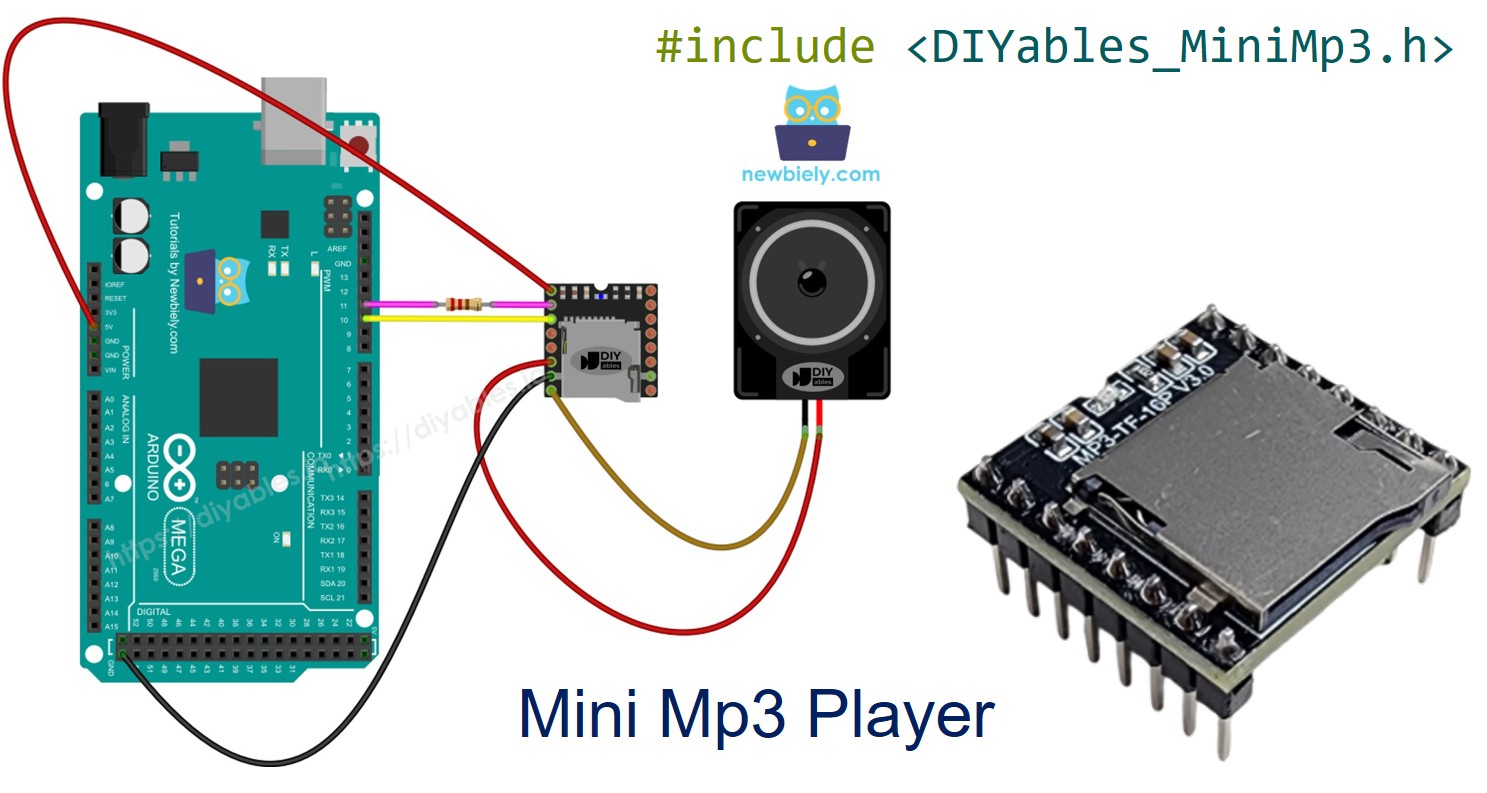
Arduino Mega - Mini MP3-Player

Der Arduino Mega 2560 verfügt über vier Hardware-Serienverbindungen, was ihn zu einer ausgezeichneten Wahl für die Arbeit mit UART-Peripheriegeräten wie dem DIYables Mini MP3-Player-Modul macht. Dieses Tutorial zeigt, wie man den Mini MP3-Player mit dem Mega verbindet und programmiert, wobei der dedizierte Serial1-Port genutzt wird, so dass Sie sich nie mit SoftwareSerial beschäftigen müssen.

Was dieses Tutorial behandelt:

Arduino Mega Mini MP3-Player

Teileliste

1×Arduino MEGA
1×Alternativ: DIYables MEGA Development Board
1×USB 2.0 Kabel Typ A/B
1×DIYables Mini MP3-Player-Modul
1×Micro-SD-Karte
1×Lautsprecher
1×Steckbrett
1×Jumper-Kabel
1×(Empfohlen) Screw Terminal Block Shield for Arduino Uno/Mega
1×(Empfohlen) Sensors/Servo Expansion Shield for Arduino Mega
1×(Empfohlen) Breadboard Shield for Arduino Mega
1×(Empfohlen) Enclosure for Arduino Mega

Oder Sie können die folgenden Kits kaufen:

1×DIYables Sensor-Kit (18 Sensoren/Displays)
Offenlegung: Einige der in diesem Abschnitt bereitgestellten Links sind Amazon-Affiliate-Links. Wir können eine Provision für Käufe erhalten, die über diese Links getätigt werden, ohne zusätzliche Kosten für Sie. Wir schätzen Ihre Unterstützung.

Über das Mini MP3-Player-Modul

Der DIYables Mini MP3-Player nutzt den YX5200-24SS-Decodier-Chip zum Lesen und Abspielen von MP3-Dateien von einer Micro-SD-Karte. Es hat einen eingebauten Verstärker, der einen kleinen Lautsprecher direkt antreiben kann (bis zu 3W), sowie DAC-Ausgänge, wenn Sie Audio an einen externen Verstärker leiten möchten.

Der Mega kommuniziert mit dem Modul über UART mit 9600 Baud. Die verfügbaren Funktionen sind:

  • Vollständige Transportregelung: Wiedergabe, Pause, Fortsetzen, Stopp, Nächster, Vorheriger
  • Lautstärkebereich: 0 (Stumm) bis 30 (Maximum)
  • EQ-Voreinstellungen: Normal, Pop, Rock, Jazz, Klassik, Bass
  • Wiederholungsoptionen: Einen Titel wiederholen, einen Ordner wiederholen, alles wiederholen, Shuffle
  • Ordner-Wiedergabe: Organisieren Sie Titel in nummerierten Verzeichnissen
  • Ankündigungsmodus: Unterbrechen und Fortsetzen des vorherigen Titels
  • Statusabfragen: Welcher Titel wird abgespielt, aktuelle Lautstärke, Gesamttitelanzahl

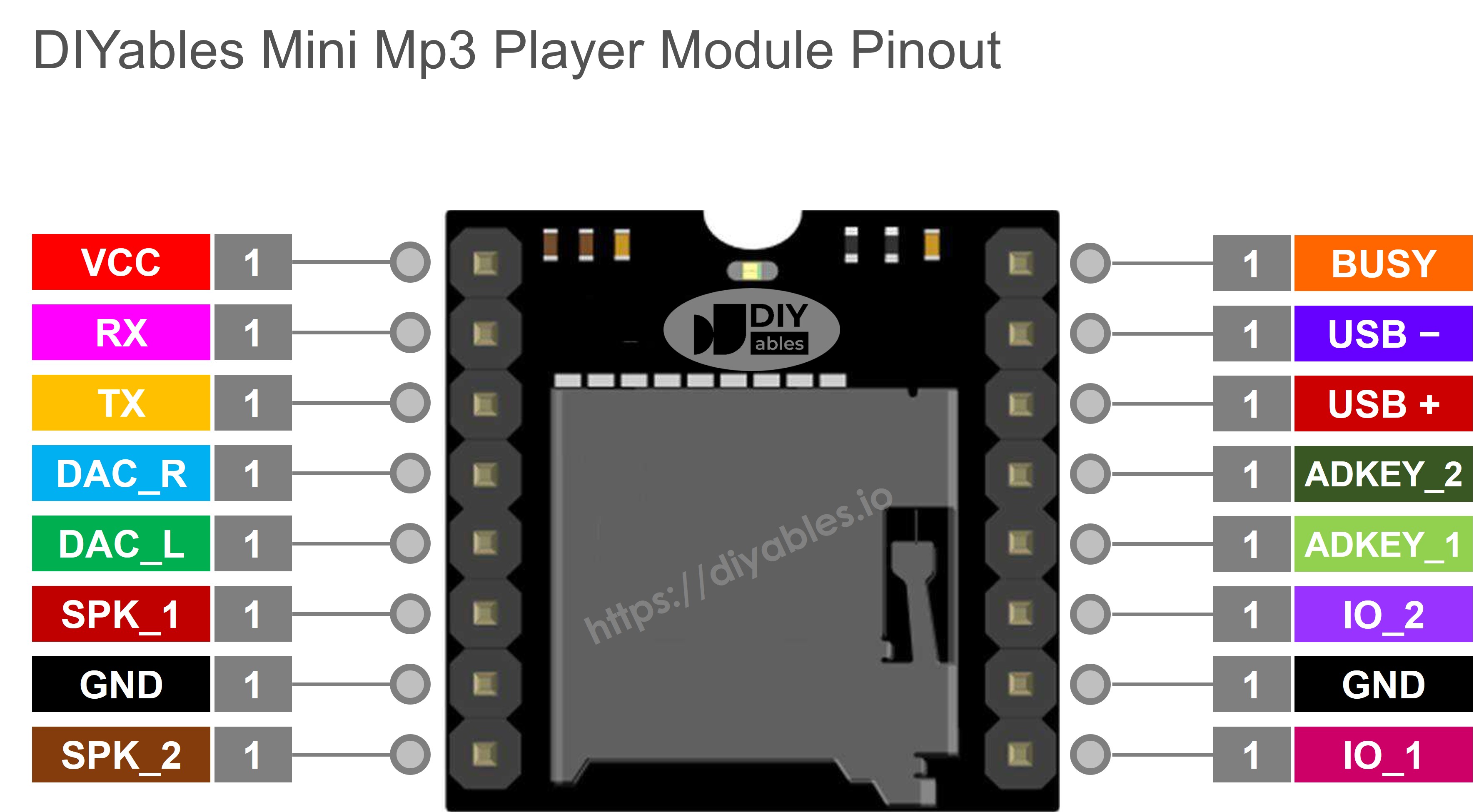
Pin-Referenz

Pin Funktion
VCC Stromversorgung (3,2V–5,0V)
GND Masse
RX Serienempfang — mit Mega TX1 über 1-kΩ-Widerstand verbinden
TX Serienübertragung — mit Mega RX1 verbinden
SPK_1 Lautsprecherplus (integrierter Verstärker, 3W max)
SPK_2 Lautsprecherminus
DAC_R Rechter Kanal-Audioausgang (Line-Level)
DAC_L Linker Kanal-Audioausgang (Line-Level)
BUSY LOW während Audiowiedergabe, HIGH wenn gestoppt
IO_1 Physischer Auslöser Kurz=Vorheriger, Lang=Lautstärke runter
IO_2 Physischer Auslöser Kurz=Nächster, Lang=Lautstärke rauf
Mini MP3-Player Pinbelegung

Verdrahtung

Der Mega ist ein 5V-Board, daher ist ein 1-kΩ-Seriewiderstand auf der RX-Leitung des Moduls erforderlich, um seinen 3,3V-Eingang zu schützen.

Wir verwenden Serial1 (TX1 = Pin 18, RX1 = Pin 19) für das MP3-Modul und lassen die Haupt-Serienverbindung (Pins 0 und 1) frei zum Debuggen über den Serial Monitor.

Mini MP3-Player Arduino Mega Anmerkungen
VCC 5V
GND GND
RX Pin 18 (TX1) Über einen 1-kΩ-Widerstand
TX Pin 19 (RX1) Direktverbindung
SPK_1 Lautsprecher +
SPK_2 Lautsprecher −

Sie können auch Serial2 (Pins 16/17) oder Serial3 (Pins 14/15) verwenden, wenn Serial1 belegt ist.
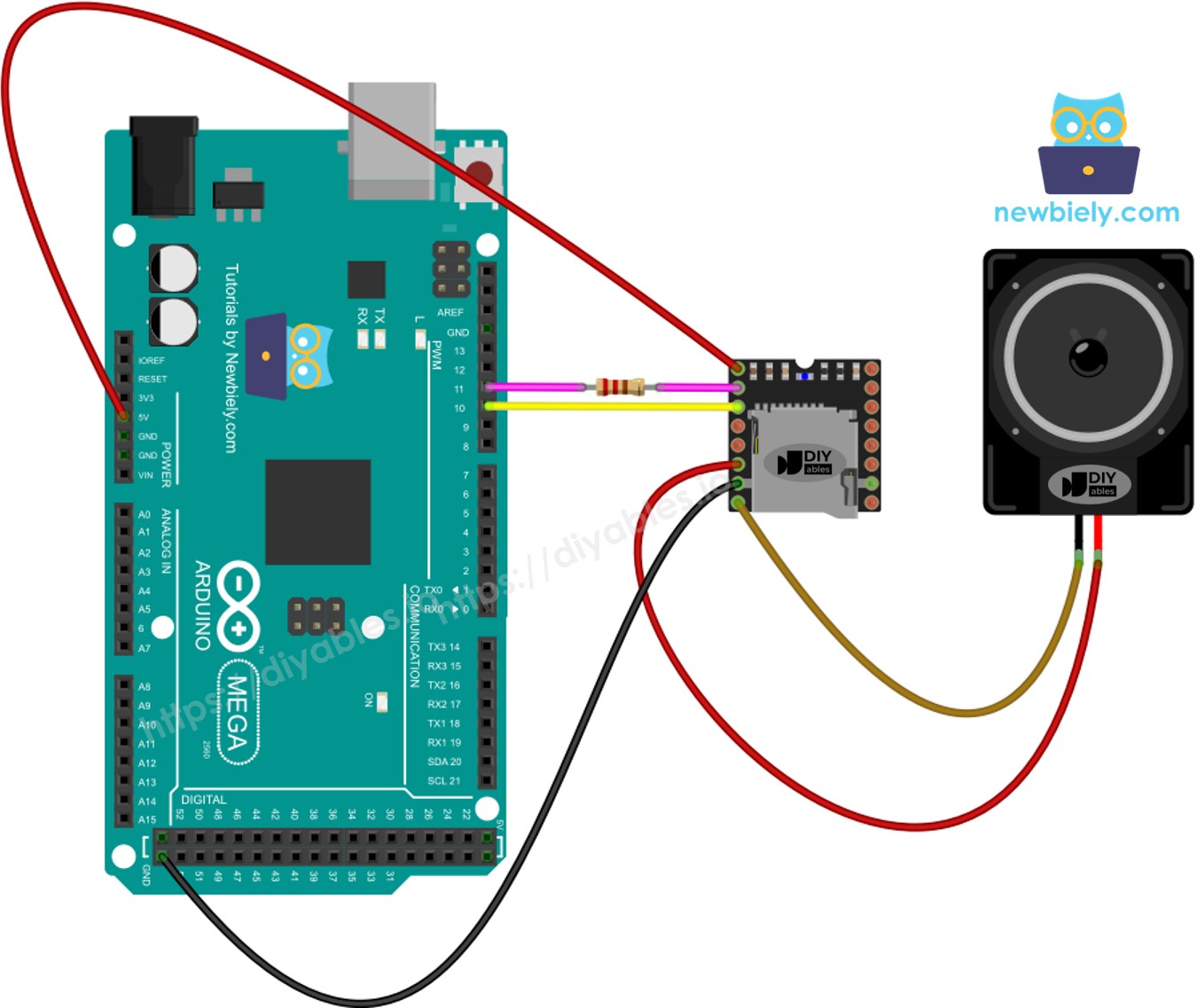
Arduino Mega Mini MP3-Player Verdrahtungsdiagramm

Dieses Bild wurde mit Fritzing erstellt. Klicken Sie, um das Bild zu vergrößern.

SD-Kartenvorbereitung

Formatieren Sie die Karte als FAT16 oder FAT32, dann fügen Sie MP3-Dateien mit Nullen aufgefüllt hinzu:

/001.mp3 /002.mp3 /003.mp3

Für Ordner-Wiedergabe erstellen Sie nummerierte Verzeichnisse:

/01/001.mp3 /01/002.mp3 /02/001.mp3

Wichtige Details:

  • Nummerierung beginnt bei 1.
  • Das Modul verwendet die Kopierreihenfolge, um Titelnummern zuzuweisen, nicht den Dateinamen. Kopieren Sie Dateien einzeln nach dem Formatieren.
  • Ordnernamen: 2 Ziffern (01–99). Dateinamen: 3 Ziffern (001–255).

Bibliotheksinstallation

  • Verbinden Sie den Mega mit Ihrem PC über das USB-Kabel.
  • In der Arduino IDE wählen Sie Arduino Mega oder Mega 2560 und den richtigen Port.
  • Öffnen Sie das Panel Bibliotheken.
  • Suchen Sie nach "DIYables_MiniMp3" und installieren Sie es.
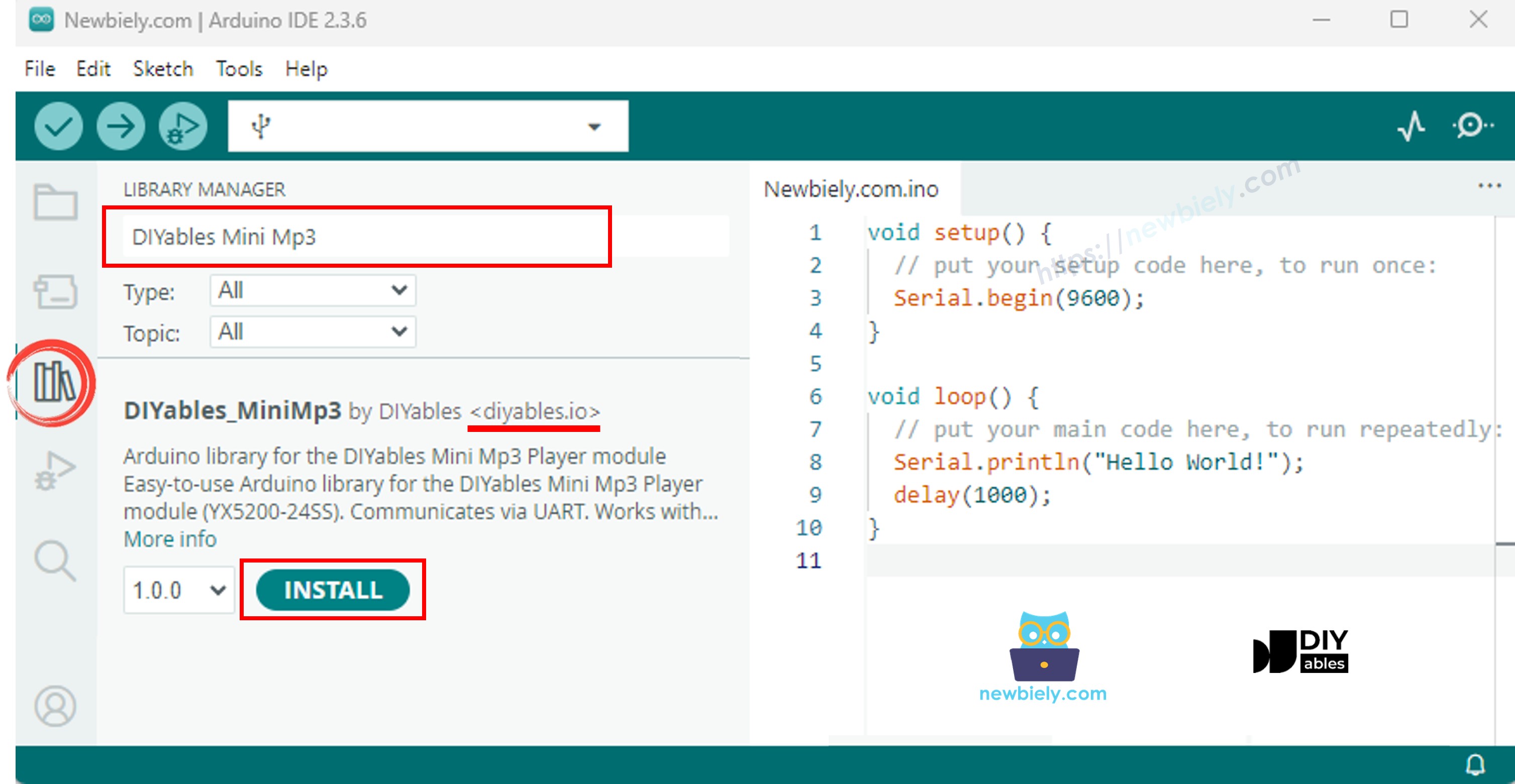
Arduino Mega Mini MP3-Player Bibliothek

Keine Abhängigkeiten erforderlich.

Grundlegende Codestruktur (Hardware-Serienverbindung)

Der Mega verfügt über viele Hardware-Serienverbindungen, daher ignorieren Sie SoftwareSerial vollständig:

#include <DIYables_MiniMp3.h> DIYables_MiniMp3 mp3; void setup() { Serial.begin(9600); // For Serial Monitor Serial1.begin(9600); // For Mini Mp3 Player mp3.begin(Serial1); delay(1000); // Module boot time mp3.setVolume(25); } void loop() { // Your logic goes here }

Mega-Code — Einen Titel abspielen

/* * DIYables Mini Mp3 Player - Play One Track * * Product: DIYables Mini Mp3 Player Module * https://diyables.io/products/mini-mp3-player-module * * Plays track 001 once, then stops. * * Wiring (Arduino Mega): * Mini Mp3 RX -> Arduino Mega Pin 11 (via 1K resistor) * Mini Mp3 TX -> Arduino Mega Pin 10 * Mini Mp3 VCC -> 5V * Mini Mp3 GND -> GND * Speaker connected to SPK_1 and SPK_2 pins * * SD Card: Put mp3 files in root, named 001.mp3, 002.mp3, etc. */ #include <DIYables_MiniMp3.h> #include <SoftwareSerial.h> SoftwareSerial mp3Serial(10, 11); // RX, TX DIYables_MiniMp3 mp3; void setup() { Serial.begin(9600); mp3Serial.begin(9600); mp3.begin(mp3Serial); delay(1000); // Wait for the module to initialize mp3.setVolume(25); // Set volume (0 to 30) Serial.println("Playing track 1..."); mp3.play(1); // Play track 001.mp3 } void loop() { // Nothing to do here }

Zur Ausführung

  • Richten Sie die SD-Karte ein, verbinden Sie das Modul mit Serial1 und laden Sie hoch. Titel 001.mp3 wird über den Lautsprecher abgespielt.

Wiedergabefunktionen

Funktion Aktion Code
play(n) Titel n abspielen mp3.play(1)
playNext() Nächster Titel mp3.playNext()
playPrevious() Vorheriger Titel mp3.playPrevious()
pause() Pause mp3.pause()
resume() Fortsetzen mp3.resume()
stop() Stopp mp3.stop()

Mega-Code — Mehrere Titel in Reihenfolge

/* * DIYables Mini Mp3 Player - Play Multiple Tracks * * Product: DIYables Mini Mp3 Player Module * https://diyables.io/products/mini-mp3-player-module * * Plays tracks one after another with a delay between them. * * Wiring (Arduino Mega): * Mini Mp3 RX -> Arduino Mega Pin 11 (via 1K resistor) * Mini Mp3 TX -> Arduino Mega Pin 10 * Mini Mp3 VCC -> 5V * Mini Mp3 GND -> GND * Speaker connected to SPK_1 and SPK_2 pins * * SD Card: Put mp3 files in root, named 001.mp3, 002.mp3, 003.mp3 */ #include <DIYables_MiniMp3.h> #include <SoftwareSerial.h> SoftwareSerial mp3Serial(10, 11); // RX, TX DIYables_MiniMp3 mp3; int currentTrack = 1; int totalTracks = 3; // Change this to match your SD card unsigned long lastTrackTime = 0; unsigned long trackDuration = 5000; // Wait 5 seconds between tracks (adjust as needed) void setup() { Serial.begin(9600); mp3Serial.begin(9600); mp3.begin(mp3Serial); delay(1000); mp3.setVolume(20); Serial.println("Playing track 1..."); mp3.play(currentTrack); lastTrackTime = millis(); } void loop() { // After trackDuration, play the next track if (millis() - lastTrackTime >= trackDuration) { currentTrack++; if (currentTrack > totalTracks) currentTrack = 1; // Loop back to first track Serial.print("Playing track "); Serial.println(currentTrack); mp3.play(currentTrack); lastTrackTime = millis(); } }

Mega-Code — Lautstärketasten

/* * DIYables Mini Mp3 Player - Volume Control * * Product: DIYables Mini Mp3 Player Module * https://diyables.io/products/mini-mp3-player-module * * Use two buttons to increase/decrease the volume. * Press button on pin 2 to volume up, pin 3 to volume down. * * Wiring (Arduino Mega): * Mini Mp3 RX -> Arduino Mega Pin 11 (via 1K resistor) * Mini Mp3 TX -> Arduino Mega Pin 10 * Mini Mp3 VCC -> 5V * Mini Mp3 GND -> GND * Speaker connected to SPK_1 and SPK_2 pins * Button UP -> Pin 2 (other leg to GND) * Button DOWN -> Pin 3 (other leg to GND) * * SD Card: Put mp3 files in root, named 001.mp3, 002.mp3, etc. */ #include <DIYables_MiniMp3.h> #include <SoftwareSerial.h> SoftwareSerial mp3Serial(10, 11); // RX, TX DIYables_MiniMp3 mp3; const int BUTTON_VOL_UP = 2; const int BUTTON_VOL_DOWN = 3; int volume = 15; // Start at half volume void setup() { Serial.begin(9600); mp3Serial.begin(9600); pinMode(BUTTON_VOL_UP, INPUT_PULLUP); pinMode(BUTTON_VOL_DOWN, INPUT_PULLUP); mp3.begin(mp3Serial); delay(1000); mp3.setVolume(volume); mp3.loopTrack(1); // Play track 1 on repeat Serial.print("Volume: "); Serial.println(volume); } void loop() { // Volume Up button (pressed = LOW because of INPUT_PULLUP) if (digitalRead(BUTTON_VOL_UP) == LOW) { if (volume < 30) { volume++; mp3.setVolume(volume); Serial.print("Volume: "); Serial.println(volume); } delay(200); // Simple debounce } // Volume Down button if (digitalRead(BUTTON_VOL_DOWN) == LOW) { if (volume > 0) { volume--; mp3.setVolume(volume); Serial.print("Volume: "); Serial.println(volume); } delay(200); // Simple debounce } }

Lautstärkefunktionen

Funktion Beschreibung Code
setVolume(v) Direkt festlegen (0–30) mp3.setVolume(20)
volumeUp() +1 mp3.volumeUp()
volumeDown() −1 mp3.volumeDown()
getVolume() Aktuelle Lautstärke lesen mp3.getVolume()

Mega-Code — Nächste/Vorherige Tasten

/* * DIYables Mini Mp3 Player - Next/Previous with Buttons * * Product: DIYables Mini Mp3 Player Module * https://diyables.io/products/mini-mp3-player-module * * Use two buttons to play next/previous tracks. * Displays the current track number on the Serial Monitor. * * Wiring (Arduino Mega): * Mini Mp3 RX -> Arduino Mega Pin 11 (via 1K resistor) * Mini Mp3 TX -> Arduino Mega Pin 10 * Mini Mp3 VCC -> 5V * Mini Mp3 GND -> GND * Speaker connected to SPK_1 and SPK_2 pins * Button NEXT -> Pin 2 (other leg to GND) * Button PREV -> Pin 3 (other leg to GND) * * SD Card: Put mp3 files in root, named 001.mp3, 002.mp3, etc. */ #include <DIYables_MiniMp3.h> #include <SoftwareSerial.h> SoftwareSerial mp3Serial(10, 11); // RX, TX DIYables_MiniMp3 mp3; const int BUTTON_NEXT = 2; const int BUTTON_PREV = 3; void setup() { Serial.begin(9600); mp3Serial.begin(9600); pinMode(BUTTON_NEXT, INPUT_PULLUP); pinMode(BUTTON_PREV, INPUT_PULLUP); mp3.begin(mp3Serial); delay(1000); mp3.setVolume(20); mp3.play(1); // Start with track 1 Serial.println("Press NEXT or PREV button to change track"); } void loop() { if (digitalRead(BUTTON_NEXT) == LOW) { Serial.println("Next track"); mp3.playNext(); delay(300); // Simple debounce } if (digitalRead(BUTTON_PREV) == LOW) { Serial.println("Previous track"); mp3.playPrevious(); delay(300); // Simple debounce } }

Mega-Code — Pause/Fortsetzen

/* * DIYables Mini Mp3 Player - Pause and Resume * * Product: DIYables Mini Mp3 Player Module * https://diyables.io/products/mini-mp3-player-module * * Demonstrates pausing and resuming playback using a single button. * Press the button to toggle between pause and resume. * * Wiring (Arduino Mega): * Mini Mp3 RX -> Arduino Mega Pin 11 (via 1K resistor) * Mini Mp3 TX -> Arduino Mega Pin 10 * Mini Mp3 VCC -> 5V * Mini Mp3 GND -> GND * Speaker connected to SPK_1 and SPK_2 pins * Button -> Pin 2 (other leg to GND) * * SD Card: Put mp3 files in root, named 001.mp3, 002.mp3, etc. */ #include <DIYables_MiniMp3.h> #include <SoftwareSerial.h> SoftwareSerial mp3Serial(10, 11); // RX, TX DIYables_MiniMp3 mp3; const int BUTTON_PIN = 2; bool paused = false; void setup() { Serial.begin(9600); mp3Serial.begin(9600); pinMode(BUTTON_PIN, INPUT_PULLUP); mp3.begin(mp3Serial); delay(1000); mp3.setVolume(20); mp3.play(1); Serial.println("Playing. Press button to pause/resume."); } void loop() { if (digitalRead(BUTTON_PIN) == LOW) { if (paused) { mp3.resume(); Serial.println("Resumed"); } else { mp3.pause(); Serial.println("Paused"); } paused = !paused; delay(300); // Simple debounce } }

Mega-Code — Titel wiederholen

/* * DIYables Mini Mp3 Player - Loop Track * * Product: DIYables Mini Mp3 Player Module * https://diyables.io/products/mini-mp3-player-module * * Loops (repeats) a track continuously with EQ setting. * * Wiring (Arduino Mega): * Mini Mp3 RX -> Arduino Mega Pin 11 (via 1K resistor) * Mini Mp3 TX -> Arduino Mega Pin 10 * Mini Mp3 VCC -> 5V * Mini Mp3 GND -> GND * Speaker connected to SPK_1 and SPK_2 pins * * SD Card file structure: * /001.mp3 * /002.mp3 * ... */ #include <DIYables_MiniMp3.h> #include <SoftwareSerial.h> SoftwareSerial mp3Serial(10, 11); // RX, TX DIYables_MiniMp3 mp3; void setup() { Serial.begin(9600); mp3Serial.begin(9600); mp3.begin(mp3Serial); delay(1000); // Wait for the module to initialize mp3.setVolume(25); // Volume: 0 to 30 mp3.setEQ(DIYables_MiniMp3::EQ_NORMAL); Serial.println("Playing track 1 on loop..."); mp3.loopTrack(1); } void loop() { // Your code here }

Wiederholungs- und Shuffle-Funktionen

Funktion Beschreibung Code
loopTrack(n) Einen Titel wiederholen mp3.loopTrack(1)
loopFolder(f) Alle in Ordner wiederholen mp3.loopFolder(1)
loopAll() Alles wiederholen mp3.loopAll()
stopLoop() Wiederholung beenden mp3.stopLoop()
shuffle() Zufällige Reihenfolge mp3.shuffle()

Mega-Code — Ordner-Wiedergabe

/* * DIYables Mini Mp3 Player - Play from Folder * * Product: DIYables Mini Mp3 Player Module * https://diyables.io/products/mini-mp3-player-module * * Plays tracks from specific folders on the SD card. * * Wiring (Arduino Mega): * Mini Mp3 RX -> Arduino Mega Pin 11 (via 1K resistor) * Mini Mp3 TX -> Arduino Mega Pin 10 * Mini Mp3 VCC -> 5V * Mini Mp3 GND -> GND * Speaker connected to SPK_1 and SPK_2 pins * * SD Card file structure: * /01/001.mp3 <- playFolder(1, 1) * /01/002.mp3 <- playFolder(1, 2) * /02/001.mp3 <- playFolder(2, 1) * /02/002.mp3 <- playFolder(2, 2) * * IMPORTANT: * - Numbering starts from 1, NOT 0 * - Folder names must be 2-digit zero-padded (01-99) * - Track names must be 3-digit zero-padded (001-255) * - Format SD card as FAT32, then copy files one by one in order * - Track order is determined by the order files were copied, * NOT by filename. So copy them in the correct sequence. */ #include <DIYables_MiniMp3.h> #include <SoftwareSerial.h> SoftwareSerial mp3Serial(10, 11); // RX, TX DIYables_MiniMp3 mp3; void setup() { Serial.begin(9600); mp3Serial.begin(9600); mp3.begin(mp3Serial); delay(1000); mp3.setVolume(20); // Play track 1 from folder 01 Serial.println("Playing folder 01, track 001..."); mp3.playFolder(1, 1); delay(5000); // Play track 2 from folder 01 Serial.println("Playing folder 01, track 002..."); mp3.playFolder(1, 2); delay(5000); // Play track 1 from folder 02 Serial.println("Playing folder 02, track 001..."); mp3.playFolder(2, 1); } void loop() { // Nothing to do here }

Ordner-Funktionen

Funktion Beschreibung Code
playFolder(f, t) Ordner f, Titel t (99 Ordner, 255 Titel) mp3.playFolder(1, 1)
playLargeFolder(f, t) Großer Modus (15 Ordner, 3000 Titel) mp3.playLargeFolder(1, 500)
playFromMP3Folder(t) Aus /mp3 Ordner mp3.playFromMP3Folder(1)

Mega-Code — Serial-Monitor-Steuerung

/* * DIYables Mini Mp3 Player - Serial Command Control * * Product: DIYables Mini Mp3 Player Module * https://diyables.io/products/mini-mp3-player-module * * Control the Mp3 player by typing commands in the Serial Monitor. * Great for testing all functions without extra hardware. * * Commands (type in Serial Monitor, then press Enter): * 1-9 Play track 1 to 9 * + Volume up * - Volume down * p Pause * r Resume * s Stop * n Next track * b Previous track (back) * ? Show current status * * Wiring (Arduino Mega): * Mini Mp3 RX -> Arduino Mega Pin 11 (via 1K resistor) * Mini Mp3 TX -> Arduino Mega Pin 10 * Mini Mp3 VCC -> 5V * Mini Mp3 GND -> GND * Speaker connected to SPK_1 and SPK_2 pins * * SD Card: Put mp3 files in root, named 001.mp3, 002.mp3, etc. */ #include <DIYables_MiniMp3.h> #include <SoftwareSerial.h> SoftwareSerial mp3Serial(10, 11); // RX, TX DIYables_MiniMp3 mp3; void setup() { Serial.begin(9600); mp3Serial.begin(9600); mp3.begin(mp3Serial); delay(1000); mp3.setVolume(20); Serial.println("=== DIYables Mini Mp3 Player ==="); Serial.println("Commands:"); Serial.println(" 1-9 Play track number"); Serial.println(" + Volume up"); Serial.println(" - Volume down"); Serial.println(" p Pause"); Serial.println(" r Resume"); Serial.println(" s Stop"); Serial.println(" n Next track"); Serial.println(" b Previous track"); Serial.println(" ? Show status"); Serial.println("================================"); } void loop() { if (Serial.available()) { char cmd = Serial.read(); switch (cmd) { case '1': case '2': case '3': case '4': case '5': case '6': case '7': case '8': case '9': Serial.print("Playing track "); Serial.println(cmd - '0'); mp3.play(cmd - '0'); break; case '+': Serial.println("Volume up"); mp3.volumeUp(); break; case '-': Serial.println("Volume down"); mp3.volumeDown(); break; case 'p': Serial.println("Paused"); mp3.pause(); break; case 'r': Serial.println("Resumed"); mp3.resume(); break; case 's': Serial.println("Stopped"); mp3.stop(); break; case 'n': Serial.println("Next track"); mp3.playNext(); break; case 'b': Serial.println("Previous track"); mp3.playPrevious(); break; case '?': { Serial.println("--- Status ---"); int16_t vol = mp3.getVolume(); Serial.print("Volume: "); Serial.println(vol); int16_t track = mp3.getCurrentTrack(); Serial.print("Current track: "); Serial.println(track); bool playing = mp3.isPlaying(); Serial.print("Playing: "); Serial.println(playing ? "Yes" : "No"); int16_t total = mp3.getTrackCount(); Serial.print("Total tracks: "); Serial.println(total); Serial.println("--------------"); break; } default: break; } } }
Taste Aktion
1–9 Titel nach Nummer abspielen
+ / − Lautstärke rauf / runter
p Pause
r Fortsetzen
s Stopp
n Nächster
b Vorheriger
? Statusbericht

EQ-Modi

Konstante Wert Klang
DIYables_MiniMp3::EQ_NORMAL 0 Flach
DIYables_MiniMp3::EQ_POP 1 Pop
DIYables_MiniMp3::EQ_ROCK 2 Rock
DIYables_MiniMp3::EQ_JAZZ 3 Jazz
DIYables_MiniMp3::EQ_CLASSIC 4 Klassisch
DIYables_MiniMp3::EQ_BASS 5 Bassanhebung
mp3.setEQ(DIYables_MiniMp3::EQ_CLASSIC);

Statusabfragen

Blockierende Aufrufe (bis zu 100 ms pro Aufruf). Geben Sie −1 bei Fehler zurück.

Funktion Typ Was es zurückgibt
isPlaying() bool true während Wiedergabe
getVolume() int16_t 0–30
getEQ() int16_t 0–5
getTrackCount() int16_t Titel auf Karte
getCurrentTrack() int16_t Aktueller Titelnummer
getFolderCount() int16_t Ordner auf Karte
getTrackCountInFolder(f) int16_t Titel in Ordner f

※ UNSERE NACHRICHTEN

  • Sie können gerne den Link zu diesem Tutorial teilen. Bitte verwenden Sie jedoch unsere Inhalte nicht auf anderen Websites. Wir haben viel Mühe und Zeit in die Erstellung der Inhalte investiert, bitte respektieren Sie unsere Arbeit!